Skip to content
Nitro PDF Pro

The Intelligent PDF Solution Built to Simplify Document Work

Edit, convert, secure, and automate with the AI-powered PDF solution that includes everything teams need for faster, smarter work. Try free for 14 days. No credit card required, no hidden fees.

Happy woman interacting with a tablet

Experience the complete PDF editor with powerful AI built in

Nitro PDF gives your team all the PDF capabilities they need across Windows, Mac, and iOS—without the complexity or cost of other alternatives.

With Nitro, you get AI-powered tools included in every plan. In just seconds, you can analyze documents, extract data from tables and forms, create interactive fillable forms, and surface sensitive information for redaction.

Add transparent pricing, centralized admin controls, and a team of experts backing you up 24/7, and you will see why millions of users and businesses trust Nitro to make document work simpler from day one.

BOOST PRODUCTIVITY

Accelerate document work from start to finish

Nitro PDF provides complete PDF capabilities, smart automation, and powerful AI tools to empower every team at every stage of the document lifecycle.
Icon-48px-Scalable flexibility-1

Every PDF tool in one editor

Easily create, edit, convert, organize, and secure documents at every stage with a complete suite of PDF tools across Windows, Mac, and iOS.
icon of fast speed

AI at your fingertips

Analyze complex content, extract data, protect sensitive information, and automate document tasks—all without leaving your workflow or putting your data at risk.
Icon-48px-Easy integrations-1

Integrate & automate

Connect Nitro's document capabilities to the AI agents, systems, and workflows your team uses every day, enabling teams to automate and scale with ease.
MINIMIZE RISK

A superior experience from day one

Nitro PDF is fast to set up, easy to use, and offers clear, predictable pricing. Backed by our team of Nitro Experts, we ensure every step of your experience—from deployment to daily use—is smooth and successful.
Icon-48px-Devices

Familiar, intuitive design

Nitro's modern interface mirrors Windows and Mac environments on desktop and in the cloud, so your team feels right at home and can be productive right away.
icon of a hand holding a dollar sign

Transparent pricing

No surprise overages, no forced bundles, and no per-seat penalties. Just straightforward licensing and volume discounts that help you scale as you grow.
icon-48px-Support

Unmatched support

Nitro experts take the risk out of switching and the effort out of scaling. From change management to daily troubleshooting, your entire experience is supported 24/7.
strengthen security & control

Enterprise-grade protection included as standard

Nitro PDF protects every document, team, and business with internationally recognized standards for privacy and security, real-time admin controls, and AI built with privacy by design, all included as standard.
 
icon of a security shield

Global security standards

Nitro PDF is independently audited against SOC 2, HIPAA, ISO 27001, and more—so you can be confident that your data and documents are always protected.
icon of an ID card

Complete admin control

Provision users, reassign licenses, and manage feature and AI access in real time through the Admin Portal. No negotiations. No minimum seat commitments.
icon of a financial line graph

Insights to prove ROI

Make data-driven decisions with Nitro Analytics, a benefit that tracks usage, measures efficiency, and proves the value of your investment to the business.

Learn more about Nitro PDF and which plan is right for you.

See Plans & Pricing

Trusted by teams worldwide

  • DocumentCreation_MomentumLeader_Leader
  • DocumentCreation_HighPerformer_Enterprise_HighPerformer
  • DocumentCreation_EasiestAdmin_Enterprise_EaseOfAdmin
  • users-love-us
  • DocumentCreation_BestSupport_Enterprise_QualityOfSupport
  • DocumentCreation_HighPerformer_Enterprise_HighPerformer
  • PDFEditor_Leader_Mid-Market_Leader
Key Nitro PDF Features

Get more done with Nitro's powerful PDF features 
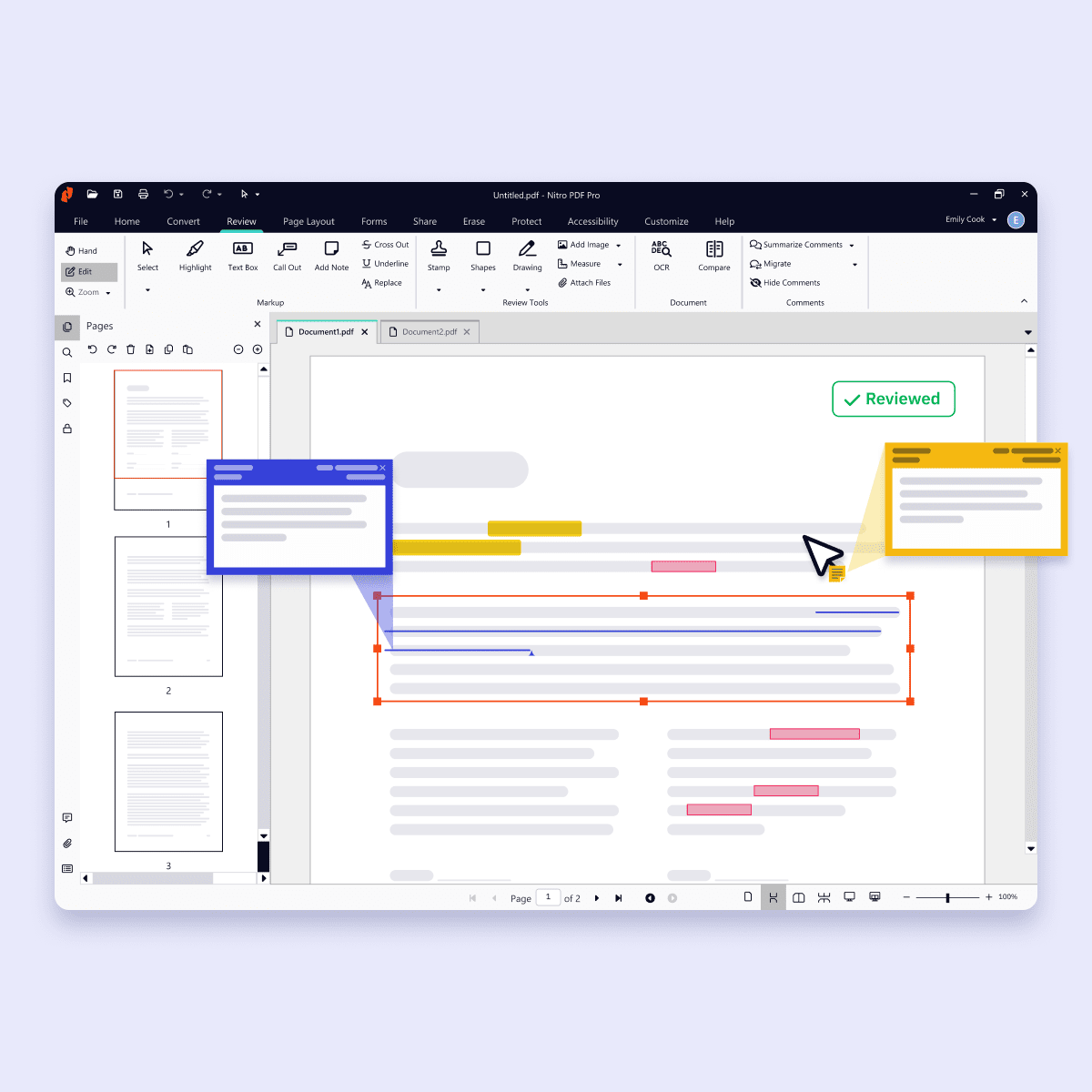
Screenshots-PDF for Windows-Edit and annotate
Icon-48px-Workspace plus PDF

Create and convert PDFs

Create and convert PDFs to and from popular formats like Word, Excel, PowerPoint, and image files while preserving layout and quality.

Learn more about converting PDFs with Nitro
icon of a pen with a gear

Edit and organize PDFs

Update, restructure, and optimize any PDF into exactly the document you want, organized the way you need, without switching back to the original file.

Learn more about editing PDFs with Nitro
Icon-48px-Seamless Collaboration-1

Review and collaborate on PDFs

Work together securely with Nitro's built-in collaboration tools. Gather and manage feedback across teams and devices with comments, highlights, and markup tools. 

Learn more about document collaboration with Nitro
Icon-48px-Compliant Documents-1

Secure and protect PDFs

Keep every document, and everything inside it, safe with advanced security features such as password protection, encryption, permission controls, and audit trails.

Learn more about Nitro's security and compliance
icon of an AI chip

Boost productivity with Nitro AI

Every Nitro PDF plan includes built-in AI tools designed for privacy and control, so you can boost productivity without compromising security. 

Explore Nitro AI
Nitro PDF Standard
Get Nitro PDF Standard
Nitro PDF Plus
Get Nitro PDF Plus
Nitro PDF Classic
Get Nitro PDF Classic

Top Features

Interact with, create, edit & review PDFs on your Windows device
Interact with, create, edit & review PDFs on your Mac device
Interact with, create, edit & review PDFs on your iOS device
Edit text and images, reorder and delete pages in a PDF
Convert PDFs and export to Word, Excel and PowerPoint
Reassign licenses in the web-based Admin Console
Add security & password protect PDF files
Turn scanned documents into editable searchable PDFs
Compare two versions of a PDF to review all differences
Access advanced 24/7 tech support 2+ users 2+ users
Access Nitro Analytics to understand PDF software usage, ROI, and sustainability savings
Automatically extract table & form data from PDFs with Nitro Table & Form Extract
Summarize, rewrite, and extract key data from your document with Nitro AI Document Assistant
Easily create, fill, sign, send, and store forms
Automatically create fillable forms with Nitro Automatic Form Creation
Enable single sign-on for users across the organization

Interact with PDFs

View, interact and comment on PDF content from your computer, mobile device or web browser
Track activity across desktop, mobile and web for documents sent for viewing & reviewing
Access, edit and store files in your Box, Dropbox, Google Drive and Microsoft OneDrive accounts
Compare two versions of a PDF to review all differences
Measure the distance, area and perimeter of objects in PDFs
Open PDFs are protected by Microsoft Information Protection solutions, including Azure Information Protection and Microsoft 365.

Create PDFs

Convert documents and images to PDF files
Create PDFs from any application that prints
Convert Microsoft Word, Excel or PowerPoint files to PDFs
Create, protect and send PDFs in popular Microsoft 365 apps for Windows
Combine multiple documents and file types into one PDF file
Convert web pages to interactive PDFs, complete with links
Prevent others from copying or editing information in PDFs
Create a password-protected PDF
Create and export PDFs on your mobile device
Use one-click creation of rich PDFs within Microsoft 365
Turn scanned paper documents into instantly searchable and editable PDFs with fonts that match the original
Convert and validate PDFs for compliance with ISO standards like PDF/A
Convert to rich & plain text
Create and validate PDFs to meet accessibility standards for people with disabilities
Extract text and images
Integration with Office 365, Sharepoint 365, OneDrive for Business, Dropbox, Box, Google Drive
Copy and paste selected parts of a PDF file with formatting intact
Batch create PDF files
Create PDF from File Explorer context menu
Create PDF from Finder/iCloud
Create accessible documents, tag creation, embed fonts, voice over

Edit & Review PDFs

Edit PDF text and images with full-page paragraph reflow
Turn PDFs into editable Microsoft Word, Excel or PowerPoint files
Insert, delete and organise pages in a PDF
Convert PDFs to JPG, TIFF or PNG image formats
Split a PDF by extracting one or multiple pages
Add bookmarks, headers, numbering and watermarks
Add or edit text and images on your tablet and mobile phone
Reorder, delete or rotate PDF pages on your iOS tablet
Redact to permanently remove sensitive visible information in PDFs
Add audio to PDFs
Add Bates numbering to legal documents
Visual rotation of images and pages
Quicksign PDF documents
Work with certificate signatures
Add comments to PDFs with a full suite of commenting tools including text editing, highlighter, and sticky notes
Turn paper or Word docs into fillable PDF forms
Automatically optimize PDFs to reduce file size and customize settings
Enhance PDF forms by adding interactivity with JavaScript
Mark PDFs with stamps, such as “approved” or “draft”

Support & Platform Benefits

Additional compliant security (HIPAA, SOC2, GDPR)
Enable single sign-on for users across the organization
Access advanced 24/7 tech support 2+ users 2+ users
Access support through the community forum & knowledge base
Access support through Nitro AI Knowledge Assistant
Customer success manager for white glove deployment & support for eligible customers for eligible customers
Access Nitro Analytics to understand PDF software usage, ROI, and sustainability savings
The outstanding support we received from Nitro’s Customer Success team helped ensure a seamless transition to Nitro PDF. Now we can provide our employees with all the PDF editing capabilities they need—at a fraction of the cost.”
Daren Spice
Lead Engineer, Directory Services, Equiniti
Smart Redact

Instant, accurate redaction you control

Smart Redact uses advanced natural language processing to instantly surface sensitive data for removal. With intuitive tools, you maintain complete control to review, adjust, and publish documents with permanent, untraceable redactions.

PromoBanner-SmartRedact

What is Nitro PDF?

Nitro PDF is a full-featured PDF editor that enables you to create, edit, convert, sign, and secure PDF documents.

It is designed for individuals, small businesses, and enterprises as a cost-effective alternative to Adobe Acrobat, combining powerful functionality with an intuitive interface that works across devices.

Nitro PDF is available in three plan tiers: Standard, Plus and Classic.

How is Nitro PDF different from Adobe Acrobat?

Nitro PDF provides the same core editing, signing, and collaboration features as Adobe Acrobat but at a more affordable price point.

With transparent licensing, no hidden fees, and a simpler user experience, Nitro PDF is widely recognized as one of the strongest alternatives to Adobe Acrobat for both individuals and businesses.

Can I try Nitro PDF for free?

 Yes. Nitro PDF offers a 14-day free trial with full access to editing, converting, signing, and security features. No credit card is required for the trial, and all features are unlocked.

Does Nitro PDF support integrations with other business tools?

Yes. Nitro PDF integrates with software such as Microsoft Office suite, OneDrive, Dropbox, and other platforms.

These integrations simplify document workflows and make it easy to create, edit, and share PDFs directly within your existing environment.

What is Smart Redact in Nitro PDF?

Smart Redact is an AI-assisted tool that automatically detects and removes sensitive information from PDFs. It identifies 30+ types of personally identifiable information (PII)—like names, addresses, ID numbers, and financial data—and allows you to review or adjust redactions before finalizing your file.

How does Nitro Smart Redact keep my information secure?

Smart Redact processes files in a temporary session with no storage or data retention. When you apply redactions, all visible and hidden content—including metadata and scripts—is permanently removed, ensuring your documents meet the highest standards of privacy and compliance.

Is Nitro PDF secure? Is it compliant with global regulations?

Yes. Nitro PDF meets international standards for data protection, including SOC 2, HIPAA, ISO 27001, and QTSP compliance, helping businesses keep sensitive documents secure. 

Is Nitro PDF available for both teams and individuals?

Yes. Nitro PDF is designed to support both individual users and organizations of any size.

Single users can access all the core editing, conversion, and signing features, while businesses benefit from advanced options like volume licensing, centralized deployment, and team collaboration tools.

This flexibility makes Nitro PDF a practical choice for freelancers, SMBs, and large enterprises alike.

Does Nitro PDF allow collaborative editing?

Absolutely. Nitro PDF enables teams to collaborate directly on documents with tools for commenting, annotating, and reviewing in real time.

Multiple users can share feedback, track changes, and resolve comments efficiently, ensuring smoother document workflows without relying on email back-and-forth or multiple file versions.

What kind of support does Nitro provide?

Nitro offers dedicated customer support, including onboarding, training, and troubleshooting resources, to ensure a smooth experience for your team.

We also offer resources such as our Knowledge Hub, Knowledge Assistant AI tool, and community forum.

Choose the perfect PDF plan for your needs

Best for Small Teams & Individuals
Subscription

Nitro PDF Standard

For individuals, teams, & businesses seeking a full suite of PDF editing features to boost productivity and streamline workflows. 
per user/month
annually
Tax calculated at checkout
Includes sales tax

Features

  • Create, convert, ​and combine PDFs
  • Manage and edit PDFs
  • Annotate and share PDFs with ease​
  • Efficient team management through
    Nitro Admin portal
  • AI tools to boost productivity
  • 24/7/365 support for all your PDF needs
  • Integrations and productivity connectors

Best for Enterprises
Subscription

Nitro PDF Plus

For teams in large organizations that require robust PDF editing capabilities and advanced features to transform digital document cycles.
Volume Discounts Available

Features

All the PDF editing functionality within Nitro PDF Standard, plus:

  • Enterprise-grade security including single sign-on (SSO), domain control, and Azure Information Protection
  • Valuable insights into PDF software usage, ROI, and sustainability savings with Nitro Analytics
  • Dedicated customer success manager if eligible 
Three Year License

Nitro PDF Classic

For individuals and small teams requiring essential PDF editing tools on their Windows device for a three-year term. 
per license/billed once
Tax calculated at checkout
Includes Sales Tax

Features

  • Access Nitro’s core PDF tools for Windows desktop
  • Create, edit, and export PDF documents 
  • Combine files and split PDFs
  • Protect documents with password-based security
  • Easy-to-use Microsoft Office-style interface
  • One-time payment for three years of use