Skip to content
solutions for students & teachers

Simplify Learning & Teaching with Smart PDF Tools

Nitro gives students and teachers affordable, easy-to-use tools for managing assignments, sharing resources, and collaborating on projects. Convert files to universal PDF format, streamline classroom workflows, and focus on what matters most: learning and teaching efficiently.

Header-Photo-Students & Teachers
  • Spr25_Grid Leader
  • Spr High Performer
  • Spr25_ROI MidMarket
  • Spr25_HighPerformerSmall
  • Sp25_Enterprise
  • Spr25_HighPerformerMid
  • Spr25_User Adoption
why nitro

Streamline assignments and collaboration with Nitro

Nitro provides students and educators with intuitive PDF and eSign tools to create, edit, share, and collaborate on assignments and classroom materials. Simplify grading, group projects, and resource sharing while keeping documents secure and organized.

Icon-48px-Rapid Support

Enable class collaboration

Nitro makes it easy to keep everyone on the same page. Share assignments, lesson plans, and study materials in universal PDF format. Google Drive, Dropbox, and other cloud platform integrations let students and teachers work together seamlessly.
icon of a person holding a box

Study and teach anywhere

Not all learning happens in a classroom. Nitro’s collaborative editing, secure document sharing, built-in version control, and cloud-based platform integrations helps teachers and students stay connected wherever they are.
icon of a check mark

Simplify academic tasks

Don’t let the day-to-day paperwork take time away from teaching. Nitro streamlines work like filling out forms, grading class assignments, and managing lesson plans, all within one intuitive and easy-to-use platform.
icon of a magic wand

Focus on learning, not tools

Spend less class time navigating software and more time learning and teaching. Nitro’s intuitive interface and centralized workspace are designed to keep students and educators connected and information flowing.
icon of money

Affordable classroom tools

Budget constraints shouldn’t impact learning. Nitro provides professional-grade PDF and eSign tools at student- and teacher-friendly pricing, helping schools, classrooms, and individual learners access the tools they need while staying on budget.
icon of an AI chip

Speed up workflows with AI

Supercharge student and teacher productivity with artificial intelligence. Use Nitro AI to extract data, analyze documents, and get insights in over 80 languages. It’s the perfect tool for research, grading, and collaborative projects.
Nitro Solutions

PDF and eSign tools to simplify classroom workflows

 Streamline classroom workflows with Nitro’s secure and easy-to-use PDF and eSign tools. Edit, share, and sign assignments, lesson plans, and educational resources quickly and reliably, keeping students and educators focused on academics, not managing documents. 
Screenshots-PDF for Windows-Edit and annotate

PDF tools designed for students and teachers

Nitro helps students and educators organize assignments, manage materials, and collaborate efficiently, so they have more time to learn and teach.

  • Summarize class notes, lecture slides, and study materials with Nitro’s Document Assistant.
  • Convert scanned worksheets and handouts into editable PDFs for easy review.
  • Provide comments and feedback on student assignments or group projects.
  • Open, compress, and manage large files, including research papers and presentations.
  • Organize lesson plans, class notes, and submitted assignments for quick access.
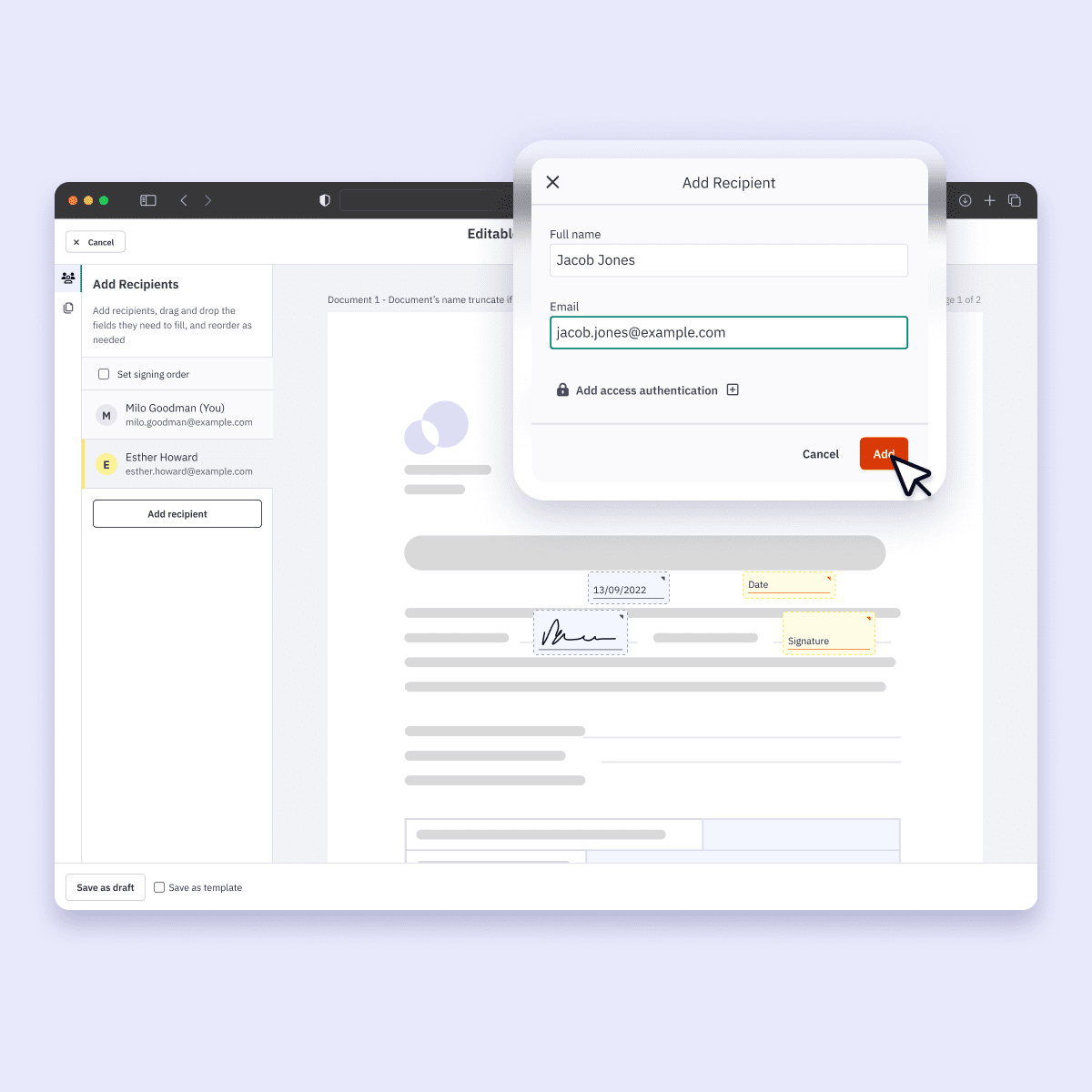
Nitro Sign being used to add fields and users

Secure eSigning for students, teachers, and parents

Nitro Sign makes electronic signatures simple and reliable. Industry-leading security, affordable plans, and an intuitive interface let students, parents, and educators sign forms efficiently while keeping documents safe and compliant.

  • Accelerate administrative tasks, including enrollment forms, permission slips, and class documents.
  • Ensure all electronic signatures are legally binding and securely encrypted.
  • Speed up approvals for financial aid, course registrations, and school activities.
  • Collect signed acknowledgements and consent forms from students and parents with ease.

Nitro Pro is intuitive and provides excellent PDF editing, conversion, and annotation tools that make document management much easier."
Efe W.
G2 Review
Learn

Featured resources for Education

Improve the student and educator experience for in-person, online, and distance learning using Nitro’s secure digital document solutions.
Explore our Resource Hub
Resource Card-Webinar-Why the University of Melbourne Switched from Adobe to Nitro
Customer Story

Why the University of Melbourne Switched from Adobe to Nitro

Watch the University of Melbourne share how easy it is to successfully migrate to Nitro’s more flexible, cost-effective PDF and eSign solutions. See how they achieved full migration to Nitro’s PDF and eSign solutions in just two weeks while cutting costs, successfully managing change for their users, and delivering clear ROI.

Blog-Nitro-Digitization-Tools-Higher-Education

How to Drive Digital Transformation in Education

focused-young-african-student-sitting-on-stairs-us-2024-09-18-15-40-42-utc

Digitization Tools to Support Online Learning in Higher Ed

group-of-university-students-attending-class-with-2023-11-27-05-31-54-utc

How Australian Higher Ed Institutions Excel with Nitro

How can Nitro help students collaborate on assignments?

Nitro allows students to edit, annotate, and share PDFs in real time, making group projects, peer reviews, and collaborative study sessions seamless across devices and platforms.

Can teachers provide feedback directly on student submissions?

Yes. Nitro’s PDF tools let educators comment, mark up, and highlight assignments securely, helping students understand feedback clearly while keeping submissions organized.

How does Nitro simplify signing school documents?

Nitro Sign enables secure, legally binding eSignatures for forms, permissions, and acknowledgements, reducing paperwork and speeding up processes for students, parents, and teachers.

Can students and teachers use Nitro on multiple devices?

Absolutely. Nitro works on Windows, Mac, and iOS, and offers web-based tools, so you can manage documents, assignments, and eSigning anywhere - in class, at home, or on the go.

How can Nitro AI help with schoolwork or teaching tasks?

Nitro AI can summarize notes, extract key information from documents, and provide insights in over 80 languages, helping students study smarter and teachers save time on grading and administrative tasks.

Is Nitro safe for storing and sharing educational documents?

Yes. Nitro provides robust encryption, secure access controls, and compliance-ready tools to keep sensitive student and school data protected while enabling safe collaboration.

Can Nitro help organize lesson plans and study materials?

Nitro makes it easy to combine, compress, and organize PDFs, worksheets, and other educational documents, so students and teachers can quickly find the files they need.

Can Nitro help convert files from other formats into PDFs for school use?

Yes. Nitro lets you easily convert Word documents, Excel spreadsheets, PowerPoint presentations, and images into universally compatible PDFs, making it simple to share assignments and resources with teachers or classmates.

How does Nitro support remote learning?

Nitro enables students and educators to access, edit, sign, and share documents from anywhere. Combined with cloud integrations and cross-platform support, it ensures continuity in learning whether at home, in the classroom, or on the go.

Can Nitro help reduce paper use and administrative costs for schools?

Absolutely. By digitizing documents, forms, and signatures, Nitro minimizes the need for printing, scanning, and physical storage, helping schools save money while supporting eco-friendly practices.

Are there tools to help with grading or reviewing multiple assignments at once?

Nitro’s annotation, commenting, and batch processing features make it easier for educators to review, mark up, and provide feedback on multiple assignments efficiently, saving time and reducing administrative burden.

See what Nitro can do for you

Take the next step to digital success today.

Icon-48px-Rapid Support

Contact sales

Talk to our experts about your business needs, and explore cost-effective options for Nitro's world-class PDF and eSign solutions.
Get in touch
Icon-48px-Smart signing

Free trial

Try Nitro’s PDF and eSign solutions to edit, sign, and organize documents effortlessly—free for 14 days!
Start your free trial
icon of people with a plus sign

Become a partner

Learn about our exciting partner opportunities for Nitro's trusted document solutions.
Partner with Nitro today