Skip to content
Nitro for Government

PDF, eSignatures, and Document Automation Solutions for Government

Nitro provides PDF editing, electronic signatures, document redaction, AI-powered document tools, and analytics to help government agencies securely create, edit, review, sign, share, and manage public records, forms, reports, court filings, and other government documents.

Assistant showing report to a politician with a tablet

Trusted by teams worldwide

Smart Redact for government

Meet disclosure requirements without the manual work

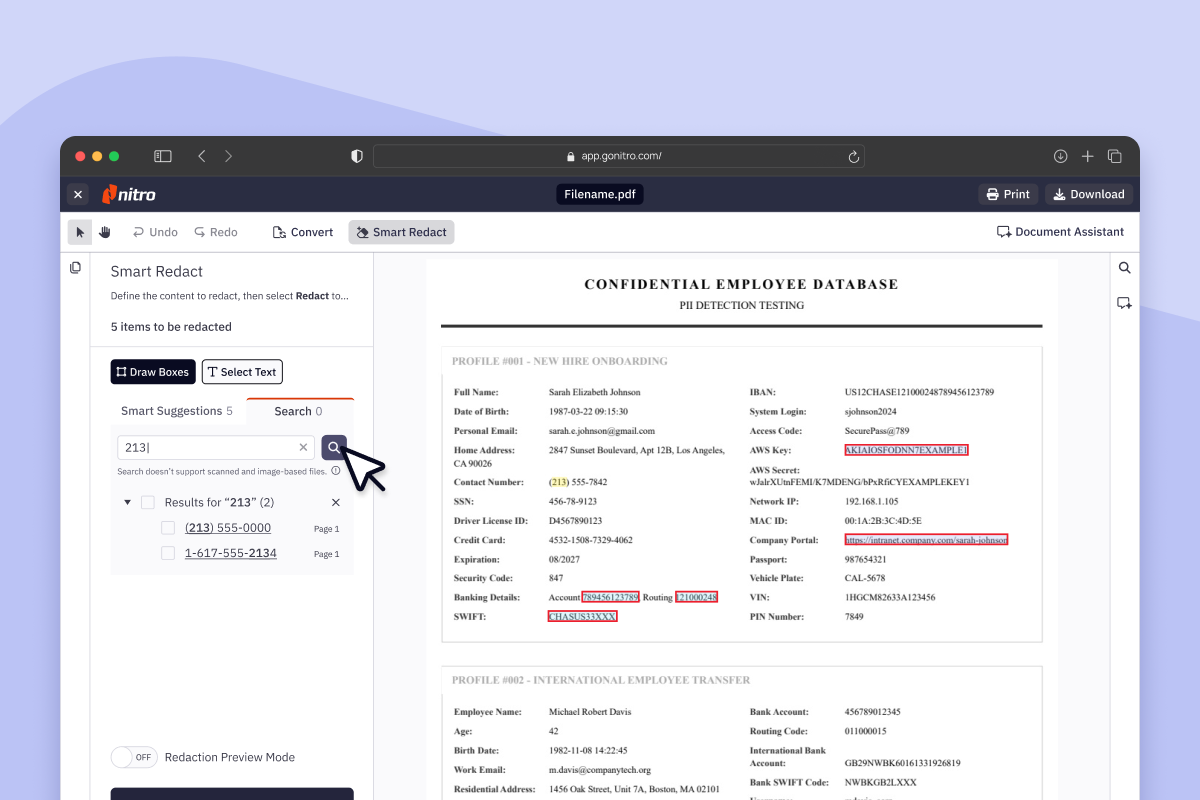
Government and public sector teams handle sensitive citizen, employee, and operational data across FOIA responses, public records requests, court filings, and internal reports. Smart Redact instantly surfaces personal data for removal, so agencies can meet disclosure obligations at pace while protecting what needs to stay private. 

PromoBanner-SmartRedact

Government need

Nitro offering

Document productivity

PDF editing, conversion, sharing, forms, OCR, and document organization

eSignatures

Electronic signatures for approvals, forms, transactions, and other government documents

Document automation

AI-powered tools for analyzing PDFs, extracting information, and automating document tasks

Digital workflows

Digital forms, approvals, document processing, and electronic signature workflows

Collaboration

Create, edit, share, and sign documents across supported devices

Analytics

Visibility into PDF and eSign usage, adoption, productivity, and workflow activity through Nitro Analytics

Document productivity

PDF editing, conversion, sharing, forms, OCR, and document organization

side-view-of-diverse-female-graphic-designers-disc-2023-11-27-05-20-50-utc
WHY NITRO

Why government teams choose Nitro

Government agencies manage large volumes of documents across public records, citizen services, administration, finance, procurement, courts, and other departments. Nitro provides PDF, eSign, AI, redaction, and document workflow tools that help government teams securely manage these documents digitally.

With Nitro, government teams can:

  • Create, edit, convert, and organize PDF documents
  • Digitize forms and document workflows
  • Send documents for electronic signature
  • Create and complete PDF forms
  • Redact sensitive information from documents
  • Identify personally identifiable information with Smart Redact
  • Extract information from PDFs using AI-powered tools
  • Summarize and analyze document content
  • Automate repetitive document tasks
  • Track document and signature activity
  • Share and sign documents across supported devices
  • Monitor document productivity and usage through Nitro Analytics


young-black-entrepreneur-working-with-laptop-offi-2023-11-27-05-36-35-utc
BLOG

How Nitro supports government document workflows

Reduce manual document processing 

Digitize forms, approvals, reports, and other routine document tasks with PDF, eSignature, and workflow tools. 

Support digital approvals and transactions 

Use electronic signatures to collect approvals and complete government transactions without relying on paper-based signing processes. 

Simplify public records and disclosure workflows 

Use Nitro Smart Redact to identify more than 30 categories of sensitive personally identifiable information and review, adjust, and permanently redact information before documents are published or shared. 

Protect sensitive government information 

Use encryption, access controls, password protection, and redaction capabilities to help protect sensitive documents and information. Nitro's security and compliance documentation describes encryption, access controls, and other security measures across its products. 

Support distributed government teams 

Create, edit, share, and sign documents across supported devices, helping teams work with digital documents across departments and locations. 

Icon Compliant Documents

Public records

Review and prepare PDF documents for public records requests and other disclosure workflows.
icon of a person holding a box

FOIA requests

Review documents and use Smart Redact to identify sensitive information that may need to be removed before disclosure.
icon of a gavel

Court filings

Create, edit, organize, review, and redact PDF documents used in court and legal workflows.
Icon-48px-Form

Government forms

Review and prepare PDF documents for public records requests and other disclosure workflows.
Icon-48px-Completion Page Check

Approvals

Send documents for electronic signature and track signing activity for approvals and other transactions.
Icon-48px-Reporting-1

Internal reports

Create, edit, review, share, and organize reports and other internal government documents.

icon of a person

Citizen services

Use digital document and eSignature workflows to support public-facing processes and reduce reliance on paper.
Icon-48px-User

Employee & admin documents

Review and prepare PDFs for public records requests and other disclosure workflows.
icon of a finger print

Sensitive records

Identify and redact sensitive personally identifiable information before documents are shared or published.
Explore Nitro Solutions

PDF and eSign designed to streamline and secure government workflows

Card-Page Previews-Nitro PDF

Nitro PDF

Create, edit, convert, share, and securely store government documents with intuitive PDF tools designed for fast, accurate workflows.

Card-Page Previews-Nitro Sign

Nitro Sign

Enable legally binding, audit-ready eSignatures for approvals, forms, and transactions, accessible on any device.
Card-Page Previews-Smart Redact

Smart Redact

Instantly surface sensitive data for removal, with complete control to review, adjust, and publish permanent, untraceable redactions.
Card-Page Previews-Insights

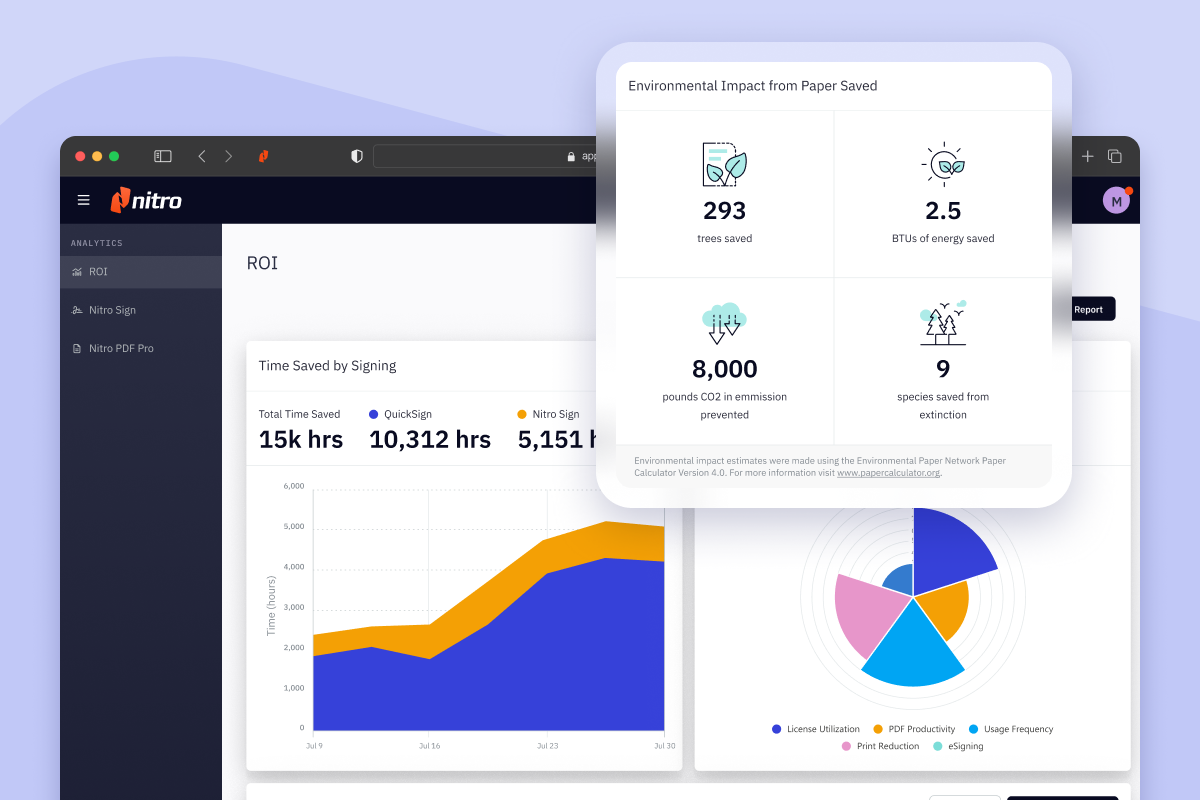
Real-time insights

Track usage, efficiency, and workflow performance with analytics that help government teams optimize operations and demonstrate accountability.

We anticipated that it would be challenging to get our staff onboard—particularly because much of the senior administrative work involved combinations of PDFs for agendas, minute taking, etc. But we were really happy with the support provided by Nitro.
Dane Hamilton
CIO, Shoalhaven City Council

Get expert guidance for your government workflows

See how Nitro can help your agency streamline document-heavy processes, enhance security and compliance, and deliver faster, more efficient public services.
Talk to an Expert
Learn

Featured resources for Government

Explore our Resource Hub
shoalhaven-city-countil-organic-social-1200x628
Customer Story

364% Increase in Productivity Tool Usage When Shoalhaven City Council Switched To Nitro 

Discover how Shoalhaven City Council has seen a 364% productivity boost, expanding access to key tools like create, combine, and convert, since switching to Nitro. 

Nitro helps UKSBS achieve seamless transition to new PDF editing tool

Nitro Helps UKSBS Seamlessly Transition to New PDF Editing Tool

share-what-makes-you-happy-shot-of-two-young-cowo-2023-11-27-05-03-02-utc

How to Make the Move to e-Government

Card-On-Demand Webinar_ How to Cut Costs by Switching PDF & eSign Vendors

On-Demand Webinar: How to Cut Costs by Switching PDF & eSign Vendors

Inline Photo-Compliance
Why Choose Nitro

Compliance without compromise for government workflows

Protect sensitive data while meeting strict regulatory standards. Nitro ensures your government documents, PDFs, and eSignatures are secure, auditable, and compliant with industry-leading certifications.

  • Icon-Check-84x84-1

    ISO 27001

    Adhere to global information security standards to safeguard sensitive data and maintain trust across government operations.
  • Icon-Check-84x84-1

    SOC 2

    Ensure your document management systems and cloud processes meet rigorous security and privacy requirements for government workflows.
  • Icon-Check-84x84-1

    HIPAA

    Protect health-related information when handling citizen medical or personal records, maintaining full HIPAA compliance.
  • Icon-Check-84x84-1

    QTSP

    Meet qualified trust service provider standards for secure, legally recognized digital signatures across government processes.

How can Nitro help government agencies go paperless?

Nitro enables digital PDF, form, approval, and electronic signature workflows that can reduce reliance on printing, scanning, and physical document distribution. Nitro Analytics can also track paper saved through digital signing workflows. 

Are Nitro eSignatures legally valid for government documents?

Nitro Sign supports electronic signature regulations and frameworks including eIDAS, UETA, and the ESIGN Act. Whether a particular government document can legally be executed electronically depends on the applicable law and requirements for that document. 

How does Nitro support document security for sensitive government data?

Nitro provides security capabilities including encryption, access controls, redaction, and audit trails, ISO 27001:2022 and SOC 2 Type 2 certifications, and other product-specific security and compliance measures. 

How does Smart Redact help government agencies?

Smart Redact uses AI-powered detection to identify more than 30 categories of personally identifiable information. Users can review and adjust suggested redactions before publishing permanent redactions. 

Can Nitro help government agencies manage public records and FOIA requests?

Yes. Government teams can use Nitro PDF and Smart Redact to review documents, identify sensitive information, and prepare records for public disclosure. 

Can Nitro integrate with existing government systems?

Nitro supports integrations with business and workflow applications, including Salesforce, Zapier, Microsoft Power Automate, Google Drive, Dropbox, Box, OneDrive, and SharePoint, depending on the product and plan. Nitro Sign also provides an API for integrating eSignature capabilities into applications and workflows.

How does Nitro support government approvals?

Nitro Sign allows teams to send documents for electronic signature, collect signatures from recipients, track signature requests, and maintain audit trails. 

How does Nitro help government teams measure document productivity?

Nitro Analytics provides visibility into PDF and eSign usage, feature adoption, signature requests, completion rates, turnaround times, paper saved, and time saved. 

How quickly can a government agency implement Nitro?

Implementation timing depends on the organization's requirements, deployment, products, and plan. Nitro provides setup assistance, change management, and customer support for Nitro Sign. 

Can Nitro help government teams reduce manual redaction work?

Yes. Smart Redact automates the detection of more than 30 categories of sensitive PII, allowing users to review suggested redactions rather than identifying every item manually. 

Get expert guidance for your government workflows

See how Nitro can help your agency streamline document-heavy processes, enhance security and compliance, and deliver faster, more efficient public services.
Talk to an Expert