Skip to content
Nitro vs. Foxit

Why Nitro is the Superior PDF Solution to Foxit

Nitro is a comprehensive and cost-effective PDF editor that provides a powerful alternative to Foxit. With an intuitive user experience and robust features, Nitro empowers businesses and teams to streamline document workflows and boost productivity & collaboration.
Man smiling while looking at tablet
Icon-48px-Productivity-1

$2.2 million total financial benefits over 3 years

icon-48h-roi

100+% ROI with payback in less than 6 months

icon-48px-Support

24/7/365 support via phone, chat, email and AI

icon of an award

Voted #1 PDF Editor for Businesses by TechRadar

Woman with headphones and computer smiling

White-glove customer support for seamless change management

At Nitro, we believe a great product is nothing without great support.

That's why our world-class, human-centric support is a key reason customers choose us and a major factor in being named the #1 PDF Editor for Businesses by TechRadar.

From initial implementation to ongoing technical needs, your team will be supported by dedicated, localized experts. Experience a new level of personalized care with expedited case routing and direct access to 24/7 global technical support engineers.

Screenshots-Workspace-Knowledge Assistant

Powerful AI tools the way they should be—safe, smart, and secure

Nitro offers a suite of AI productivity tools for PDF editing designed to empower your business without compromising your data integrity. With our innovative AI beta tools, you can automate data extraction and enhance document workflows—all while keeping your data secure.

Unlike many AI tools, Nitro never trains its models on your data or shares it with third parties. Our approach ensures your data remains completely private and is used only for the tasks you request, giving you peace of mind.

Nitro's Document Assistant, our primary AI tool, is powered by ChatGPT and hosted on Microsoft Azure OpenAI, an enterprise-grade platform. This partnership ensures your data remains in a secure, isolated environment under Nitro's control. Microsoft Azure OpenAI's strict security protocols and responsible AI principles provide an extra layer of protection for your most sensitive information.

And with Smart Redact, our automated AI redaction tool, you can instantly detect and permanently remove sensitive data such as names, emails, and IDs across entire documents or batches.

Screenshot showing sample pages of Forrester study

Competitive pricing with increased flexibility to maximize ROI

Nitro's competitive pricing and flexible licensing model are designed to maximize your return on investment. In fact, a recent Forrester study found that Nitro customers gained $2.2 million in financial benefits and achieved a 694% ROI with a payback period of just six months.

In direct comparison, a similar Forrester study on Foxit revealed a return on investment that was 50% lower than Nitro's, a stark difference in long-term value.

Screenshots-PDF for Windows-Edit and annotate

An intuitive PDF editor for effortless onboarding

Nitro PDF editor's intuitive layout is a primary reason former Foxit customers made the switch.

According to G2, Nitro outperforms Foxit in ease of setup, helping users get comfortable and productive right away. To provide a familiar experience, the Nitro for Windows user interface mimics the Microsoft Office ribbon UI, while the Nitro for Mac interface mirrors Apple's native toolbar.

This intuitive design saves your team valuable time. A recent Forrester study found that users save an average of 35 minutes per document thanks to Nitro's best-in-class tools and streamlined workflows. For example, our customizable ribbon tab allows you to create a personalized collection of tools to complete common tasks, further boosting efficiency.
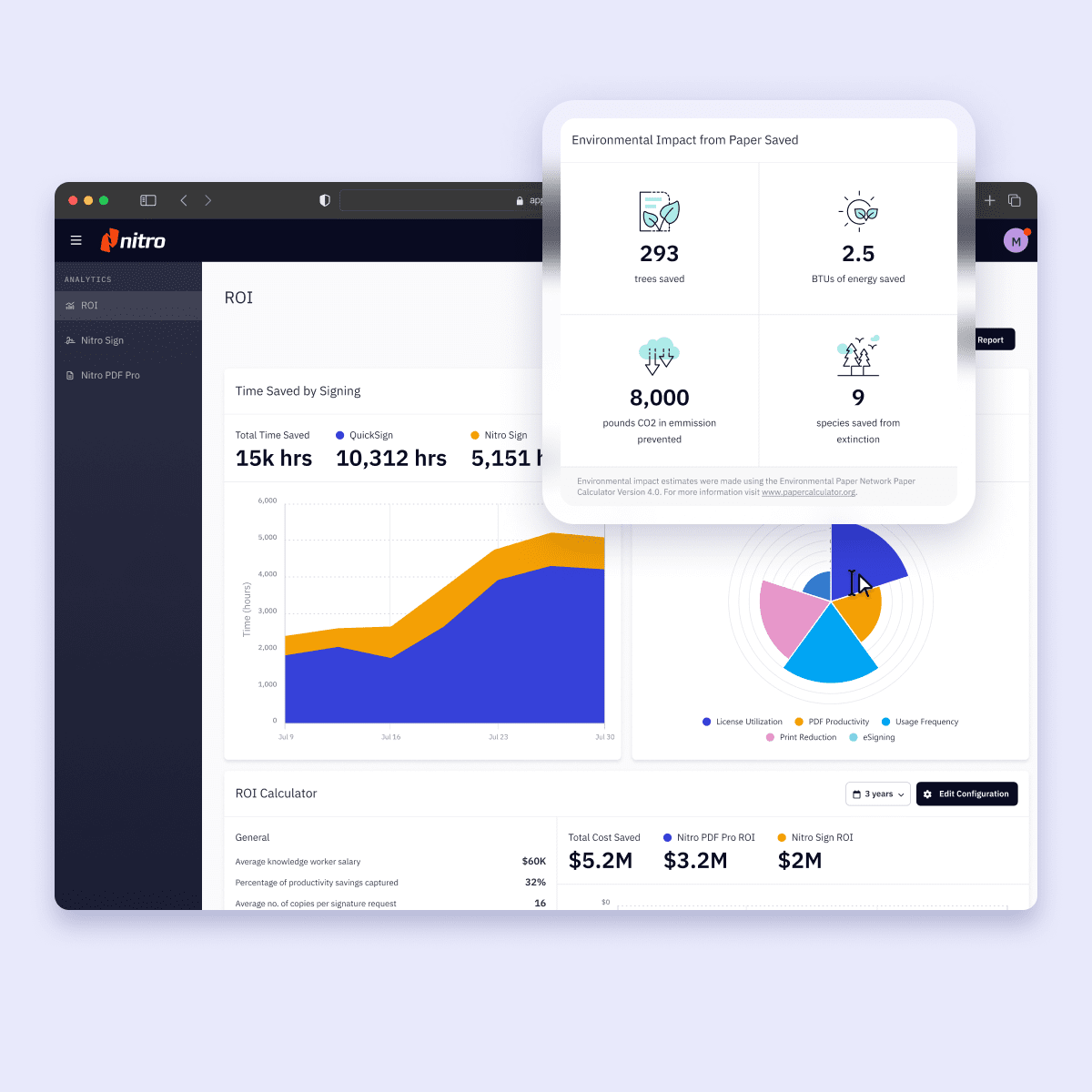
Screenshots-Analytics-ROI

Seamless license management and analytics

Nitro's Admin Portal provides all the tools you need to efficiently manage software provisioning for all your users in one centralized place.

Within the Admin Portal, you can see a complete list of all users associated with the account, add new users, and track user adoption.

Additionally, you can access real-time analytics through the Nitro Admin Portal. Using these insights, you can demonstrate and improve profitability, track organizational and environmental savings, and track financial targets and key metrics.

Man looking at laptop while talking on the phone, with security an compliance icons

Best-in-class security and compliance

At Nitro, security and compliance are paramount. We continuously invest in state-of-the-art security measures and adhere to stringent global data protection laws in regions where we operate, including Australia, Toronto, and Dublin. Our commitment is validated by internationally recognized certifications like SOC 2, HIPAA, and ISO 27001.

Data residency and privacy are crucial considerations when evaluating PDF editors. In stark contrast to Nitro, Foxit is headquartered in China, where data regulations and practices may differ significantly from those in the regions where your business operates. This can raise serious concerns about the security and confidentiality of sensitive data.

Ready to make the switch to a better PDF experience?

Connect with our Sales Team

Join the thousands of businesses worldwide who trust Nitro

Nitro PDF Plus
Foxit PDF Editor+

Company overview

Headquarters Headquartered in San Francisco with 5 global hubs Headquartered in China with minimal global footprint
Holdings Privately held by Potentia Capital Publicly traded on the Shanghai Stock Exchange

Layout

User interface Familiar Microsoft Office-style ribbon interface for ease of use Cluttered and less intuitive interface
Toolbar Ability to customize your tool with your most frequently used tools Toolbar customization is not available

Features

Batch processing Offers a variety of batch processing functions to complete large tasks with a simple click Limited batch processing functions (e.g., no OCR batch processing functionality)
Comparison Visual and user-friendly layout with clear highlighted areas marking changes Comparison time is more challenging to navigate and identify changes
Analytics Available for Admins with the ability to view aggregated usage and feature-level analytics Feature-level analytics not available
PDF tools Seamlessly edit, convert, OCR, merge, secure, and sign PDFs—no complexity required Create, edit, convert, annotate, and sign PDFs; lacks native OCR merging tools

AI features

AI cost of use Nitro users have access to AI beta tools at no additional cost. Foxit charges a monthly fee for access to their AI tools and usage is capped.
Text translation Over 80 languages supported Only 30 languages supported
Table extract
Form extract
Generate instant document summaries and ask specific questions Additional fee for AI tools
Have conversations with documents in multiple languages 80+ languages 30 languages

Security

ISO 27001
Data privacy framework
Cloud infrastructure Nitro is hosted on Microsoft Azure with top-tier security certifications. Foxit's cloud hosting infrastructure is vague and less secure. Not transparent on their cloud security.

Customer support

Global 24/7 support Additional costs may apply for premium support services.
Dedicated customer success manager Yes for eligible customers Additional costs may apply for premium support services.
Get instant answers and resources about Nitro features with Knowledge Assistant, a 24/7 generative AI chat tool

Packaging

Licensing tiers Full Nitro PDF features included Advanced features may involve additional costs
Mobile application Included with license Additional cost

Why should I choose Nitro PDF over Foxit PDF Editor?

Nitro offers powerful AI and PDF editing tools, comprehensive document collaboration, unlimited eSigning, and advanced integrations at highly competitive pricing.

Our cost-effective solutions also come with easy, intuitive onboarding, seamless integrations, best-in-class security and compliance, and customer-first, white-glove support—making Nitro ideal for businesses looking for more user-friendly alternatives to Foxit PDF Editor.

How does Nitro's security and data compliance compare to Foxit's?

Nitro prioritizes security at every step, implementing robust encryption, secure user authentication, detailed audit trails, and compliance with GDPR, HIPAA, SOC 2, eIDAS, ISO 27001, and other standards.

Nitro also offers Smart Redact, which uses AI to automatically detect and permanently remove sensitive text—reducing human error and helping teams stay compliant.

How does Nitro's ROI and pricing compare to Foxit's?

A recent Forrester study found that Nitro delivers a superior return on investment. Our customers achieved a 694% ROI and $2.2 million in financial benefits over three years, with a payback period of just six months. In a similar study, Foxit’s ROI was reported to be 50% lower than Nitro's, demonstrating a significant difference in long-term value.

How do Nitro's collaborative tools compare to Foxit's?

Nitro is specifically designed for effortless collaboration. Its intuitive editing interface, straightforward commenting tools, real-time version tracking, and built-in document sharing significantly streamline workflows, minimizing confusion, and optimizing productivity.

Does Nitro offer AI tools, and are they secure?

Yes, Nitro offers a suite of AI productivity tools, including our primary tool, Document Assistant. Our approach to AI is built on a foundation of security and trust. We never train our AI models on your data or share it with third parties. Instead, our tools are powered by established, enterprise-grade platforms like Microsoft Azure OpenAI, ensuring your data remains in a secure, isolated environment that we control.

Nitro also includes Smart Redact, an AI-powered redaction feature that automatically detects and permanently removes sensitive information across single or multiple documents, helping teams maintain compliance and privacy with minimal effort.

How does Nitro integrate with business tools like Microsoft 365 and Salesforce?

Nitro features seamless, easy-to-use integrations with Microsoft 365, SharePoint, Salesforce, Google Drive, Dropbox, and many more, without complex setup or hidden costs.

Is Nitro compatible with both Windows and Mac operating systems?

Yes, Nitro is designed to support both Windows and Mac operating systems, providing a native and intuitive experience on both platforms. The Nitro for Windows interface mimics the Microsoft Office ribbon UI, while the Nitro for Mac interface mirrors Apple’s native toolbar, making it easy for new users to get started right away.

Is migrating from Foxit to Nitro a simple process?

Transitioning from Foxit to Nitro PDF is extremely straightforward.

Nitro provides dedicated onboarding support and user training resources, ensuring your team can easily switch platforms, adopt best practices quickly, and realize immediate productivity improvements.

What level of customer support can I expect with Nitro compared to Foxit?

Nitro is renowned for its responsive and dedicated customer support, providing individualized guidance, customized onboarding, and proactive assistance that exceeds typical support experiences. Businesses benefit from reduced downtime and enhanced productivity through easily accessible expertise.

Can I trial Nitro for free before switching from Foxit?

Absolutely. Nitro offers a risk-free 14-day trial that delivers complete access to all PDF editing, collaboration, and eSigning features—no credit card required—allowing you to fully explore its functionality before making a commitment.

Make the switch to Nitro and experience the smarter PDF editor

Our sales team is standing by to help you get started.