


Built at Nitro: Flow
Built at Nitro is our new product showcase, bringing together the latest from across the Nitro platform. Our first edition is all about Flow: removing the stops, starts, and handoffs that slow document work down.
Video
Work is meant to flow
Document work is rarely one task. Teams create, review, and edit. They extract information, remove what's sensitive, collect signatures, and share the document with people and systems that need it. This edition focuses on the handoffs, repetitive steps, and manual moments across that whole journey.
 Nitro PDF Pro
 Nitro Sign
 Nitro Smart Redact
 Nitro Automate
Nitro PDF Pro gets a fresh interface, expanded form support, and improved core features
The latest Nitro PDF Pro updates offer support for more complex documents, faster everyday tools, a fresh look across your devices, and greater control over where your data lives.
Learn more about Nitro PDF Pro
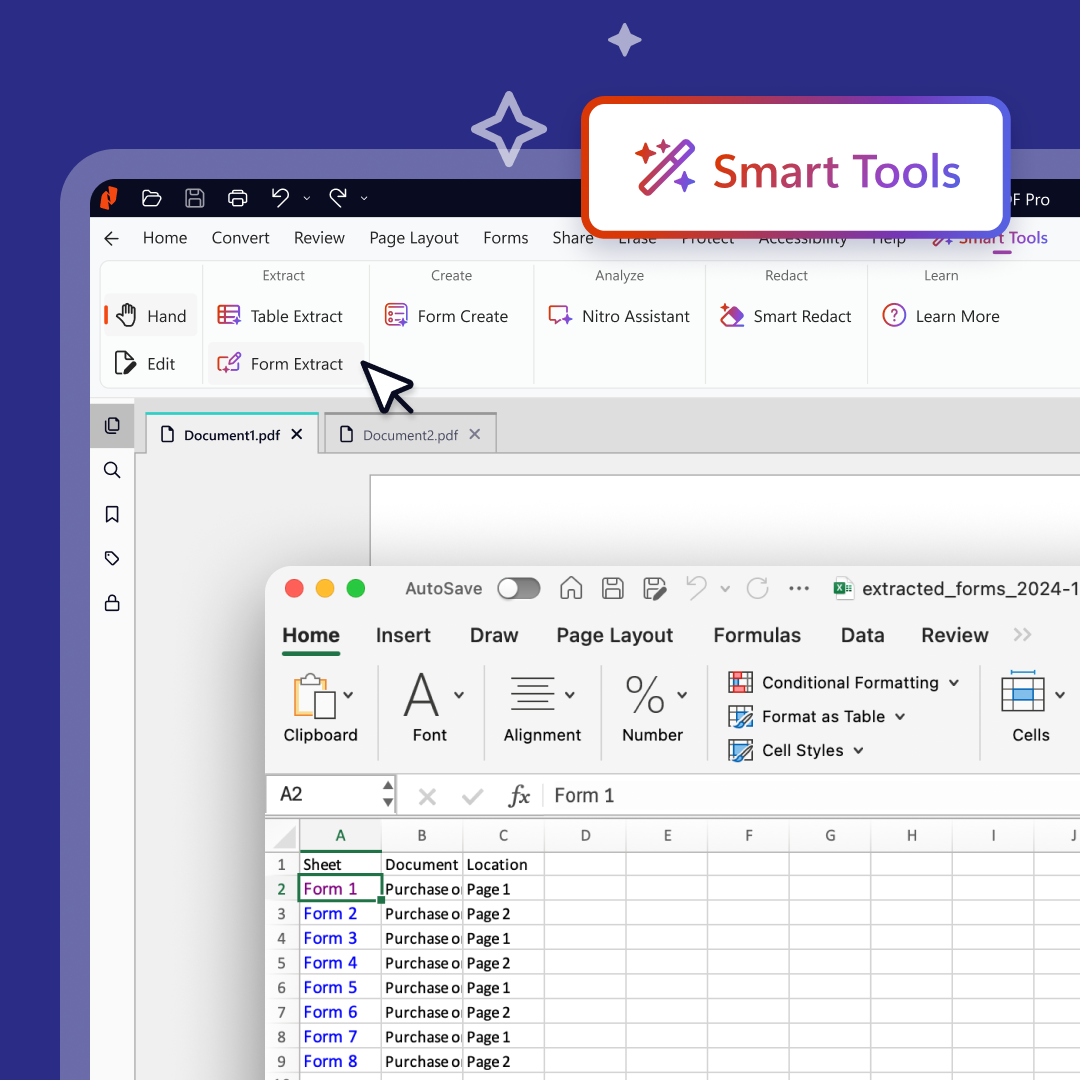
Get the full Nitro v26 experience
Version 26 brings a more modern interface to Nitro PDF Pro, along with faster, more accurate tools for the PDF work teams do every day. Read more.
Video
Get the full v26 experience
Version 26 of Nitro PDF Pro for Windows is one of the biggest updates to the product in years, with a more modern interface and faster, more accurate everyday tools.
PDF Pro sits at the center of how millions of people work with documents every day. Version 26 removes the moments where the document gets in the way of the work, and every release since has built on that foundation.
What's new in Version 26
A redesigned interface
It's the same powerful PDF editor your teams rely on, made easier to use with a cleaner interface, more intuitive navigation, and improved discoverability at any screen size.
Smart Tools in one place
A dedicated Smart Tools tab brings Nitro's AI-powered capabilities together. Extract form and table data into Excel, create fillable forms, work with sensitive information and use Nitro Assistant to understand document content.
Stronger fundamentals
Get better PDF compression, a faster and more accurate OCR engine, and expanded support for right-to-left languages.
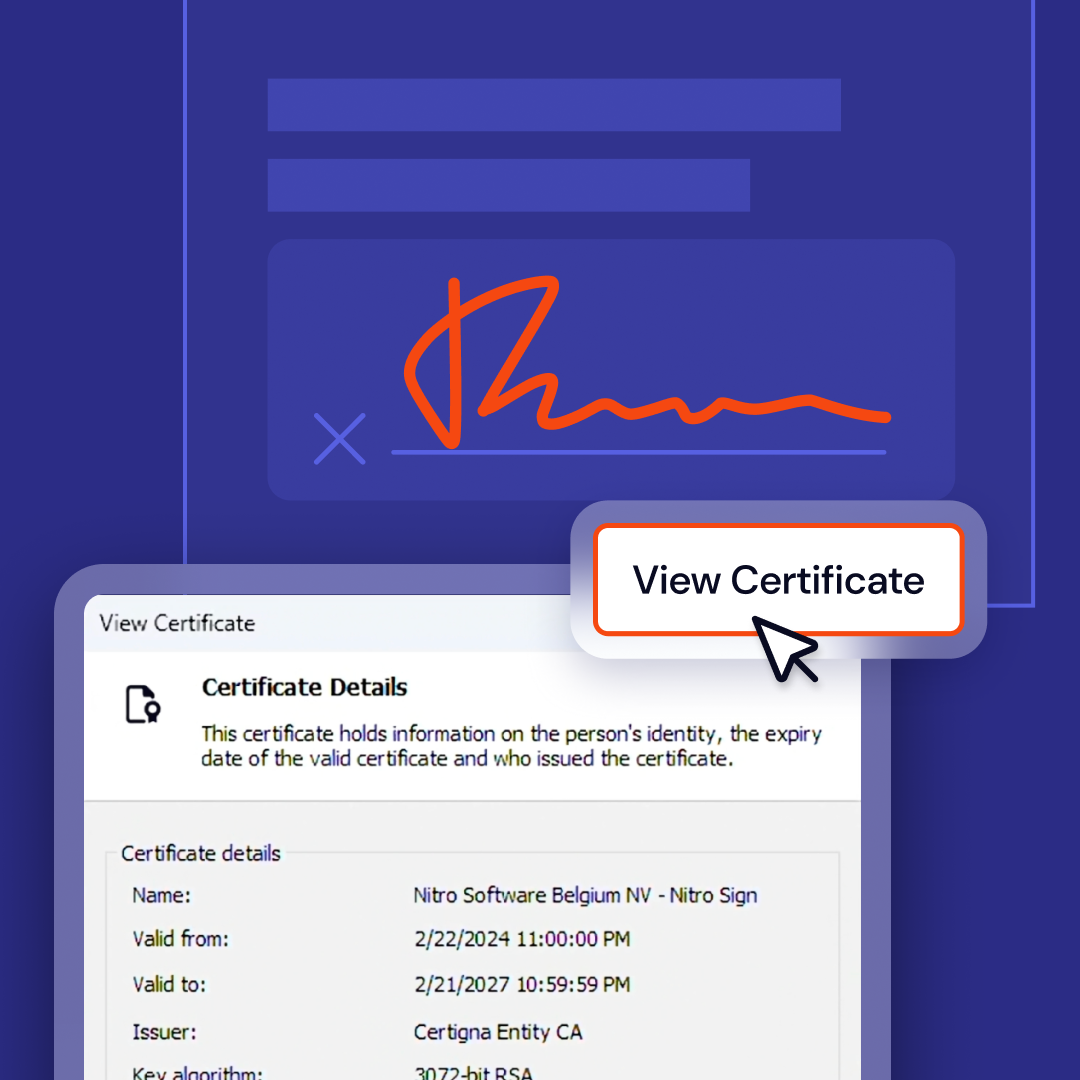
Verify digitally signed documents
Digital Signature Verification now includes customizable validation settings, improved accuracy, and broader recognition of trusted digital signatures. Read more.
Verify digitally signed documents with confidence
Nitro PDF Pro introduces enhanced digital signature verification, with customizable validation settings, improved accuracy when verifying signed documents, and expanded support for trusted digital signatures.
What you can do with Digital Signature Verification
Set validation your way
Customize the settings used to validate digital signatures.
Get more accurate results
Verify signed documents with improved accuracy.
Recognize more trusted signatures
Benefit from broader recognition of trusted digital signatures.
Ready to get started?
The updated Digital Signature Verification is available now in Nitro PDF Pro for Windows.
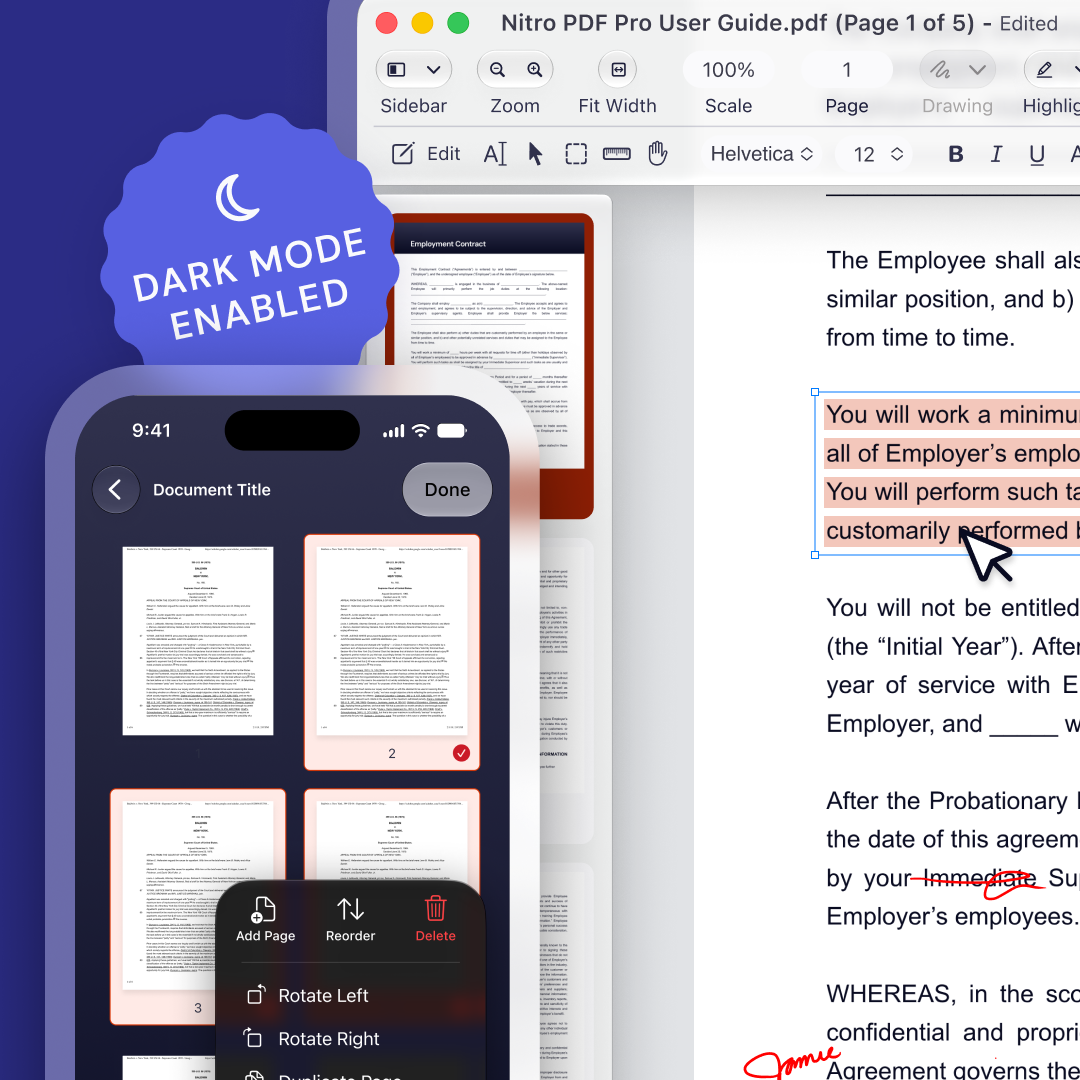
A fresh look for PDF on Mac and iOS
Nitro PDF Pro for Mac and iOS now uses Apple's Liquid Glass design framework, giving your documents more room on every screen. Read more.
Video
A fresh look for Nitro PDF Pro on Mac and iOS
Nitro PDF Pro for Mac and iOS now uses Apple's Liquid Glass design framework.
How you work matters as much as what you can do. With Liquid Glass, Nitro feels modern and right at home alongside the other apps you use every day on your Apple devices. It's lighter, cleaner, and built for MacOS 26, iOS 26 and iPadOS 26 or later, giving your documents more room on every screen.
Ready to get started?
Install the latest version of Nitro PDF Pro on your Mac, iPhone or iPad to see it.
Work with Dynamic XFA forms
Nitro PDF Pro now offers enhanced support for Dynamic and Static XFA Forms, so teams can open and complete even complex interactive documents in the same editor they use for the rest of their PDF work. Read more.
Video
Work with Dynamic XFA forms
Nitro PDF Pro for Windows now offers enhanced native support for both static and dynamic XFA forms, so you can complete even complex interactive documents in the same editor you use for the rest of your PDF work.
Improved support for complex interactive forms has been one of our most requested additions. Dynamic XFA forms change as you fill them in, adding rows, revealing new sections or adjusting fields based on what you enter. For teams that work with these forms regularly, this closes an important compatibility gap.
What you get with XFA support
Open complex forms natively
Work with static and dynamic XFA forms without switching to another application.
Complete forms that adapt as you go
Fill in forms that add rows, reveal sections or adjust fields based on your answers.
Keep going once the form is done
Search, flatten or convert the completed form, or prepare it for whatever comes next, with the full PDF Pro toolkit.
Ready to get started?
Dynamic XFA form support is available now Nitro PDF Pro for Windows. Update to the latest version to start working with XFA forms.
Nitro PDF Pro is coming to Android
Coming soon! Nitro PDF Pro's Android app will bring all of the quality and document capabilities you expect from Nitro to an even broader range of mobile devices. So now, wherever you work, Nitro PDF Pro works too. Read more.
Video
Nitro PDF Pro is coming to Android
Nitro PDF Pro is coming to Android, so you can work with your documents on even more devices.
Android makes up a significant share of the global mobile market, and customers have asked to use Nitro on Android alongside Windows, Mac, iPhone and iPad. We've built a native Android app that brings the quality and document capabilities you expect from Nitro to a much broader range of devices.
Ready to get started?
The Nitro PDF Pro app for Android is rolling out soon. Stay tuned for updates.
Enhanced Data Residency support
With Regional Data Residency, you choose where your data is hosted, with options for the US, EU, or Australia. This allows you to meet your compliance requirements without changing how your users work. Read more.
Choose where data is hosted
With Regional Data Residency, your Nitro PDF Pro data is hosted in the US, the EU or Australia to help you meet your compliance requirements.
Businesses have clear requirements for where their data and documents live. Data residency meets those requirements without changing how your users work.
What you can do with Regional Data Residency
Choose your region
Host your data in the US, the EU or Australia.
Support compliance
Align where your data is stored with your organization's requirements.
Keep work unchanged
Your users keep working in Nitro exactly as they do today.
Ready to get started?
Regional Data Residency is available now in Version 26 of Nitro PDF Pro for Windows.
Nitro Sign takes more of the manual work out of getting agreements signed
The latest Nitro Sign updates speed up signing request setup, follow up with recipients automatically, and bring eSigning into the tools teams already use.
Learn more about Nitro Sign
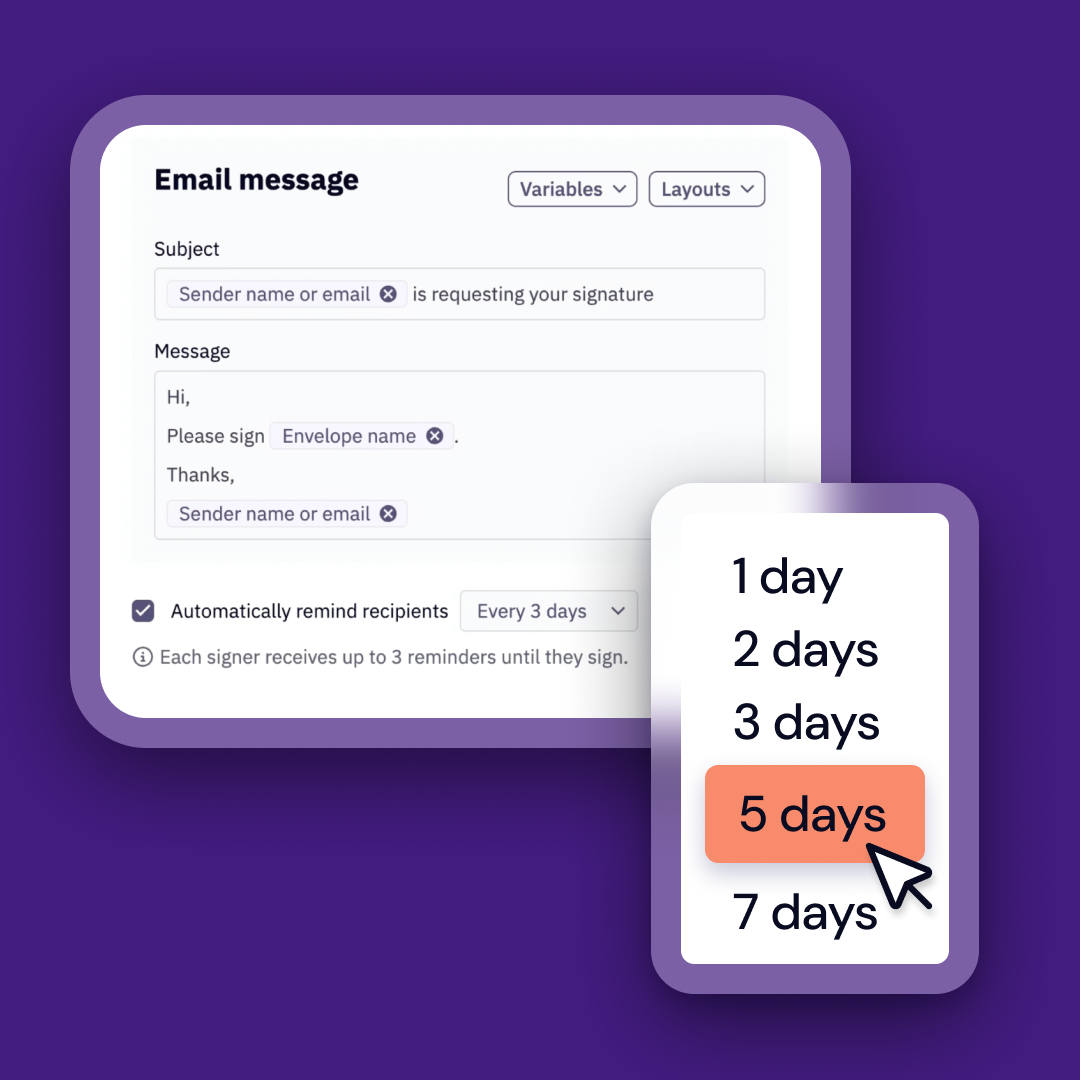
Stop chasing signatures with Auto-Reminders
Nitro Sign now follows up automatically with recipients who haven't completed their part of a signing request. Read more.
Video
Stop chasing signatures with Auto-Reminders
Nitro Sign now follows up automatically with recipients who haven't completed their part of a signing request.
Anyone who sends agreements regularly knows pressing Send isn't the end of the job. That's often when the chasing starts: who has opened it, who hasn't signed, and whether to follow up today. Once a request is sent, you shouldn't have to spend your time pushing it to completion.
Send a contract on Monday and let Nitro Sign remind outstanding recipients automatically on the schedule you choose, reducing the need for manual follow-up.
What you can do with Auto-Reminders
Follow up automatically
Nitro Sign reminds recipients who haven’t completed their part of the request.
Control the frequency
Set how frequently reminders are sent, with options from every day to every seven days.
Get back your time
Cancel automatic reminders when you need to, while still retaining the option to send a manual reminder.
Ready to get started?
Auto-Reminders are available now in Nitro Sign. Turn them on when you send your next envelope.
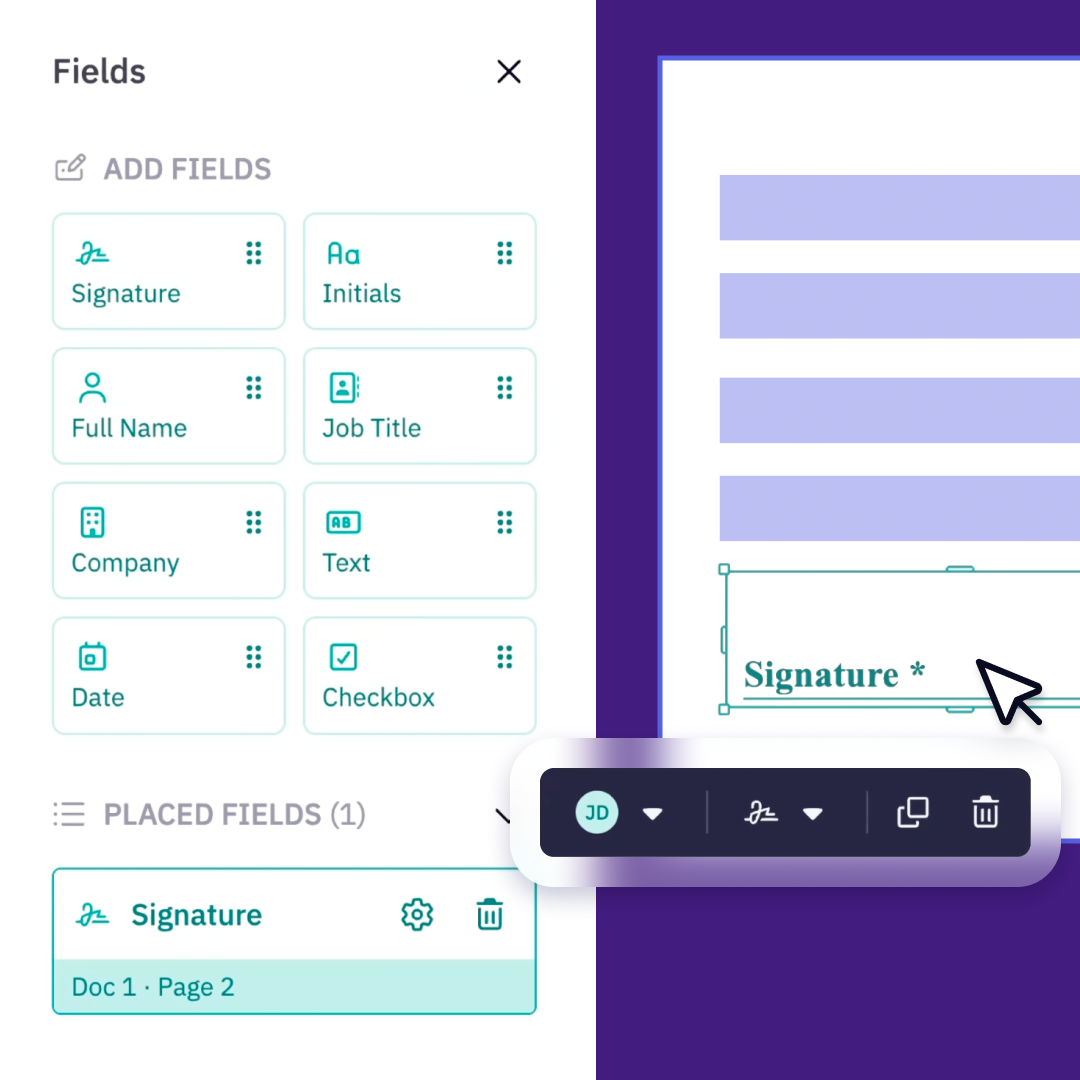
Prepare documents faster with the new Fields experience
Coming soon! We’ve redesigned the Fields experience to make adding and configuring fields clearer and easier. Read more.
Video
Prepare documents faster with the new Fields experience
We’ve redesigned the Fields experience in Nitro Sign to make preparing signature requests clearer, quicker and easier to manage.
The new experience gives senders a more streamlined way to add and configure fields across a document, reducing friction when preparing agreements for signature.
What you can do with the new Fields experience
Add fields more easily
Use the redesigned field experience to prepare documents more efficiently.
Configure fields more clearly
Manage field settings in a simpler, more intuitive preparation flow.
Work more efficiently across a document
Add and manage fields without interrupting the flow of preparing your signing request.
Ready to get started?
The new Fields experience is available now in Nitro Sign.
More ways to send, manage, and complete agreements
New Zapier, Power Automate, and Microsoft Office integrations bring Nitro Sign into your existing workflows. Read more.
More ways to send, manage, and complete agreements
Recent Nitro Sign releases make it easier to send, manage and complete agreements across the tools and workflows you already use.
Each update solves a different part of the signing process. Together, they help keep agreements moving with less effort from the sender.
What's new in Nitro Sign
Sender in Signing Order
Add yourself to the signing order so an envelope comes back to you at the right point in the process.
Office Add-ins
Send documents for signature directly from Word, Excel and PowerPoint.
SharePoint integration
Send documents for signature from SharePoint
Download in-progress envelopes
Download envelope documents even while signatures are still outstanding.
Edit signers after sending
Change a signer on an envelope that has already been sent.
Ready to get started?
These updates are available now in Nitro Sign.
Send and manage Nitro Sign envelopes from Salesforce
Coming soon! A rebuilt Salesforce integration lets teams send and manage envelopes without switching apps. Read more.
Video
Send and manage Nitro Sign envelopes from Salesforce
We're rebuilding the Nitro Sign integration for Salesforce so teams can send and manage envelopes without leaving the platform where they work.
For many teams, especially sales, the customer workflow lives in Salesforce. If you spend your day there, you shouldn't have to switch tools just because a document needs signing. Nitro meets you where your work happens.
For example, a sales rep can send a contract for signature directly from an opportunity and track its progress alongside the deal.
What you'll be able to do with the new Salesforce integration
Send from Salesforce
Create and send Nitro Sign envelopes directly from Salesforce.
Manage envelopes in context
Keep track of signing requests alongside the customer workflow already happening in Salesforce.
Track progress
See the status of signing requests alongside the customer or deal workflow already happening in Salesforce.
Ready to get started?
The rebuilt Salesforce integration is coming soon.
Nitro Sign Enterprise Verified
Nitro Sign Enterprise Verified offers higher-assurance eSigning for regulated organizations in Europe, with trusted identity verification across Simple, Advanced and Qualified signatures.
Send high-trust signature requests at scale with Bulk Send
Coming soon! Bulk Send comes to Nitro Sign Enterprise Verified, letting you configure a signing workflow once and send it to large groups of recipients at the same time. Read more.
Video
Send high-trust signature requests at scale with Bulk Send
Bulk Send lets Nitro Sign Enterprise Verified users send the same signing workflow to large groups of recipients at once, without preparing each request individually.
For high-volume processes like employee onboarding, policy distribution or contract renewals, you can configure the workflow once, import recipient data in bulk and review everything before sending. Each recipient receives their own signing request, while you manage the overall bulk request from one place.
What you'll be able to do with Bulk Send
Send at scale
Create signature requests for up to 999 recipients from a single bulk workflow.
Import recipient data
Use a CSV to populate recipient details and review the imported information before sending.
Configure the workflow once
Set up documents, recipients, signing order and fields for the bulk request rather than rebuilding each request individually.
Manage bulk requests
Track bulk requests and the individual signing packages they contain from a dedicated view.
Ready to get started?
Bulk Send is coming soon to Nitro Sign Enterprise Verified.
Manage Nitro Sign Enterprise Verified settings directly
Coming soon! With self-service Tenant Settings, admins will be able to configure their Nitro Sign Enterprise Verified environment without raising a ticket. Read more.
Video
Manage Nitro Sign Enterprise Verified settings directly
With self-service Tenant Settings, admins will be able to configure their Nitro Sign Enterprise Verified environment without raising a ticket.
Routine configuration changes shouldn't mean waiting on someone else. Admins can manage approved settings directly, preview branding changes live and see every change logged.
What you'll be able to do with Tenant Settings
Manage approved settings
Update branding, signing text, sending defaults, reminders and languages.
Preview before you publish
See branding changes in a live preview.
Keep a record
Every change is logged.
Ready to get started?
Self-service Tenant Settings are coming soon to Nitro Sign Enterprise Verified.
Nitro Smart Redact makes more complex redaction jobs easier to manage, from start to finish
Nitro Smart Redact uses AI to surface sensitive information across large documents, while keeping you in control of what gets permanently removed.
Learn more about Nitro Smart Redact
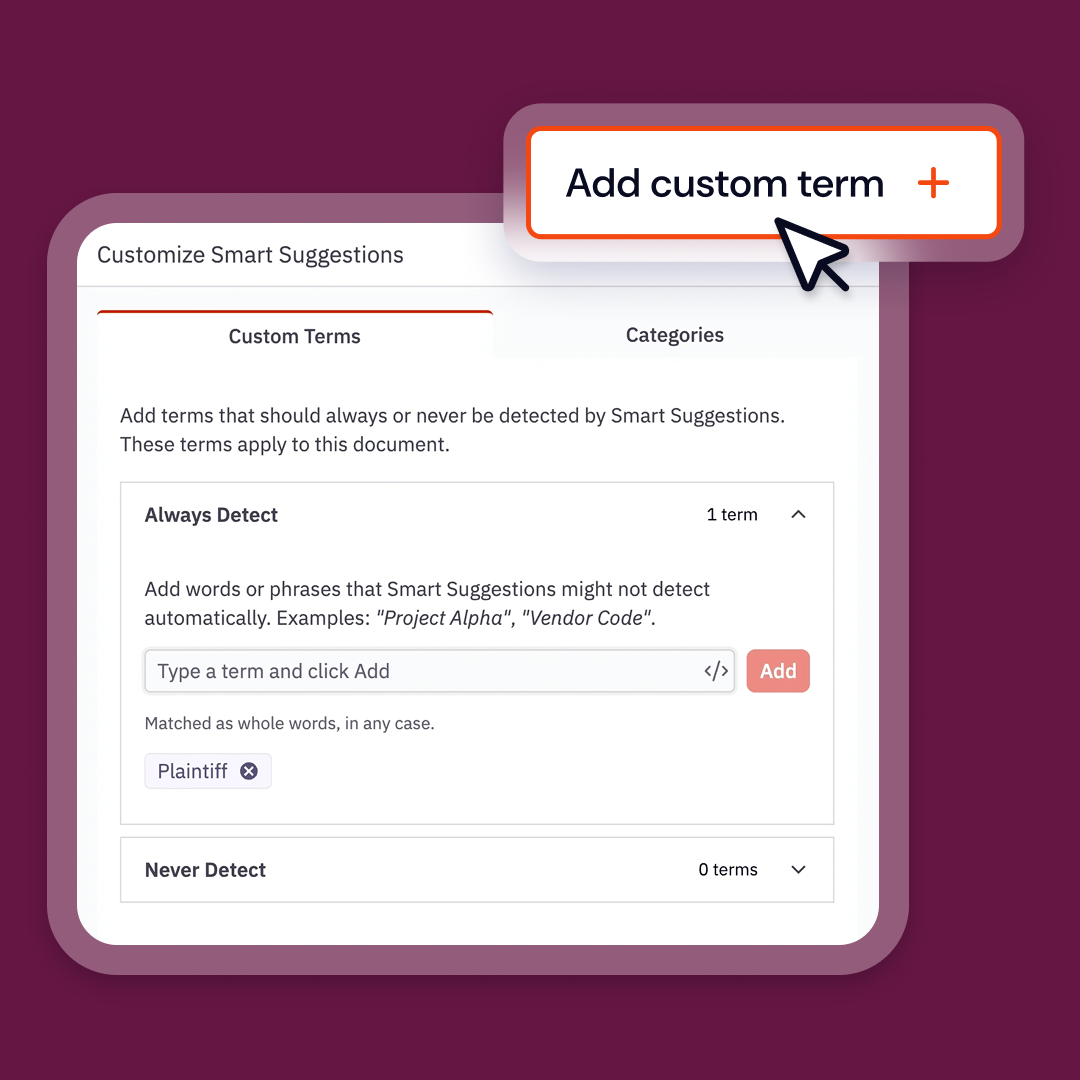
Tailor what Nitro Smart Redact detects with Custom Terms
Add terms that should always be surfaced for review, or exclude terms you never want Nitro Smart Redact to suggest. Read more.
Video
Tailor what Smart Redact detects with Custom Terms
Custom Terms gives you more control over what Smart Redact suggests for redaction, beyond its predefined types of sensitive information.
Add organization-specific terms to Always Redact so they’re flagged even when they aren’t standard PII, or add terms to Never Detect to remove suggestions you don’t want. Your lists are saved to your profile and carry across sessions.
For example, you might add an internal project name, case reference or client identifier to Always Redact, while using Never Detect for terms you know should remain visible.
What you can do with Custom Terms
Flag what matters to your organization
Add terms to Always Redact to surface information that falls outside standard PII categories.
Remove unwanted suggestions
Add terms to Never Detect so Smart Redact no longer suggests them for redaction.
Reuse your preferences
Your Custom Terms lists are saved to your profile and apply across sessions.
Ready to get started?
Custom Terms are available now in Nitro Smart Redact.
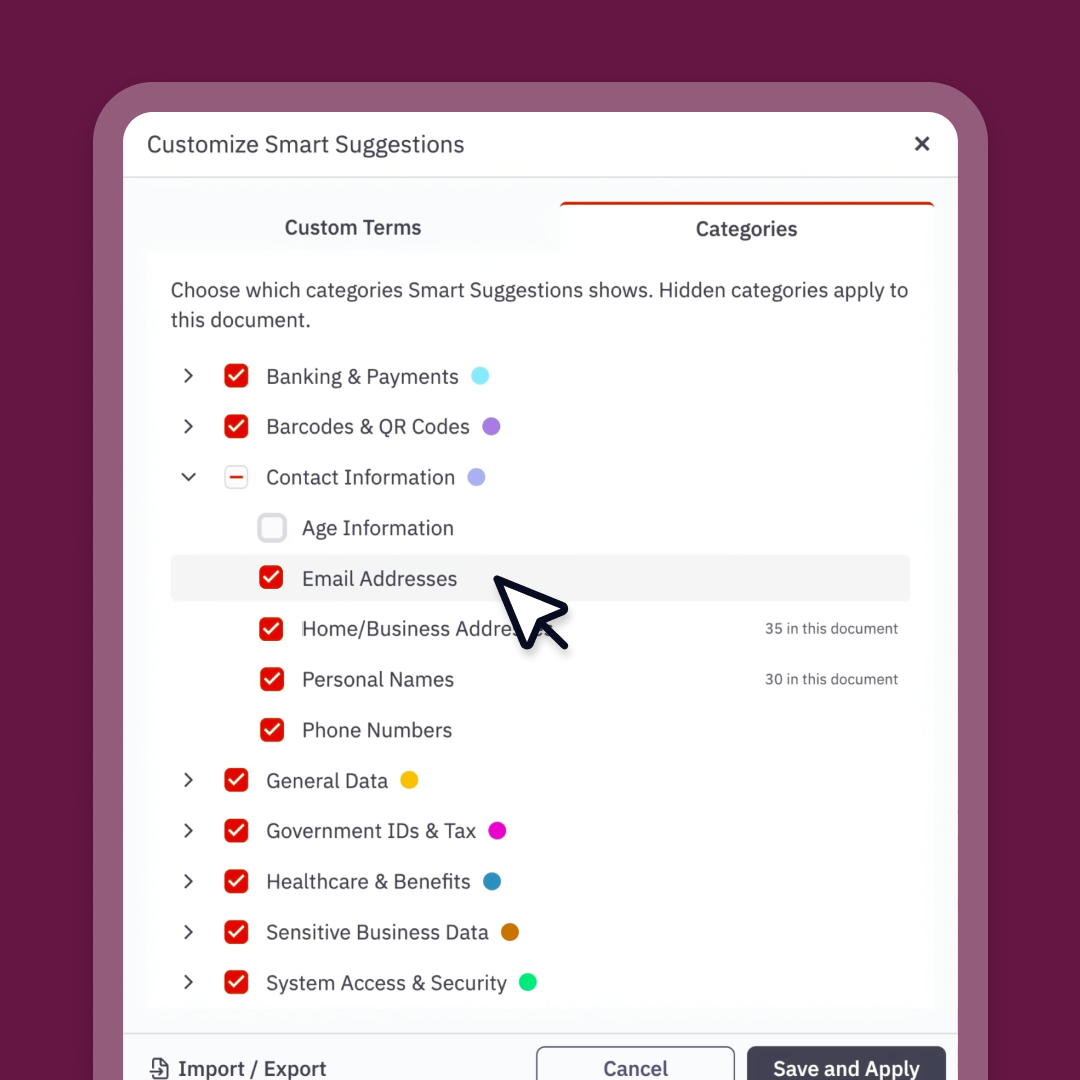
Focus on the right sensitive information with Category Selection
Choose which categories of sensitive information Nitro Smart Redact surfaces, with your preferences saved for future documents. Read more.
Video
Focus on the information you need with Category Selection
Category Selection lets you choose which categories of sensitive information Smart Redact surfaces.
Not every redaction job needs every category. Choose the ones that matter to the task at hand to reduce unnecessary results and focus your review on the information you need. Your preferences are saved and applied to future documents.
What you can do with Category Selection
Choose your categories
Select which types of sensitive information Smart Redact should surface.
Reduce noise
Review only the results relevant to the job.
Save your preferences
Your choices carry over to future documents.
Ready to get started?
Category Selection is available now in Nitro Smart Redact.
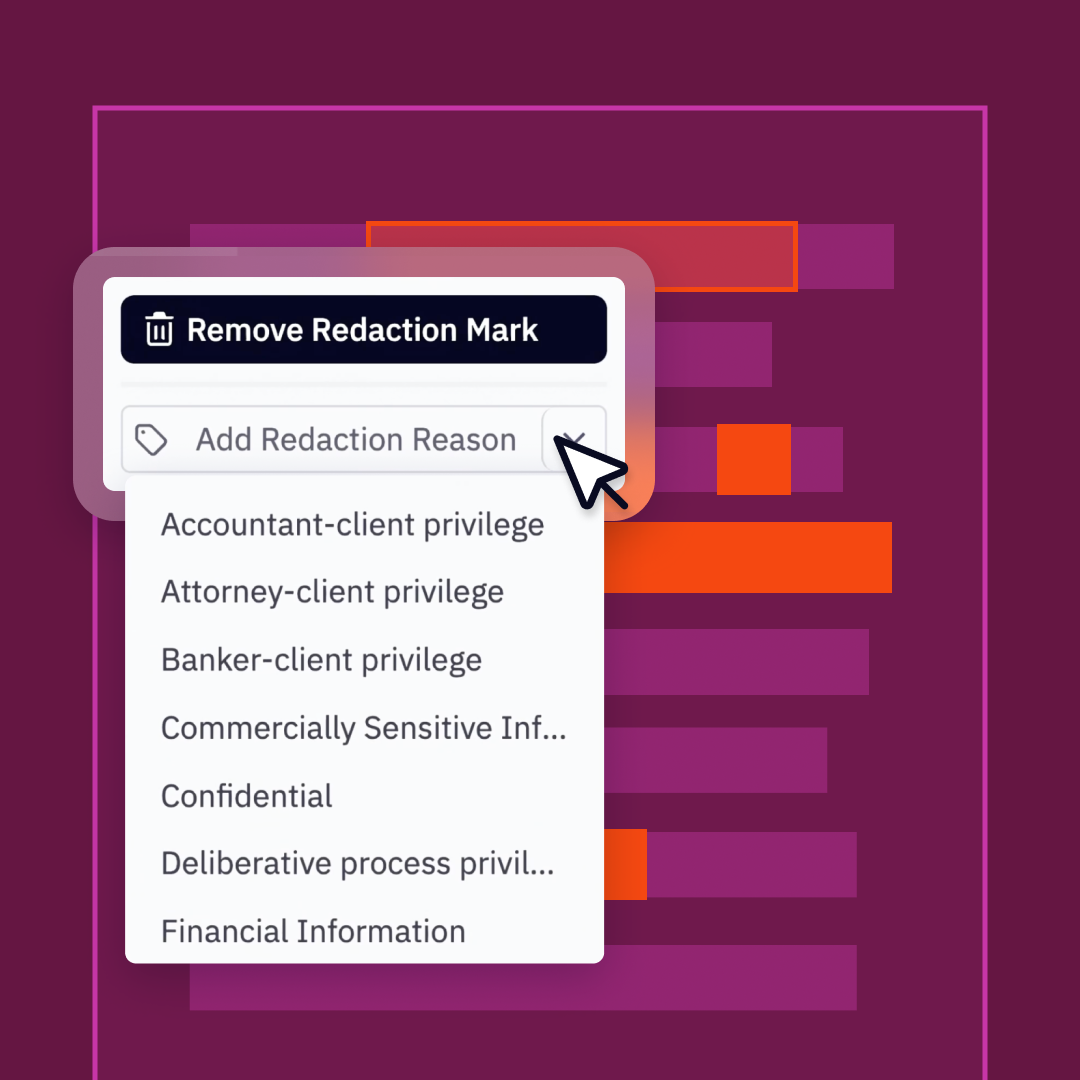
Explain and document every redaction
Add reasons to individual or multiple redactions, and generate an exportable record of what was removed and why. Read more.
Video
Explain and document your redactions
Redaction Reasons lets you record why information was removed, directly in the final document. Choose from predefined reasons or enter your own, then apply a reason to an individual redaction or to multiple marks at once.
When redactions are applied, the reason appears in the redacted area of the final document, so anyone reviewing the file can understand why the information was removed.
Redaction Logs complement this by providing an exportable record of the redaction work, making it easier to review and document what was removed and why.
What you can do with Redaction Reasons and Logs
Add a reason to each redaction
Choose from predefined reasons or enter your own.
Apply reasons at scale
Add a reason to one mark or multiple marks at once, including by PII type or your own selection.
Show reasons in the final document
Reasons appear directly within the redacted area when redactions are applied.
Export a record of the work
Generate a Redaction Log containing details such as each redaction’s page, location, category and reason.
Ready to get started?
Redaction Reasons and Redaction Logs are available now in Nitro Smart Redact.
Redact much larger files
Nitro Smart Redact now supports files up to 1 GB and 2,500 pages, helping teams tackle substantial redaction jobs without splitting documents first. Read more.
Video
Redact much larger files
Smart Redact now supports much larger files, so you can take on the substantial redaction jobs that are hardest to manage by hand.
Some of the highest-value redaction work involves exactly the kind of document volume that makes manual review difficult. Smart Redact is built for those big jobs, not just the simple ones.
Ready to get started?
Large file support is available now in Nitro Smart Redact.
Don't lose work with Save Progress
Coming soon! Save Progress will automatically preserve your redaction work so you can return later with your marks, labels and review decisions intact. Read more.
Video
Pick up exactly where you left off with Save Progress
Save Progress will make it possible to work on larger redaction jobs across multiple sessions, without losing the work you’ve already done.
Your progress is saved automatically as you work. When you return, your redaction marks, labels and previous suggestion decisions are preserved, so you can continue where you left off without rescanning the document or repeating your review.
You’ll also be able to reopen your draft from Smart Redact on another device and continue working from there.
What you'll be able to do with Save Progress
Save automatically as you work
Redaction actions and other changes are preserved without having to manage a separate draft file yourself.
Resume where you left off
Return to your document with your marks, labels and suggestion decisions intact.
Continue from another device
Open an in-progress draft from Smart Redact and carry on where you stopped.
Keep working with your document
Reorder, rotate or delete pages while maintaining the redaction work associated with them.
Ready to get started?
Save Progress is coming soon to Nitro Smart Redact.
1
Nitro Automate turns manual document processes into automated workflows
Nitro Automate connects Nitro’s document capabilities to the systems, agents and workflows businesses already run.
Learn more about Nitro Automate
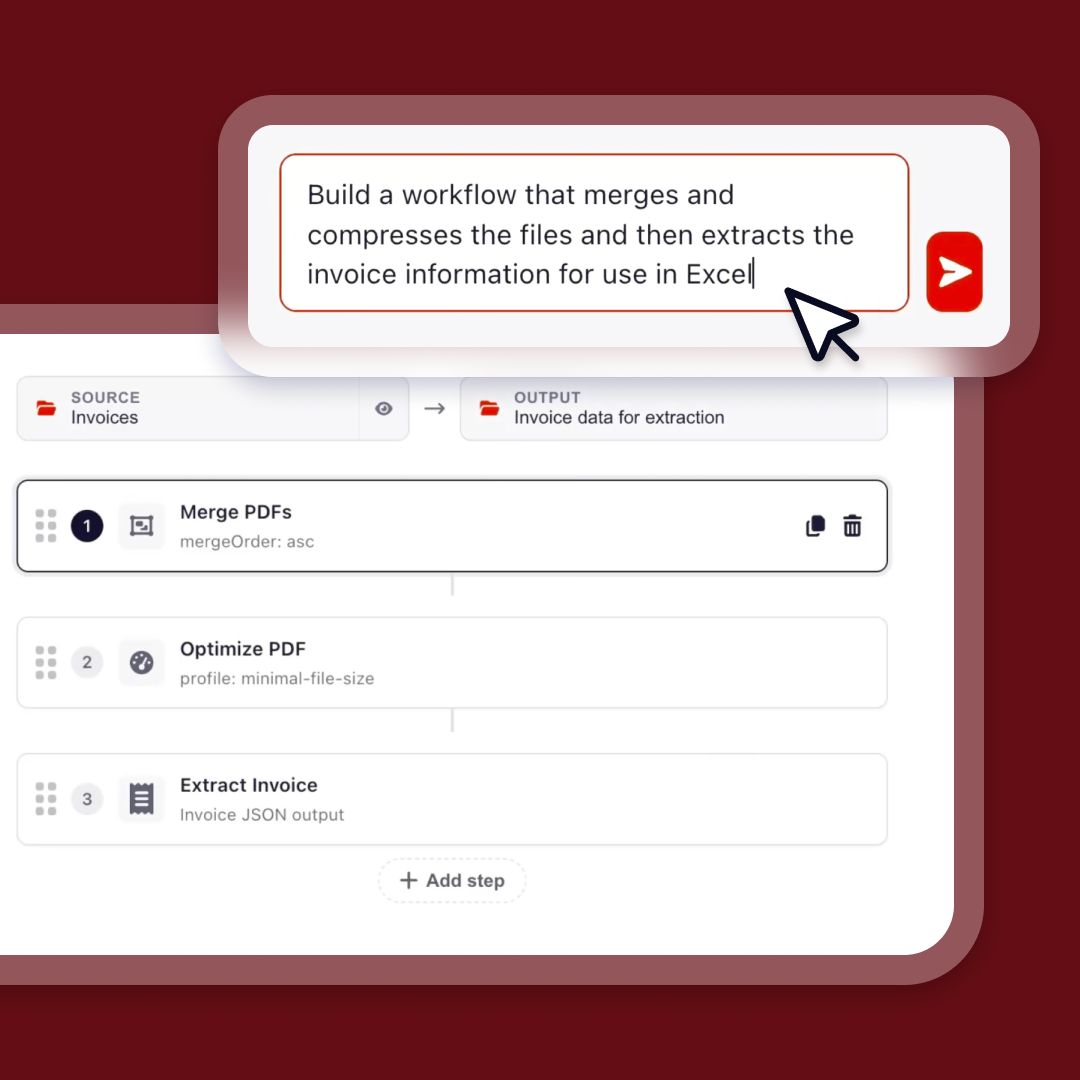
Build powerful, secure automations with the Nitro Automate App
Coming soon! Give any user the ability to create, run, and manage multi-step document automations with no dependency on IT or dev teams. Read more.
Video
Build document workflows without code in the Nitro Automate app
The new Nitro Automate app, now in Beta, lets anyone build powerful document workflows on a no-code visual canvas. No dev team required.
In most organizations, the same documents arrive and go through the same steps again and again. Files get converted, compressed or protected. Forms get filled with data that already sits in another system. Many business processes are already automated, but documents still often depend on people to move work along. You don't need to automate an entire process, or bring in developers, to start seeing value.
For example, when a vendor invoice arrives, Automate can extract key information, convert, rename or compress the file, send the data to another system and trigger the next action based on what the invoice contains.
What you can do with the Nitro Automate app
Build visually
Design document workflows step by step on a no-code canvas.
Describe it in plain language
Tell Nitro what you need and let it build the workflow for you.
Turn repeat work into repeatable workflows
Automate the predictable steps in processes like invoices, onboarding, contracts and claims.
Ready to get started?
The Nitro Automate app is now available in beta.
Add Nitro document capabilities to Power Automate and Zapier
Connect Nitro’s PDF and eSign capabilities to existing business processes inside the automation tools you already use. Read more.
Add Nitro to your Power Automate and Zapier workflows
Nitro's PDF and eSign capabilities now work inside Microsoft Power Automate and Zapier, the workflow automation tools many organizations already use.
The goal isn't another tool to learn. It's for Nitro to fit into the automation environment your business already has, giving less technical users another way to remove repetitive steps across the tools they use every day.
What you can do with the Power Automate and Zapier connectors
Bring PDF and eSign into your flows
Add Nitro actions to workflows in Power Automate or Zapier.
Work in tools you already use
Automate document steps without leaving your current automation platform.
Remove repetitive steps
Let routine document tasks run as part of your wider business processes.
Ready to get started?
Nitro connectors for Power Automate and Zapier are available now.
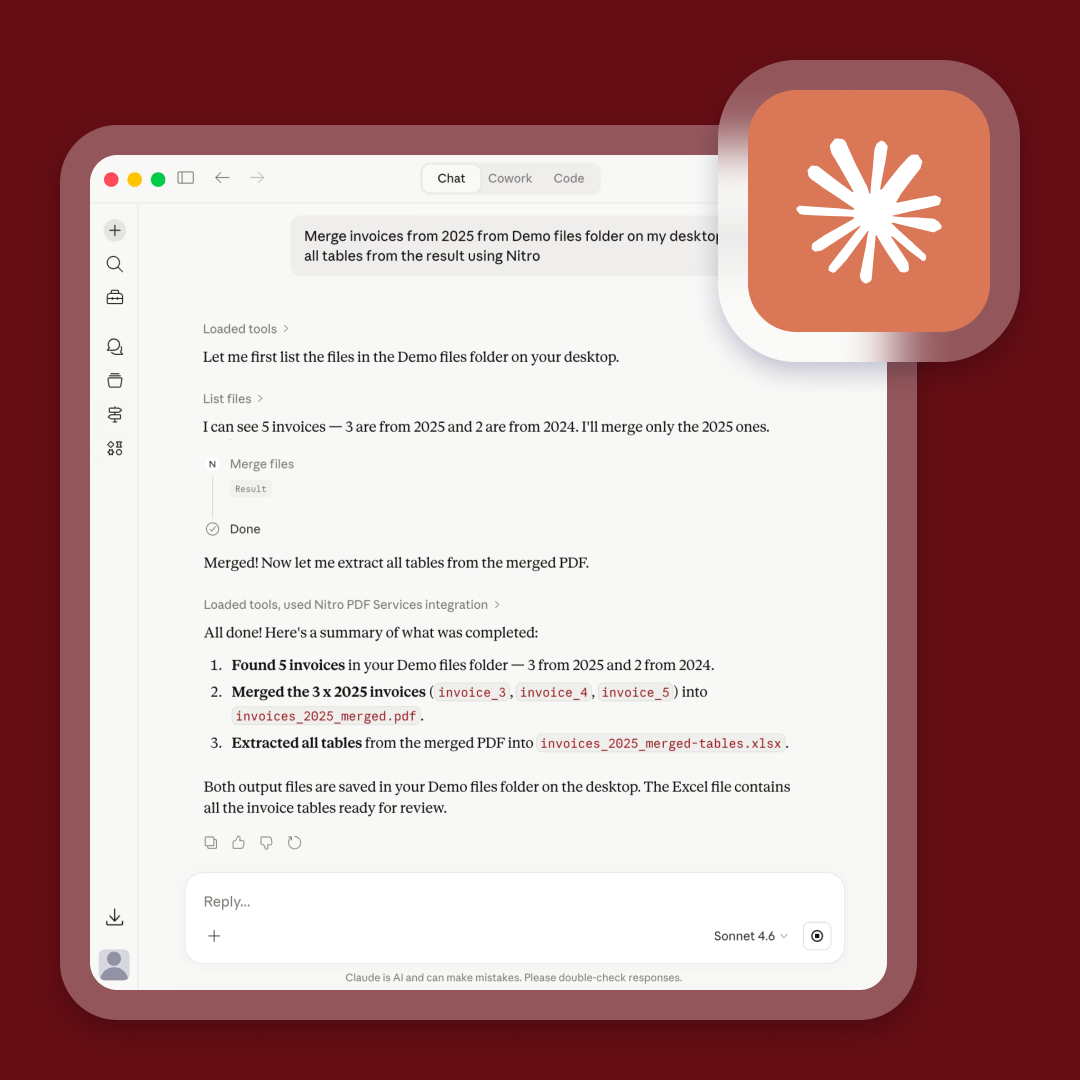
Connect your Claude to Nitro’s document engine via MCP
Let Nitro handle the extraction, conversion, redaction and more to ensure precise, accurate outcomes within Claude. Read more.
Video
Work with Nitro through Claude using Nitro MCP
With Nitro MCP, Claude can work with Nitro's document engine to extract information, convert files, redact sensitive information and more.
More people now start with the outcome they want, not the application they need to open. The chat window is just the interface. When Claude calls on Nitro, the work is done by Nitro's dedicated document engine, bringing the speed, accuracy and reliability businesses expect from Nitro.
For example, ask Claude to pull key details from a contract or redact personal information from a report, and Nitro does the document work behind the scenes.
What you can do with Nitro MCP for Claude
Start with the outcome
Ask for what you need in natural language.
Use Nitro's document engine
Extract, convert, redact and carry out other document actions.
Rely on the results
Document work is executed by Nitro, not approximated in chat.
Ready to get started?
Nitro MCP is available now for Claude.
Embed document automation into your own systems and apps
Automate document workflows in your CRM, ERP and HR systems with modern REST APIs. Read more.
Build PDF processing and eSigning into your own systems
Nitro's PDF and Sign API endpoints let your developers bring document processing and eSigning into your own applications, in a single workflow.
Many organizations want more control. Rather than adding another tool for teams to learn, they want document workflows built directly into the systems they already use. With Nitro's APIs, the whole journey, from the first file to the signed document, runs inside your systems with one provider behind it.
What you can do with Nitro's APIs
Prepare documents
Convert and prepare files as part of your own workflows.
Extract and protect
Pull out the data you need and protect what's sensitive.
Send for signature
Send documents straight for signature from your applications.
Trigger what's next
Start the next step in your process automatically once a document is signed.
Ready to get started?
Visit our Developer Documentation to learn more.
Connect your Copilot to Nitro’s document engine via MCP
Coming soon! Copilot will handle the same document tasks through natural language prompts. Read more.
Nitro MCP is coming to Microsoft Copilot
Nitro MCP will soon extend to Microsoft Copilot.
For organizations built on the Microsoft ecosystem, employees, and increasingly AI agents, will be able to work with documents through a tool they already use across the business.
Ready to get started?
Nitro MCP for Microsoft Copilot is coming soon. Stay tuned for updates.
1
Nitro Smart Compare makes document review faster and clearer
Compare two versions side by side, see every difference highlighted, and get an AI-generated summary of what changed.
Be the first to discover new Nitro Features
Sign up to stay up to date with the latest updates, enhancements, and new features across Nitro products.