Skip to content
Nitro PDF Plus Plan

Enterprise-Grade PDF Editing with Nitro PDF Plus

Nitro PDF Plus offers powerful PDF editing capabilities, comprehensive analytics, and dedicated support to transform and optimize your digital workflows.

Inline Photo-Real Estate 3
Why choose Nitro PDF Plus

Enhance Productivity and Workflows

Designed for teams within larger organizations, Nitro PDF Plus drives efficiency and empowers everyone to work smarter. Enjoy seamless PDF creation, editing, and collaboration along with advanced security, AI tools, dedicated support, and actionable insights for measurable ROI.

Key Features

Comprehensive PDF editing with advanced features
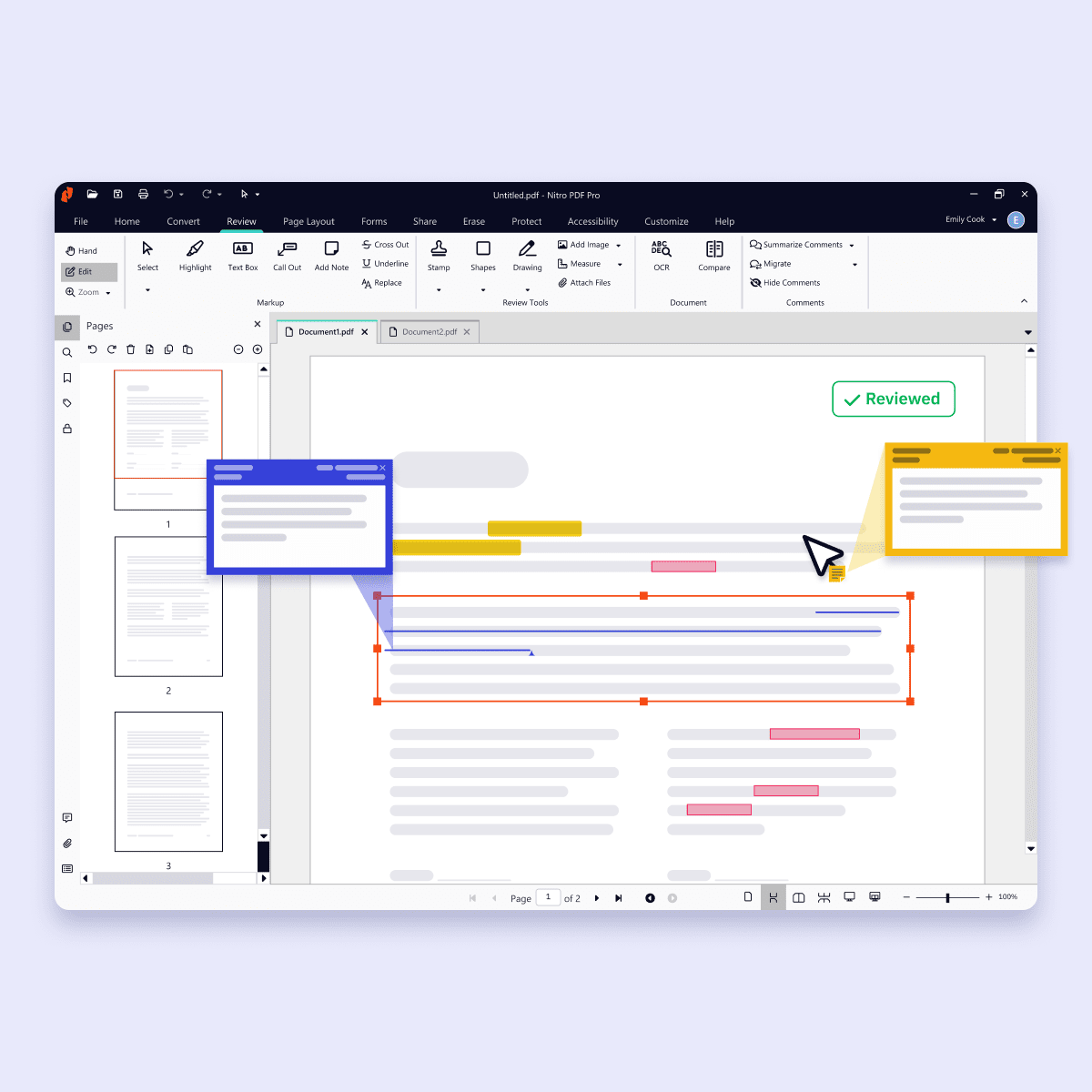
Screenshots-PDF for Windows-Edit and annotate
Icon-48px-Edit

Advanced PDF Editing

The Nitro PDF Plus plan allows you to easily create, edit, convert, combine, and collaborate on PDFs with ease. Advanced tools like Smart Redact help teams securely remove sensitive information from documents while streamlining workflows. Seamlessly integrate with your organization's existing storage solutions for maximum efficiency.

Icon-48px-Secure-1

Enterprise-grade security and control

Integrate with Azure Information Protection for advanced security and simplify user management with Single Sign-On (SSO) and domain control.  

icon of a bar graph

Advanced analytics

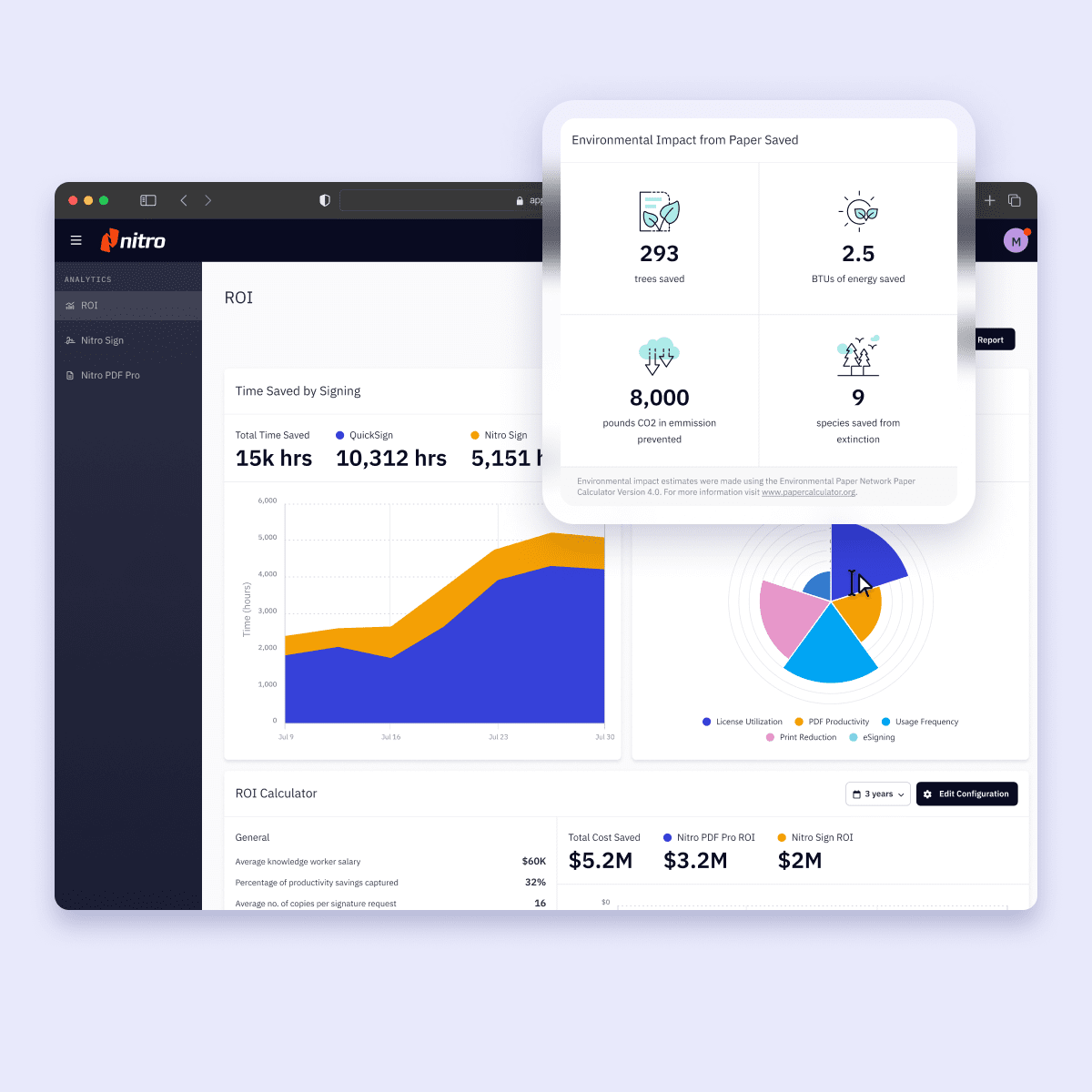
Gain valuable insights into PDF software usage, ROI, and sustainability savings with Nitro Analytics  

icon-48px-Support

Dedicated customer support

Receive personalized PDF software support with expedited case routing, 24/7 global technical support engineers, and more. 

Man smiling while working with a computer surrounded by security and compliance logos
Security & Compliance

Nitro PDF Plus offers enterprise-grade security and compliance 

At Nitro, security and compliance are paramount. We hold internationally recognized certifications like SOC 2, HIPAA, QTSP, and ISO 27001. Our operations in Australia, Toronto, and Dublin adhere to strict data protection laws, ensuring your sensitive data is safeguarded with top-tier security measures.
It was straightforward to deploy globally, and the adoption was a success thanks to Nitro’s proactive Customer Success team.
Ian Steere
Digital Business Partner, Mace Group
Screenshots-Analytics-ROI
Nitro Analytics

Maximize ROI with data-driven insights from Nitro PDF Plus

Demonstrate ROI, increase software utilization, and track sustainability metrics like CO2 emissions and trees saved with Nitro Analytics. Leverage data visualizations to enhance performance and profitability.

Scalable PDF editing with efficiency

icon of a coin

Tailored pricing and flexible licensing

Nitro supports per-user licensing rather than competitors' device-based licensing, helping you control costs and support scalability.
icon of a bar graph

Robust analytics for data-driven decisions

Leverage Nitro Analytics for actionable insights into document workflows. Measure ROI and identify optimization opportunities effectively.
Icon Simple, intuitive interface

A simple, user-friendly experience

Implement Nitro’s intuitive PDF editing tools with ease. Minimal training needed for teams to start quickly and work efficiently.
icon of a security shield

Enterprise-grade security and compliance

Nitro PDF Plus integrates Azure Information Protection and holds certifications like SOC 2, HIPAA, QTSP, and ISO 27001.
icon of a handshake

Dedicated support and customer success

From installation to growth, receive personalized support with expedited case routing and 24/7 global technical assistance.
Icon-48px-Seamless Collaboration-1

Centralized control for seamless provisioning
The Nitro Admin Portal offers effortless software provisioning and user management. Optimize license use with insights and easy reallocation.

Trusted by 67% of the Fortune 500

  • Spr25_Grid Leader
  • Spr High Performer
  • Spr25_ROI MidMarket
  • Spr25_HighPerformerSmall
  • Sp25_Enterprise
  • Spr25_HighPerformerMid
  • Spr25_User Adoption

Start Your Free 14-Day Trial of Nitro PDF Plus

Get Started Free

Get the PDF editor built for teams and enterprises

Switch to Nitro PDF Plus and give your organization a secure, scalable, and cost-effective PDF editor. With flexible licensing, advanced security, AI tools like Smart Redact, powerful analytics, and dedicated support, Nitro makes it easy to manage documents, control costs, and keep teams productive - without surprise price hikes.
Best for Enterprises
Subscription

Nitro PDF Plus

For teams in large organizations that require robust PDF editing capabilities and advanced features to transform digital document cycles.
Volume Discounts Available

Features

All the PDF editing functionality within Nitro PDF Standard, plus:

  • Enterprise-grade security including single sign-on (SSO), domain control, and Azure Information Protection
  • Valuable insights into PDF software usage, ROI, and sustainability savings with Nitro Analytics
  • Dedicated customer success manager if eligible 

What is Nitro PDF Plus?

Nitro PDF Plus is an enterprise-grade PDF solution designed for large teams and organizations that need secure, scalable, and efficient document workflows.

It includes all the core PDF editing tools—create, edit, convert, and combine—plus advanced features like analytics, Azure Information Protection integration, Single Sign-On (SSO), domain control, and dedicated customer support.

Nitro PDF Plus helps enterprises reduce costs, improve productivity, and track ROI while ensuring data security and compliance.

Is there a free version of Nitro PDF Plus?

Nitro provides a 14-day free trial of its PDF software, which gives full access to the features included in the Plus plan.

This allows individuals and teams to explore advanced PDF editing, collaboration, and productivity tools before committing to a subscription.

After the trial, users can determine if the Nitro PDF Plus plan best fits their needs.

What makes Nitro PDF Plus different from Nitro PDF Standard?

Nitro PDF Plus includes all the editing, conversion, and collaboration features found in Nitro PDF Standard, but adds advanced enterprise capabilities.

These include Single Sign-On (SSO), domain control, Azure Information Protection integration, Nitro Analytics for ROI and sustainability tracking, and dedicated customer support.

It’s designed for organizations that need secure, scalable document management with measurable business outcomes.

What is Nitro Analytics, and how does it benefit my organization?

Nitro Analytics provides actionable insights into how your teams use PDF software. You can track adoption, measure ROI, and even monitor sustainability savings such as CO2 emissions and paper reduction.

These insights help IT leaders improve utilization, justify investment, and identify opportunities for workflow optimization.

How does Nitro PDF Plus ensure enterprise-grade security?

Security is built into every layer of Nitro PDF Plus. The plan integrates with Azure Information Protection for advanced document protection and supports SSO and domain control for centralized user access.

Nitro also holds global certifications like SOC 2, HIPAA, QTSP, and ISO 27001, and operates under strict data protection laws in Australia, Toronto, and Dublin—ensuring sensitive data is always safeguarded.

What kind of support is included with Nitro PDF Plus?

Nitro PDF Plus customers receive dedicated, enterprise-level support.

This includes 24/7 global technical assistance, expedited case routing, and, for eligible customers, a dedicated customer success manager.

Users can also turn to our Knowledge Base, community forum, or user guides for additional help.

Whether you need onboarding help, troubleshooting, or ongoing optimization, Nitro’s support team is committed to your success.

Can Nitro PDF Plus integrate with my existing systems?

Yes. Nitro PDF Plus integrates seamlessly with Microsoft 365, SharePoint, iManage, AIP, and other leading enterprise tools. These integrations allow your organization to create, edit, share, and secure PDFs without disrupting existing workflows or requiring complex setups.

How does Nitro PDF Plus scale for large teams?

Nitro PDF Plus includes the Nitro Admin Portal, a centralized interface for license provisioning, user management, and access control.

IT administrators can easily allocate or reassign licenses, monitor usage, and optimize adoption across hundreds or thousands of users, making it ideal for enterprises of any size.

Does Nitro PDF Plus offer compliance support for regulated industries?

Yes. Nitro PDF Plus is built to meet strict compliance requirements across multiple industries.

With certifications like SOC 2, HIPAA, QTSP, and ISO 27001, it supports organizations in healthcare, finance, legal, and government sectors that must adhere to stringent data protection standards.

Is training required for teams to use Nitro PDF Plus?

Very little training is needed. Nitro PDF Plus is designed with a simple, intuitive interface similar to Microsoft Office, making it easy for employees to get started quickly.

To further accelerate adoption, Nitro provides onboarding support and resources tailored to your organization’s needs, ensuring a smooth rollout across teams.

This combination of ease-of-use and guided onboarding reduces deployment time and helps maximize ROI from day one.