PDF Editor | Edit, OCR, Sign & Fill PDFs | Nitro Software
Skip to content

Complete Guide to Editing PDFs: Tools, Tips & Tutorials

A PDF editor allows you to edit text and images, convert scanned documents with OCR, create and fill forms, add electronic signatures, annotate files, organize pages, and protect sensitive information. Whether you need to update a contract, collaborate on a document, digitize paper records, or automate document workflows, the right PDF editing tools can help you work more efficiently.

This guide explains the most common PDF editing tasks, how they work, and when to use them. You'll also learn how Nitro PDF helps individuals and teams edit, manage, sign, and secure PDF documents from a single platform.
Blog - Header Banner - Nitro PDF Pro v26 - 1600x1200

Caroline Brady

Product Marketing Manager, PDF

Last updated: September 21, 2026

Explore PDF editing tasks

What do you want to do with your PDF editor? Explore Nitro's range of tools and features.
Icon-48px-Edit

Edit PDF Text

Update text, fonts, images, and layouts in existing PDFs without changing the original formatting.
Learn how to edit PDF text
icon of a picture

Add Images to PDF

Insert, resize, and position photos, logos, graphics, and other images anywhere in your PDF.
Learn how to add images to PDFs
Icon-48px-User-intuitive OCR

OCR & Searchable PDFs

Convert scanned documents into searchable, selectable, and editable PDFs using OCR technology.
Learn how to create searchable PDFs with OCR
icon of a pen filling out a form field

Fill & Create Forms

Create interactive PDF forms or complete existing forms digitally to simplify document workflows.
Learn how to create interactive PDF forms
icon of a signature with a padlock

Sign PDFs

Add secure electronic signatures to approve and share documents without printing or scanning.
Learn how to add secure signing to PDFs
icon of a stamp

Bates Numbering

Automatically apply sequential page numbers to legal, compliance, and business documents for easier organization.
Learn how to apply Bates Numbering to PDFs
icon of a pencil

Annotate & Markup

Markup PDFs with highlights, comments, drawing tools, and other annotations to improve collaboration.
Learn how to apply markup tools to PDFs
Icon-48px-AI Automation-1

PDF AI Assistant

Use AI to summarize documents, answer questions, extract data, and quickly find information within PDFs.
Learn how to use Nitro’s PDF AI assistant

Nitro PDF Pro v26: Now Available

Email Header - v26 (2)

The latest version of Nitro PDF Pro is one of its biggest updates yet.

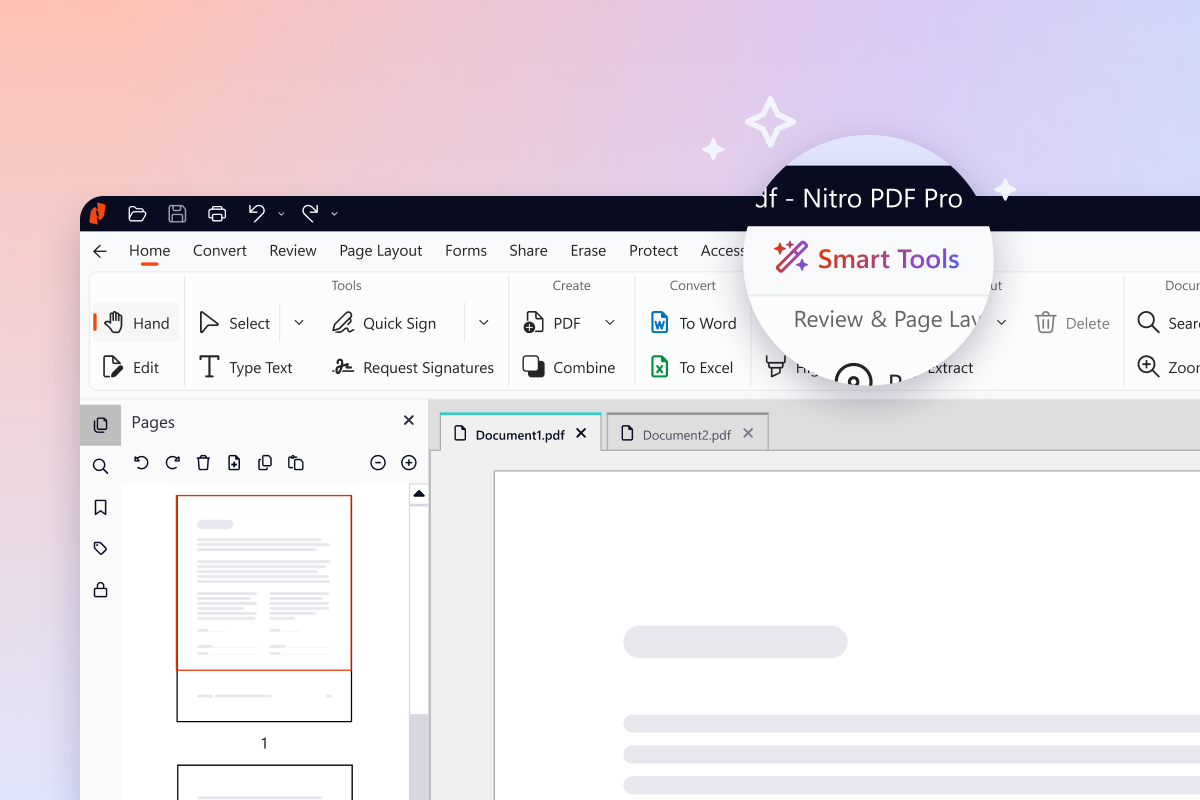
Nitro PDF Pro v26 brings a fully modernized interface, a new Smart Tools tab that centralizes all AI-powered capabilities — including form extraction, smart redact, and a PDF chat assistant — alongside meaningful under-the-hood improvements to OCR accuracy, PDF compression, and PDF-to-Office conversion quality.

Learn more or try it for free today.
What can you do with a PDF editor?

edit-text-3

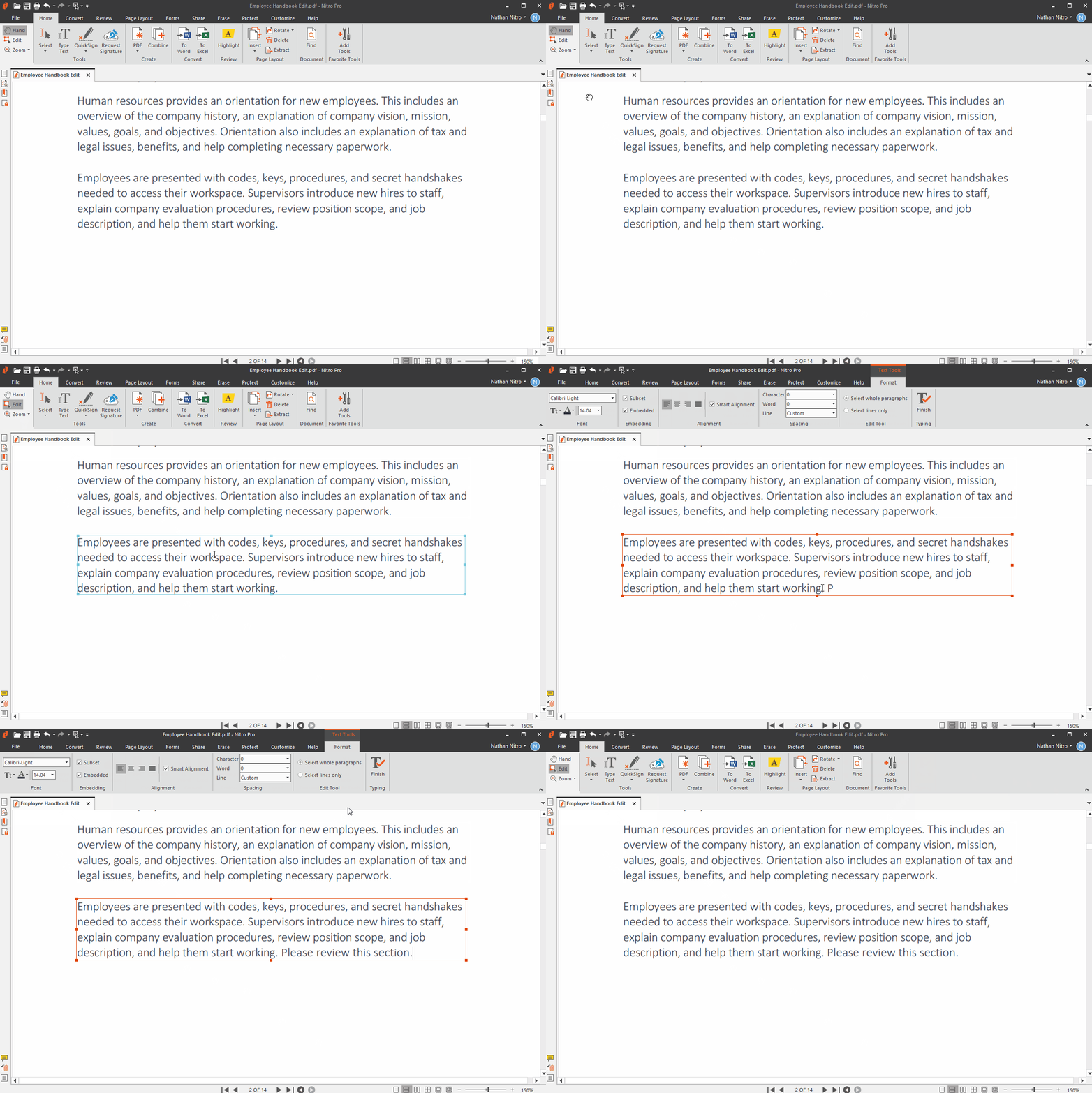
Edit PDF Text

Editing PDF text allows you to update existing documents without returning to the original source file. PDF editors let you modify paragraphs, fonts, formatting, images, and page layouts while preserving the document's original design. 

Nitro PDF makes it easy to edit text directly on the page, modify images and graphics, and maintain formatting throughout the editing process. It also works with Adobe Acrobat-compatible PDF files, facilitating collaboration across teams that use different PDF software.

Screenshots-PDF for Mac-Edit & Annotate

Add Images to PDF

Adding images to a PDF helps you personalize documents with logos, photos, diagrams, screenshots, signatures, and other graphics. 
Nitro PDF lets you insert, resize, rotate, and reposition images while maintaining a polished, professional layout. The intuitive editing tools make it easy to enhance documents without recreating them from scratch.

Screenshots-PDF Pro for Mac-OCR

Turn Scanned Pages Into Editable PDFs With OCR

Optical Character Recognition (OCR) converts scanned documents and image-based PDFs into searchable, selectable, and editable text. OCR makes it easier to find information, copy content, archive paper records, and update scanned documents without manual retyping. 

Nitro PDF includes built-in OCR technology that accurately recognizes text in scanned files, allowing you to search, edit, annotate, and export content to Microsoft Office formats for faster document workflows.

Screenshots-PDF-Forms Auto

Create & Fill Forms

Interactive PDF forms simplify data collection by allowing users to complete and submit documents electronically. Organizations use fillable PDF forms for applications, contracts, onboarding, surveys, and approvals. 
Nitro PDF lets you create custom forms, add interactive fields, complete existing forms digitally, and reuse templates to speed up business processes and reduce paperwork and manual data entry.
digital-sign-3

Sign PDFs

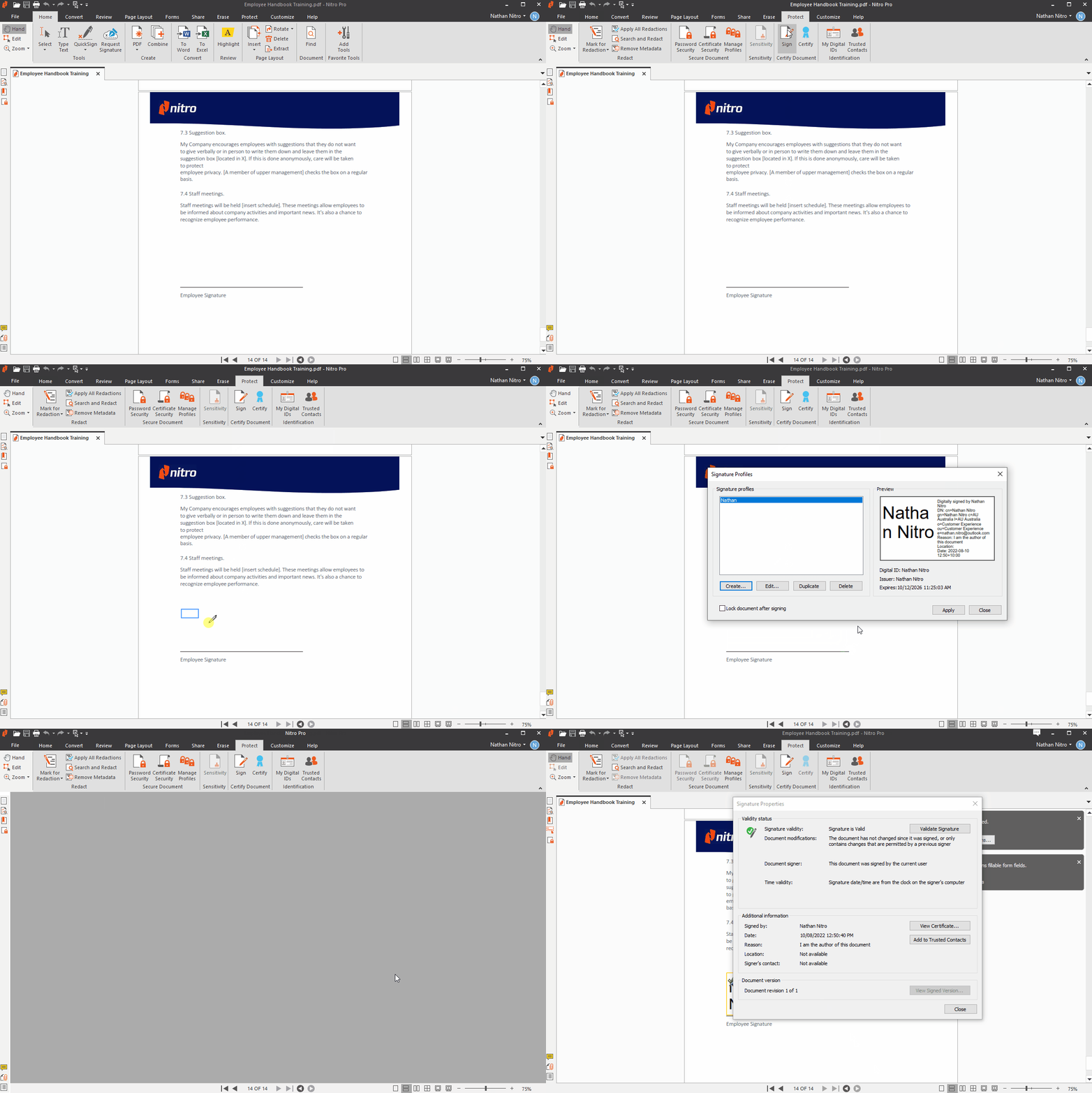
Electronic signatures allow you to approve and share documents securely without printing, signing by hand, or scanning paper copies. Businesses use eSignatures to accelerate contract approvals, employee onboarding, purchase agreements, and other document workflows. 
Nitro PDF lets you add secure electronic signatures to PDF documents in just a few clicks, helping individuals and teams complete approvals faster while maintaining document integrity.
bates-presuf-4

Bates Numbering

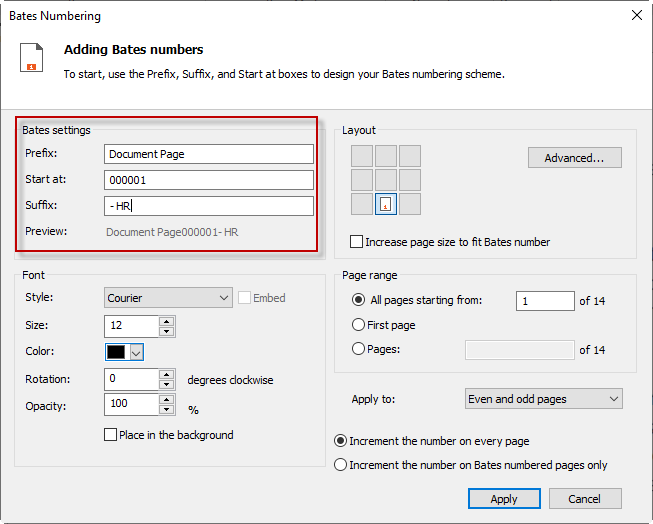
Bates numbering assigns sequential page numbers to PDF documents, making large collections of files easier to organize, reference, and manage. It's commonly used in legal, compliance, government, and corporate document review. 

Nitro PDF automates Bates numbering across single or multiple PDF files while preserving document formatting, helping teams prepare organized, professionally numbered document sets quickly and accurately.

Screenshots-PDF for Mac-Edit & Annotate

Annotate & Markup

PDF annotation tools make it easier to review documents, share feedback, and collaborate throughout the editing process. You can highlight text, add comments, insert stamps, draw shapes, and mark revisions without changing the original content. 
Nitro PDF provides a comprehensive set of annotation and markup tools that help teams communicate clearly, simplify document reviews, and keep feedback organized in one place.

Card-Release-Knowledge Assistant

PDF AI Assistant

Generate instant summaries, extract table data, or ask Nitro’s AI-powered assistant questions in 80+ languages to transform PDFs into actionable knowledge.

Try Our PDF Editor 14 Days Free

No credit card required, no features locked.
Start Your Free Trial

Term

Definition

AI PDF Assistant

AI tools that summarize, analyze, extract information from, or answer questions about PDFs.

Annotation

Comments, highlights, stamps, or drawings added during document review. 

Bates Numbering

Sequential numbering used to organize legal and compliance documents.

Electronic Signature

A legally recognized digital signature used to approve documents electronically.

Fillable Form

A PDF containing interactive fields users can complete digitally.

OCR

Optical Character Recognition converts scanned images into searchable, editable text.

PDF

Portable Document Format used to preserve document formatting across devices.

PDF Compression

Reducing file size while maintaining document quality.

PDF Conversion

Transforming PDFs to or from formats such as Word, Excel, PowerPoint, or images.

Redaction

Permanently removing sensitive information from a document.

Why choose Nitro for PDF editing?

Nitro helps organizations modernize document workflows by combining PDF editing, eSignatures, AI-powered document intelligence, OCR, collaboration, and enterprise security within a single platform.
Start Your Free Trial

What is a PDF editor?

A PDF editor is software that lets you create, edit, convert, organize, annotate, sign, and secure PDF documents while preserving their formatting. Unlike a PDF reader, a PDF editor allows you to modify document content, complete forms, perform OCR on scanned files, and collaborate on PDFs.

What can you do with a PDF editor?

A PDF editor can edit text and images, convert scanned documents with OCR, create and fill forms, add electronic signatures, annotate files, organize pages, redact sensitive information, and convert PDFs to and from formats like Microsoft Word and Excel. Many modern PDF editors also include AI-powered document assistance.

Can I edit a PDF without Adobe Acrobat?

Yes. You don't need Adobe Acrobat to edit a PDF. Many PDF editors, including Nitro PDF, let you edit text and images, create forms, add signatures, perform OCR, and convert files while maintaining compatibility with standard PDF documents.

How do I edit text in a PDF?

To edit text in a PDF, open the document in a PDF editor, select the text editing tool, click the text you want to change, and make your edits. Most professional PDF editors also let you modify fonts, formatting, images, and page layouts while preserving the document's original design.

Can I edit scanned PDFs?

Yes. Scanned PDFs can be edited after Optical Character Recognition (OCR) converts the scanned image into searchable and editable text. Once OCR is complete, you can edit text, search document contents, copy information, and annotate the file just like a standard PDF.

What is OCR in a PDF editor?

OCR, or Optical Character Recognition, is a technology that converts scanned documents and image-based PDFs into searchable and editable text. OCR makes it easier to update scanned files, search document contents, copy text, and digitize paper records for long-term storage.

Can I add images to a PDF?

Yes. Most PDF editors let you insert photos, logos, screenshots, signatures, charts, and other graphics into existing PDF documents. You can typically resize, rotate, reposition, or replace images without affecting the surrounding content or document layout.

How do I create fillable PDF forms?

To create a fillable PDF form, open your document in a PDF editor, add interactive fields such as text boxes, checkboxes, drop-down menus, and signature fields, then save the form as a fillable PDF. Users can complete the form electronically without printing it.

Can I electronically sign PDFs?

Yes. Electronic signatures allow you to sign PDF documents digitally without printing or scanning. Many PDF editors, including Nitro PDF, support secure electronic signatures for contracts, approvals, forms, and other business documents.

Does Nitro work on Windows, Mac, and mobile devices?

Yes. Nitro offers PDF editing solutions for Windows, macOS, web browsers, and mobile devices, making it easy to edit, review, sign, and manage PDF documents across different platforms and work environments.

Does Nitro PDF include AI features?

Yes. Nitro PDF includes AI-powered tools that help users summarize documents, answer questions about PDF content, extract tables and structured data, and quickly find key information, helping reduce manual review and improve productivity.

Is Nitro secure for business use?

Yes. Nitro is designed for business and enterprise use with security features that help organizations protect sensitive documents, manage access, and support compliance requirements. Nitro also provides enterprise-grade security controls and responsible AI practices for document workflows.

Can teams collaborate using Nitro?

Yes. Teams can use Nitro to review documents, share feedback with annotations and comments, complete approvals with electronic signatures, and manage document workflows more efficiently. These collaboration features help reduce manual processes and keep projects moving. 

How is Nitro different from Adobe Acrobat?

Nitro PDF provides many of the same core PDF editing capabilities as Adobe Acrobat, including text editing, OCR, forms, electronic signatures, annotations, and AI-powered tools. Many organizations choose Nitro for its intuitive interface, transparent pricing, and enterprise-focused document productivity features. 

Can Nitro convert PDFs to Word and Excel?

Yes. Nitro PDF converts PDFs to editable Microsoft Word, Excel, and PowerPoint files while preserving formatting whenever possible. It also converts Office documents to PDF, making it easier to edit, share, and reuse business documents across applications. 
Nitro PDF Standard
Get Nitro PDF Standard
Nitro PDF Plus
Get Nitro PDF Plus
Nitro PDF Classic
Get Nitro PDF Classic

Top Features

Interact with, create, edit & review PDFs on your Windows device
Interact with, create, edit & review PDFs on your Mac device
Interact with, create, edit & review PDFs on your iOS device
Edit text and images, reorder and delete pages in a PDF
Convert PDFs and export to Word, Excel and PowerPoint
Reassign licenses in the web-based Admin Console
Add security & password protect PDF files
Turn scanned documents into editable searchable PDFs
Compare two versions of a PDF to review all differences
Access advanced 24/7 tech support 2+ users 2+ users
Access Nitro Analytics to understand PDF software usage, ROI, and sustainability savings
Automatically extract table & form data from PDFs with Nitro Table & Form Extract
Summarize, rewrite, and extract key data from your document with Nitro AI Document Assistant
Easily create, fill, sign, send, and store forms
Automatically create fillable forms with Nitro Automatic Form Creation
Enable single sign-on for users across the organization

Interact with PDFs

View, interact and comment on PDF content from your computer, mobile device or web browser
Track activity across desktop, mobile and web for documents sent for viewing & reviewing
Access, edit and store files in your Box, Dropbox, Google Drive and Microsoft OneDrive accounts
Compare two versions of a PDF to review all differences
Measure the distance, area and perimeter of objects in PDFs
Open PDFs are protected by Microsoft Information Protection solutions, including Azure Information Protection and Microsoft 365.

Create PDFs

Convert documents and images to PDF files
Create PDFs from any application that prints
Convert Microsoft Word, Excel or PowerPoint files to PDFs
Create, protect and send PDFs in popular Microsoft 365 apps for Windows
Combine multiple documents and file types into one PDF file
Convert web pages to interactive PDFs, complete with links
Prevent others from copying or editing information in PDFs
Create a password-protected PDF
Create and export PDFs on your mobile device
Use one-click creation of rich PDFs within Microsoft 365
Turn scanned paper documents into instantly searchable and editable PDFs with fonts that match the original
Convert and validate PDFs for compliance with ISO standards like PDF/A
Convert to rich & plain text
Create and validate PDFs to meet accessibility standards for people with disabilities
Extract text and images
Integration with Office 365, Sharepoint 365, OneDrive for Business, Dropbox, Box, Google Drive
Copy and paste selected parts of a PDF file with formatting intact
Batch create PDF files
Create PDF from File Explorer context menu
Create PDF from Finder/iCloud
Create accessible documents, tag creation, embed fonts, voice over

Edit & Review PDFs

Edit PDF text and images with full-page paragraph reflow
Turn PDFs into editable Microsoft Word, Excel or PowerPoint files
Insert, delete and organise pages in a PDF
Convert PDFs to JPG, TIFF or PNG image formats
Split a PDF by extracting one or multiple pages
Add bookmarks, headers, numbering and watermarks
Add or edit text and images on your tablet and mobile phone
Reorder, delete or rotate PDF pages on your iOS tablet
Redact to permanently remove sensitive visible information in PDFs
Add audio to PDFs
Add Bates numbering to legal documents
Visual rotation of images and pages
Quicksign PDF documents
Work with certificate signatures
Add comments to PDFs with a full suite of commenting tools including text editing, highlighter, and sticky notes
Turn paper or Word docs into fillable PDF forms
Automatically optimize PDFs to reduce file size and customize settings
Enhance PDF forms by adding interactivity with JavaScript
Mark PDFs with stamps, such as “approved” or “draft”

Support & Platform Benefits

Additional compliant security (HIPAA, SOC2, GDPR)
Enable single sign-on for users across the organization
Access advanced 24/7 tech support 2+ users 2+ users
Access support through the community forum & knowledge base
Access support through Nitro AI Knowledge Assistant
Customer success manager for white glove deployment & support for eligible customers for eligible customers
Access Nitro Analytics to understand PDF software usage, ROI, and sustainability savings
  • DocumentCreation_MomentumLeader_Leader
  • DocumentCreation_HighPerformer_Enterprise_HighPerformer
  • DocumentCreation_EasiestAdmin_Enterprise_EaseOfAdmin
  • users-love-us
  • DocumentCreation_BestSupport_Enterprise_QualityOfSupport
  • DocumentCreation_HighPerformer_Enterprise_HighPerformer
  • PDFEditor_Leader_Mid-Market_Leader

Start editing PDFs for free today

See our PDF editor in action with a 14-day free trial. No credit card required.