Skip to content
Nitro PDF

Unlock Efficiency with Nitro PDF

Edit, convert, secure, and sign PDFs with annotation, OCR, and more. Try free for 14 days. No credit card required, no hidden fees.

Happy woman interacting with a tablet

The PDF editor with advanced features

Easily edit, convert, sign, annotate, OCR, secure, and protect your documents, streamlining document workflows and allowing you to focus on what matters. 

Nitro PDF is a full-featured PDF editor and is recognized as the strongest alternative to Adobe Acrobat. It's simple to purchase, easy to implement, and straightforward to use. Plus, we offer a wide range of service and support resources to ensure the success of every customer. That’s why millions of users around the world trust Nitro as their PDF editing solution of choice. 

Nitro PDF simplifies PDF editing workflows for teams and businesses of all sizes

icon of a financial line graph

Competitive pricing

Unlike expensive alternatives like Adobe, Nitro PDF offers a cost-effective solution with transparent pricing and no hidden fees, giving you the freedom to adapt to changing market conditions while maximizing ROI.
icon of a security shield

Trusted security

Security and compliance are top priorities at Nitro. Through our compliance program, we have obtained internationally recognized certifications for our products, such as Soc 2, HIPAA, QTSP, ISO 27001, and more.
icon of people with a plus sign

Intuitive ease of use

Nitro’s user-friendly PDF editor allows for fast user adoption. Nitro PDF seamlessly mirrors the Microsoft Office ribbon UI (Windows) and Apple's toolbar (Mac), providing an intuitive experience for users across different operating systems.
icon of a headset

Dedicated support

Get the help you need, when you need it. From setup assistance and change management to major troubleshooting and support, Nitro's expert customer support team prioritizes your success every step of the way.
icon of a star

Productivity & efficiency

Nitro PDF simplifies and accelerates your document workflows, enabling you to accomplish more in less time. Automate repetitive tasks and seamlessly collaborate across teams and departments.
Icon of a chip

Transformation with AI
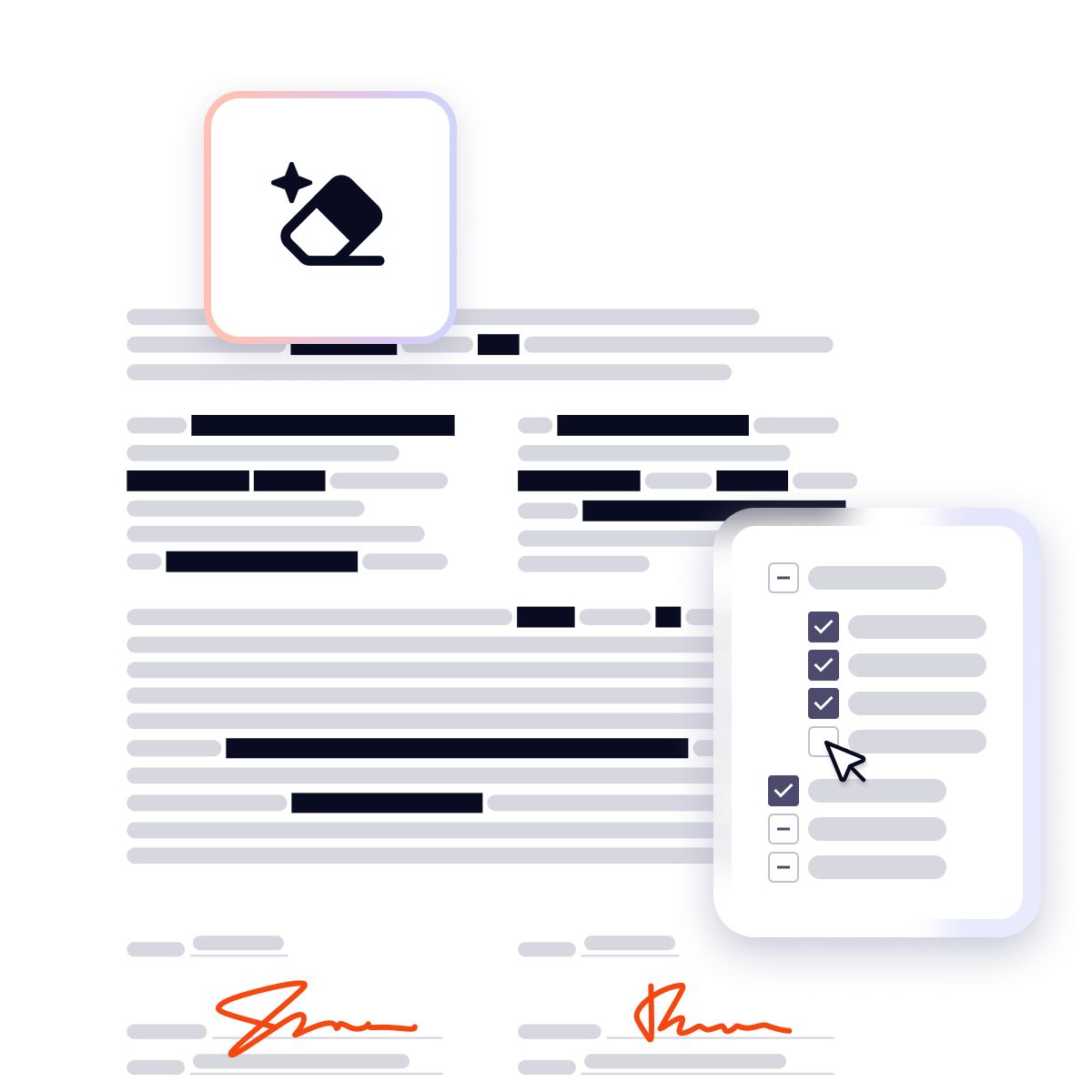
Nitro’s AI tools boost productivity with intelligent, secure solutions. Smart Redact automatically detects and removes sensitive information from PDFs, while AI-powered assistants help you summarize and extract data.

Trusted by teams worldwide

  • Spr25_Grid Leader
  • Spr High Performer
  • Spr25_ROI MidMarket
  • Spr25_HighPerformerSmall
  • Sp25_Enterprise
  • Spr25_HighPerformerMid
  • Spr25_User Adoption

Learn more about Nitro PDF and which of our plans is right for you.

See Plans & Pricing
Key Nitro PDF Features

Get more done with Nitro's powerful PDF features
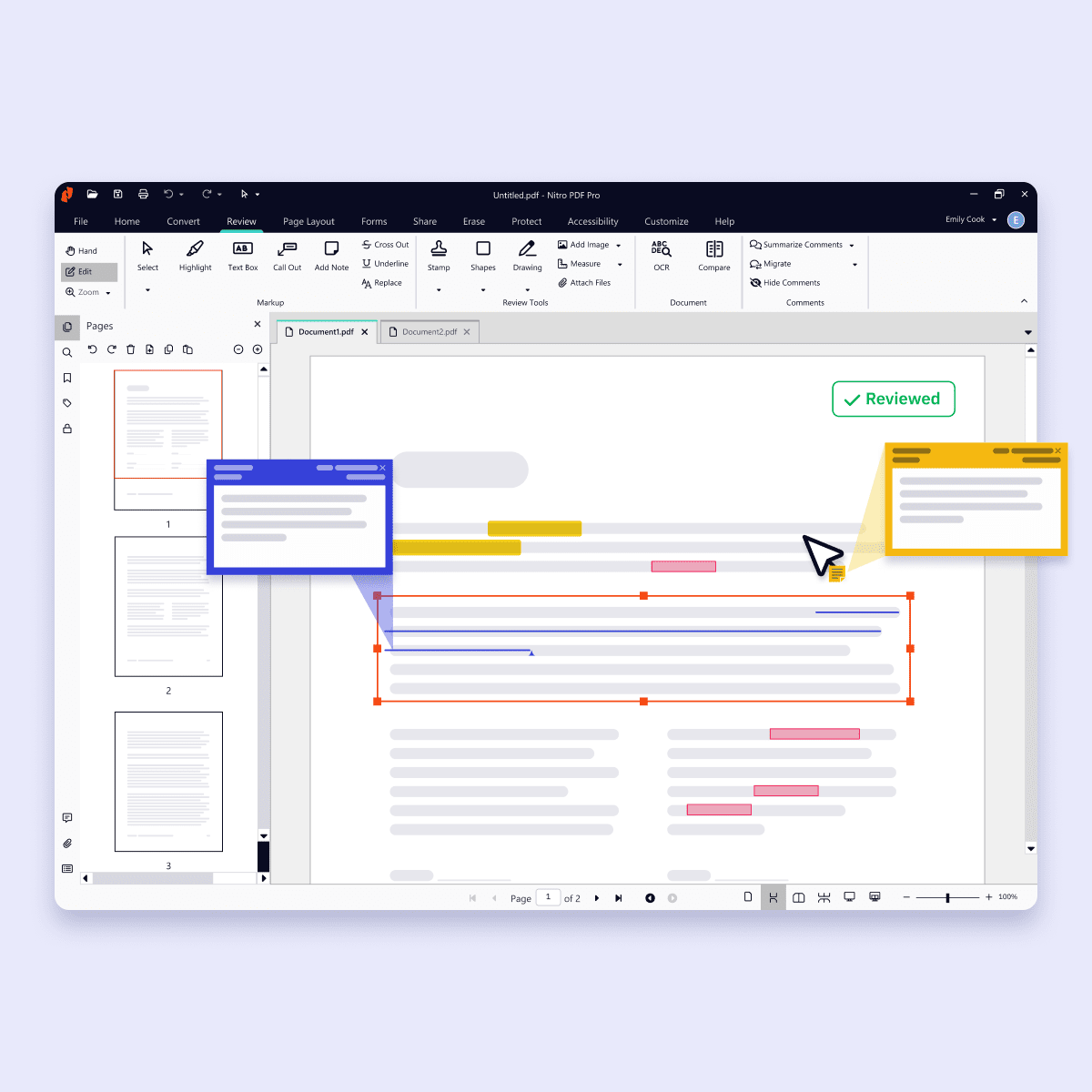
Web - Screenshot - editing pdf
Icon-48px-Edit

Edit PDFs with precision

Make changes directly to your PDFs with ease. Update text, swap or resize images, add annotations, and fill forms without having to switch back to the original file. Nitro PDF gives you the flexibility to keep documents accurate and up to date. 

Learn more about PDF editing with Nitro
Icon-48px-PDF Converter

Seamlessly convert and organize PDFs

Quickly convert PDFs to and from popular formats like Word, Excel, PowerPoint, and image files while preserving layout and quality. Merge multiple PDFs, split files into smaller documents, or reorder pages so your files are always organized the way you need.

Learn more about converting PDFs with Nitro
Icon-48px-Seamless Collaboration-1

Secure sensitive data with Smart Redact

Smart Redact automatically identifies 30+ types of sensitive information, from names and addresses to credit cards and health data. Review AI suggestions, make manual adjustments, and permanently remove all sensitive content—including metadata and scripts—for safer, faster redaction.

Learn more about Smart Redact from Nitro
Icon-48px-Seamless Collaboration-1

Safely share and collaborate on PDFs

Work better together with built-in collaboration tools. Add comments, highlight sections, and share feedback in real time, whether your team is across the office or across the world. Nitro PDF simplifies collaboration while keeping your documents protected.

Learn more about document collaboration with Nitro
icon of an AI chip

Boost PDF productivity with Nitro AI

Generate summaries, ask questions in multiple languages, and easily extract table and form data with Nitro’s AI beta tools.

Explore Nitro AI
Happy woman with phone and surrounded by security and compliance logos

Security and compliance you can trust 

Built with cutting-edge security at every step 

At Nitro, we are committed to protecting our clients' data and privacy. Nitro continuously invests in state-of-the-art security measures. Our operations in Australia, Toronto, and Dublin are subject to stringent data protection laws and regulations, so you can rest assured that your sensitive data is protected to the highest standards.

Compliant with global regulations 

Nitro's compliance program is established to meet your organizational compliance needs, including performing independent third-party audits and obtaining certifications for our products such as SOC 2, HIPAA, QTSP, ISO 27001, and more.

Customer support woman smiling while wearing a headphone set

Dedicated customer support

Our customer support promise

Your entire experience—from installation and rollout to onboarding and ongoing growth—will be supported by expert teams. Businesses can look forward to a new level of personalized PDF software support with expedited case routing, 24/7 global technical support engineers, and more. 

Cutting-edge AI assistance 

Nitro's Knowledge Assistant is your on-demand expert. Our 24/7 generative AI chat tool that provides you with instant answers and resources. Ask questions in over 80 languages.

Learn more about Nitro PDF and which of our plans is right for you.

Explore Plans & Pricing
Nitro PDF Standard
Explore Nitro PDF Standard
Nitro PDF Plus
Explore Nitro PDF Plus
Nitro PDF Classic
Explore Nitro PDF Classic

Top Features

Interact with, create, edit & review PDFs on your Windows device
Interact with, create, edit & review PDFs on your Mac device
Interact with, create, edit & review PDFs on your iOS device
Edit text and images, reorder and delete pages in a PDF
Convert PDFs and export to Word, Excel and PowerPoint
Reassign licenses in the web-based Admin Console
Add security & password protect PDF files
Turn scanned documents into editable searchable PDFs
Compare two versions of a PDF to review all differences
Access advanced 24/7 tech support 2+ users 2+ users
Access Nitro Analytics to understand PDF software usage, ROI, and sustainability savings
Automatically extract table & form data from PDFs with Nitro Table & Form Extract
Summarize, rewrite, and extract key data from your document with Nitro AI Document Assistant
Easily create, fill, sign, send, and store forms
Automatically create fillable forms with Nitro Automatic Form Creation
Redact PDFs with AI-assisted Smart Redact to permanently remove sensitive information
Enable single sign-on for users across the organization

Interact with PDFs

View, interact and comment on PDF content from your computer, mobile device or web browser
Track activity across desktop, mobile and web for documents sent for viewing & reviewing
Access, edit and store files in your Box, Dropbox, Google Drive and Microsoft OneDrive accounts
Compare two versions of a PDF to review all differences
Measure the distance, area and perimeter of objects in PDFs
Open PDFs are protected by Microsoft Information Protection solutions, including Azure Information Protection and Microsoft 365.

Create PDFs

Convert documents and images to PDF files
Create PDFs from any application that prints
Convert Microsoft Word, Excel or PowerPoint files to PDFs
Create, protect and send PDFs in popular Microsoft 365 apps for Windows
Combine multiple documents and file types into one PDF file
Convert web pages to interactive PDFs, complete with links
Prevent others from copying or editing information in PDFs
Create a password-protected PDF
Create and export PDFs on your mobile device
Use one-click creation of rich PDFs within Microsoft 365
Turn scanned paper documents into instantly searchable and editable PDFs with fonts that match the original
Convert and validate PDFs for compliance with ISO standards like PDF/A
Convert to rich & plain text
Create and validate PDFs to meet accessibility standards for people with disabilities
Extract text and images
Integration with Office 365, Sharepoint 365, OneDrive for Business, Dropbox, Box, Google Drive
Copy and paste selected parts of a PDF file with formatting intact
Batch create PDF files
Create PDF from File Explorer context menu
Create PDF from Finder/iCloud
Create accessible documents, tag creation, embed fonts, voice over

Edit & Review PDFs

Edit PDF text and images with full-page paragraph reflow
Turn PDFs into editable Microsoft Word, Excel or PowerPoint files
Insert, delete and organise pages in a PDF
Convert PDFs to JPG, TIFF or PNG image formats
Split a PDF by extracting one or multiple pages
Add bookmarks, headers, numbering and watermarks
Add or edit text and images on your tablet and mobile phone
Reorder, delete or rotate PDF pages on your iOS tablet
Redact to permanently remove sensitive visible information in PDFs
Add audio to PDFs
Add Bates numbering to legal documents
Visual rotation of images and pages
Quicksign PDF documents
Work with certificate signatures
Add comments to PDFs with a full suite of commenting tools including text editing, highlighter, and sticky notes
Turn paper or Word docs into fillable PDF forms
Automatically optimize PDFs to reduce file size and customize settings
Enhance PDF forms by adding interactivity with JavaScript
Mark PDFs with stamps, such as “approved” or “draft”

Support & Platform Benefits

Additional compliant security (HIPAA, SOC2, GDPR)
Enable single sign-on for users across the organization
Access advanced 24/7 tech support 2+ users 2+ users
Access support through the community forum & knowledge base
Access support through Nitro AI Knowledge Assistant
Customer success manager for white glove deployment & support for eligible customers for eligible customers
Access Nitro Analytics to understand PDF software usage, ROI, and sustainability savings
The outstanding support we received from Nitro’s Customer Success team helped ensure a seamless transition to Nitro PDF. Now we can provide our employees with all the PDF editing capabilities they need—at a fraction of the cost.”
Daren Spice
Lead Engineer, Directory Services, Equiniti

What is Nitro PDF?

Nitro PDF is a full-featured PDF editor that enables you to create, edit, convert, sign, and secure PDF documents.

It is designed for individuals, small businesses, and enterprises as a cost-effective alternative to Adobe Acrobat, combining powerful functionality with an intuitive interface that works across devices.

Nitro PDF is available in three plan tiers: Standard, Plus and Classic.

How is Nitro PDF different from Adobe Acrobat?

Nitro PDF provides the same core editing, signing, and collaboration features as Adobe Acrobat but at a more affordable price point.

With transparent licensing, no hidden fees, and a simpler user experience, Nitro PDF is widely recognized as one of the strongest alternatives to Adobe Acrobat for both individuals and businesses.

Can I try Nitro PDF for free?

 Yes. Nitro PDF offers a 14-day free trial with full access to editing, converting, signing, and security features. No credit card is required for the trial, and all features are unlocked.

Does Nitro PDF support integrations with other business tools?

Yes. Nitro PDF integrates with software such as Microsoft Office suite, OneDrive, Dropbox, and other platforms.

These integrations simplify document workflows and make it easy to create, edit, and share PDFs directly within your existing environment.

What is Smart Redact in Nitro PDF?

Smart Redact is an AI-assisted tool that automatically detects and removes sensitive information from PDFs. It identifies 30+ types of personally identifiable information (PII)—like names, addresses, ID numbers, and financial data—and allows you to review or adjust redactions before finalizing your file.

How does Nitro Smart Redact keep my information secure?

Smart Redact processes files in a temporary session with no storage or data retention. When you apply redactions, all visible and hidden content—including metadata and scripts—is permanently removed, ensuring your documents meet the highest standards of privacy and compliance.

Is Nitro PDF secure? Is it compliant with global regulations?

Yes. Nitro PDF meets international standards for data protection, including SOC 2, HIPAA, ISO 27001, and QTSP compliance, helping businesses keep sensitive documents secure. 

Is Nitro PDF available for both teams and individuals?

Yes. Nitro PDF is designed to support both individual users and organizations of any size.

Single users can access all the core editing, conversion, and signing features, while businesses benefit from advanced options like volume licensing, centralized deployment, and team collaboration tools.

This flexibility makes Nitro PDF a practical choice for freelancers, SMBs, and large enterprises alike.

Does Nitro PDF allow collaborative editing?

Absolutely. Nitro PDF enables teams to collaborate directly on documents with tools for commenting, annotating, and reviewing in real time.

Multiple users can share feedback, track changes, and resolve comments efficiently, ensuring smoother document workflows without relying on email back-and-forth or multiple file versions.

What kind of support does Nitro provide?

Nitro offers dedicated customer support, including onboarding, training, and troubleshooting resources, to ensure a smooth experience for your team.

We also offer resources such as our Knowledge Hub, Knowledge Assistant AI tool, and community forum.

Choose the perfect PDF plan for your needs

Best for Small Teams & Individuals
Subscription

Nitro PDF Standard

For individuals, teams, & businesses seeking a full suite of PDF editing features to boost productivity and streamline workflows. 
per user/month
annually
Tax calculated at checkout
Includes sales tax

Features

  • Create, convert, ​and combine PDFs
  • Manage and edit PDFs
  • Annotate and share PDFs with ease​
  • Efficient team management through
    Nitro Admin portal
  • AI tools to boost productivity
  • 24/7/365 support for all your PDF needs
  • Integrations and productivity connectors

Best for Enterprises
Subscription

Nitro PDF Plus

For teams in large organizations that require robust PDF editing capabilities and advanced features to transform digital document cycles.
Volume Discounts Available

Features

All the PDF editing functionality within Nitro PDF Standard, plus:

  • Enterprise-grade security including single sign-on (SSO), domain control, and Azure Information Protection
  • Valuable insights into PDF software usage, ROI, and sustainability savings with Nitro Analytics
  • Dedicated customer success manager if eligible 
One-Time Purchase

Nitro PDF Classic

Essential PDF editing features for Windows desktop - three year license.
per license/billed once
Tax calculated at checkout
Includes Sales Tax

Features

  • For Windows
  • Create, edit and export PDFs
  • Password protect and secure PDFs
  • Combine and split files
  • User friendly Microsoft Office-style interface