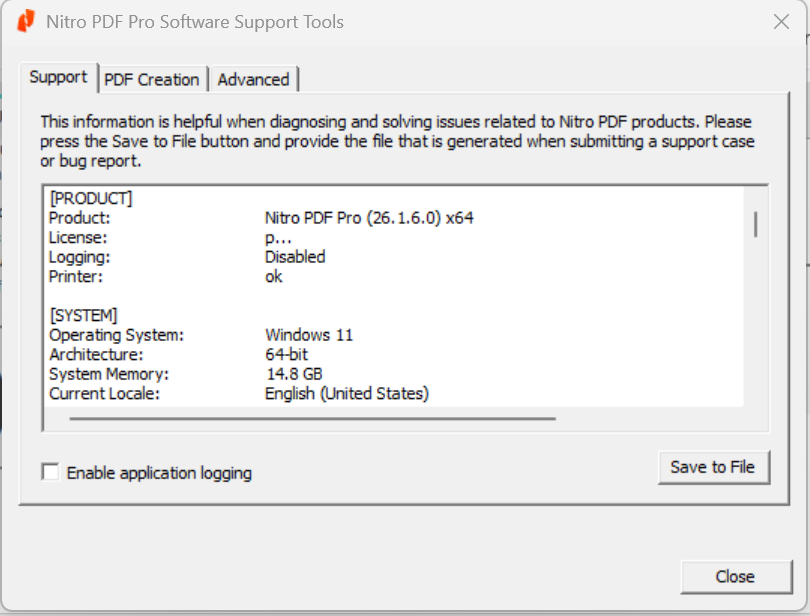
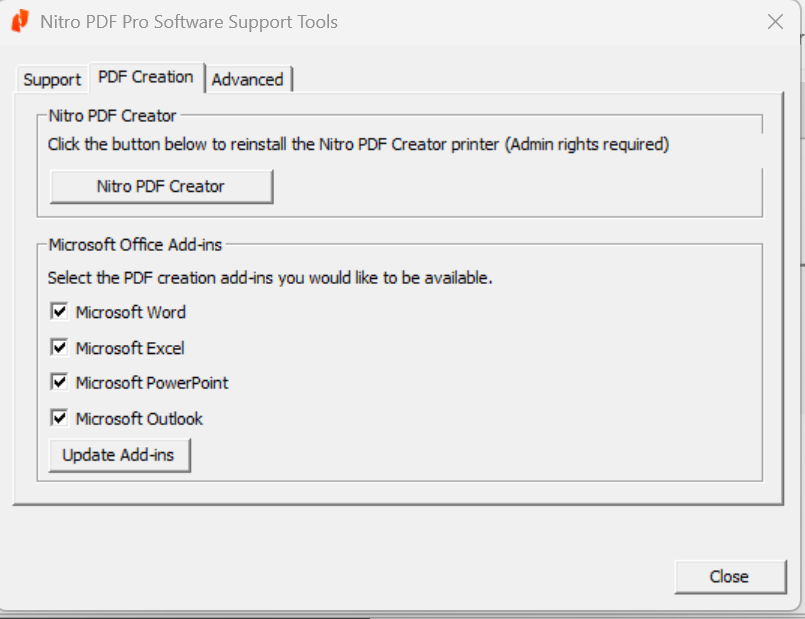
The Support Tools utility provides you with a quick way to gather support-related information that can be useful in requesting assistance from the Nitro PDF Support Team. You can also use Support Tools to reinstall the Nitro PDF Creator printer or update the Microsoft Office add-ins.
To gather support-related information:
On the Help tab, from the Product panel, click Support Tools
When the Support Tools dialog opens, click the Save to File button
Select a location for the Support Tools file, and click Save
Submit the Support Tools .zip file along with your question or problem report
To reinstall the Nitro PDF Creator printer:
On the Help tab, from the Product panel, click Support Tools
From the PDF Creation tab, click Nitro PDF Creator
To update the Microsoft Office add-ins:
On the Help tab, from the Product panel, click Support Tools
From the PDF Creation tab, click to select the Microsoft Office add-ins you would like to be available
Click Update Add-ins
Last updated: July 23, 2026
Was this article helpful?
Thanks for your feedback. We're glad we could help.
Thank you. Your feedback will be used to make future improvements.
Thanks for your interest in Nitro!
For those requiring fewer than 20 licenses, our online store is the fastest way to access the same trusted Nitro PDF tools—optimized for simplicity, security, and speed.
Recommended plans for you:
Nitro PDF Standard
For Windows, Mac, and iOS
For individuals, small teams, and businesses seeking a full suite of PDF editing tools to boost productivity and streamline workflows.
For those requiring fewer than 20 licenses, our online store is the fastest way to access the same trusted Nitro Sign tools—optimized for simplicity, security, and speed.
Recommended plans for you:
Nitro Sign Standard
For Windows, Mac, and iOS
For individuals or small teams with basic signing needs.