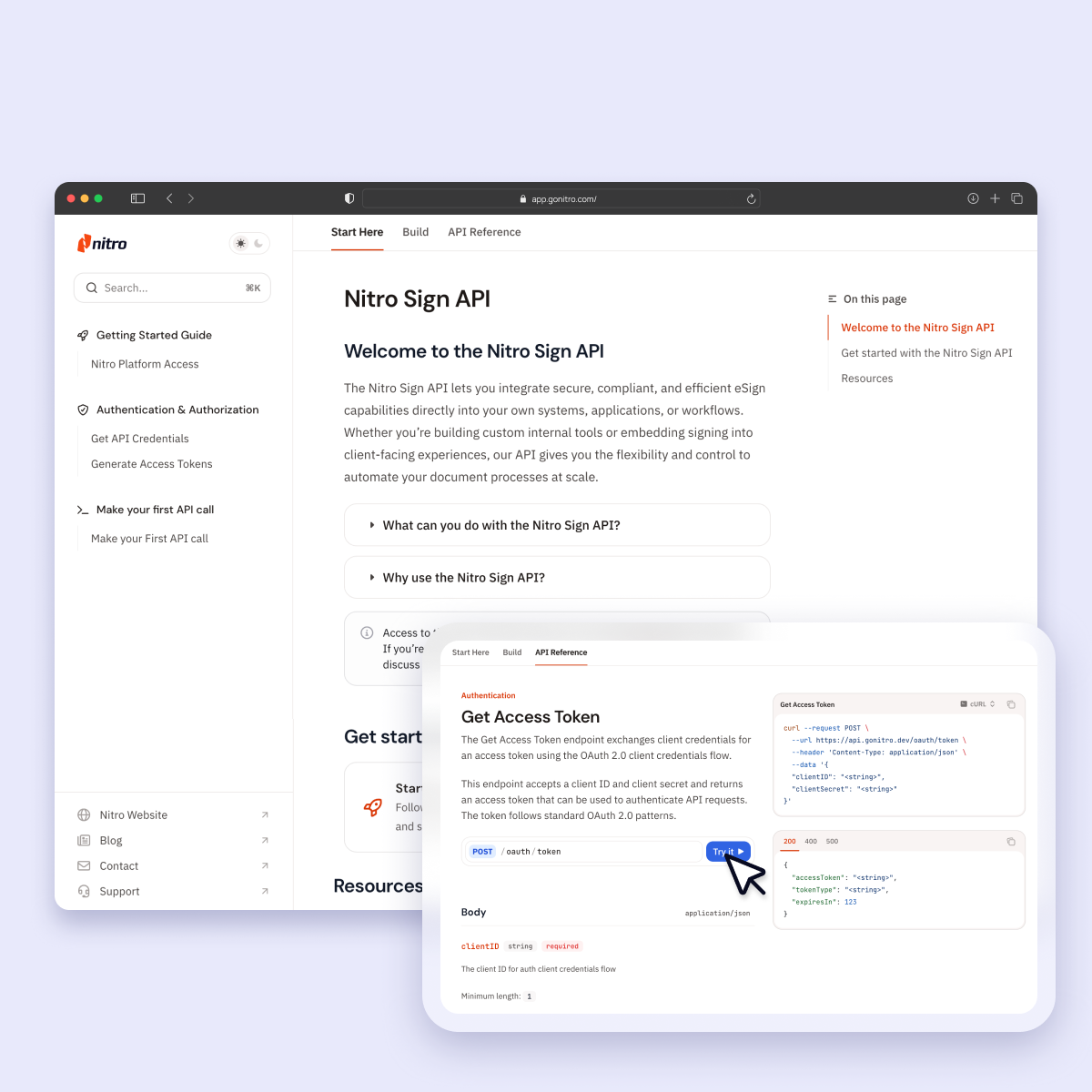
Best eSign APIs in 2026
Compare the top eSign APIs to find the best solution to embed eSigning directly into your existing systems, applications, and processes.

Darragh Ó Drisceoil
Product Marketing Manager, eSign
An eSign API (Application Programming Interface) is a set of instructions that connects an electronic signature software, also known as eSign software, to core business systems, like CRMs, ERPs, document management systems, and custom applications.
Integrating automated eSign capabilities into the applications where work happens allows enterprises to create signature requests, retrieve documents, and track the status of in-progress files, with fewer errors, higher security, and a lower total cost of ownership.
This guide provides a comprehensive comparison of the top eSign APIs to watch in 2026 with a focus on ease of implementation, security and compliance, scalability, and cost effectiveness.
Why every enterprise needs an eSign API
Large organizations manage a massive number of documents while also navigating complex workflows and adhering to strict data security and compliance requirements.
Using an eSign API to embed eSign capabilities inside core systems like customer relationship management (CRM), enterprise resource planning (ERP), and business-specific applications, makes it easier to manage all of those moving parts at scale.
The right eSign API makes it possible to:
-
Add electronic signature functionality directly inside an application to reduce friction.
-
Send documents to customers or employees for signatures automatically, eliminating manual back-and-forth.
-
Collect legally binding signatures online and create an audit trail.
-
Track status to create visibility into when a document was sent, viewed, and signed.
-
Store signed documents according to data security and compliance regulations.
-
Automate signature-dependant workflows to eliminate bottlenecks.
Feature comparison: What to look for in an eSign API
The best eSign APIs make it straightforward to create, send, and track signature requests without manual intervention or context switching. When evaluating eSign API providers, look for solutions that support your business’s specific workflows, security and compliance regulations, and system requirements.
Features to look for:
-
Automated workflows to generate, send, and track signature requests.
-
Enterprise-grade security and compliance with eIDAS, UETA, and the ESIGN Act.
-
Scalable infrastructure to handle low- or high-volume document workflows.
-
Developer tools including SDKs, documentation, and sandbox environments.
-
Audit trails and tamper-proof logs for legal validation and traceability.
-
Embedded signing to keep the signing flow inside your applications.
-
Webhooks and event notifications to trigger actions based on document status.
-
Multi-signer routing and sequential or parallel signing support.
-
Template and reusable document support to speed up repetitive workflows.
-
Transparent pricing with no surprise overage fees or mandatory add-ons.
How does a strong eSign integration ecosystem create smooth application connections?
An integration ecosystem lets developers embed eSigning, automate document flows, and maintain security across multiple systems, reducing manual work and integration complexity.
Key components include:
-
Prebuilt connectors for Salesforce, Microsoft 365, Google Workspace, SharePoint, Workday, ServiceNow, and other popular business applications.
-
SDKs and client libraries for Java, .NET, Python, and JavaScript to simplify API requests, authentication, and error handling.
-
Webhooks and event subscriptions to notify systems when documents are viewed, signed, expired, or declined.
-
Plug-ins and extensions for Outlook, Word, Teams, and Chrome to surface signing features without custom development.
-
Workflow integrations with RPA, BPM, and orchestration tools like UiPath, Zapier, Make, and MuleSoft.
-
Identity and authentication integrations including SSO, SAML, OAuth, OpenID Connect, and national ID schemes for eIDAS.
-
Storage and CRM integrations for Box, Dropbox, OneDrive, SharePoint, and CRM systems to automatically sync signed documents.
At-a-Glance: Compare the Best eSign API Providers
|
Tool |
Best For |
|
Nitro Sign API |
Teams that want to integrate eSign functionality directly into existing workflows and applications |
|
Adobe Acrobat Sign API |
Enterprises already working in Adobe or Microsoft ecosystems |
|
Docusign API |
Organizations that need complex routing, multi-step approvals, and global compliance |
|
Dropbox Sign API |
Developers looking for fast implementation and simple embedded eSigning |
|
Foxit eSign API |
Teams with simple eSigning needs and limited automation requirements |
|
PandaDoc electronic signature API |
Teams that need document generation, templates, quoting, and eSign in one system |
|
Signeasy API |
Businesses or field teams that need simple, mobile-friendly eSigning |
|
airSlate SignNow API |
Teams that need a cost-effective API with reliable webhook support for basic automation |
|
Zoho Sign API |
Organizations already using Zoho apps that want tightly integrated eSign workflows and strong security |
What are the Best eSign API Providers in 2026?
Nitro Sign API
Best for: Enterprise teams that want to automate high-volume workflows, embed eSignature capabilities into client- and employee-facing applications, and ensure compliance at scale.
The Nitro Sign API is a cost-effective, developer-friendly API that allows you to embed Nitro Sign functionality directly into business applications, internal systems, and custom workflows.
Nitro Sign API: Strengths
-
Automatically generates, sends, and tracks signature requests directly from your CRM, ERP, or custom portal.
-
Enterprise-grade support that ensures a fast, successful deployment.
-
No hidden fees, no overage penalties, and a low total cost of ownership.
-
SOC 2 Type II, HIPAA, ISO 27001, and GDPR compliant.
-
Global legal validity under eIDAS, UETA, and ESIGN Act.
Verdict: For organizations focused on high-volume automation or building custom, client-facing signing experiences, the Nitro Sign API offers complete control and flexibility at a fraction of the cost of leading competitors.

Start Your Free 14-Day Trial of Nitro Sign Today
Adobe Acrobat Sign API
Best for: Enterprise teams that manage high-volume workflows and need advanced eSign automation and integration with their Adobe and Microsoft ecosystems.
Adobe Acrobat Sign API lets developers embed legally binding eSigning into apps, websites, and systems like Salesforce or Microsoft 365.
Adobe Acrobat Sign API: Strengths
-
Ease of integration, especially with other Adobe products
-
Broad platform support, including web, desktop, and mobile
Adobe Acrobat Sign API: Weaknesses
-
Expensive compared to competitor products
-
Steep learning curve on advanced features
-
Slow loading time
Verdict: Adobe Acrobat Sign API is a good fit if you need PDF editing, document review, and eSign in one stack and you’re already working in and Adobe or Microsoft environment. But for strictly eSign and automation capabilities, you may pay for more than you need.
Docusign API
Best for: Organizations that need multi-step approval processes, conditional routing, and enterprise-grade eSigning integration
Docusign API lets developers embed advanced eSign capabilities into existing workflows on popular business platforms like Oracle and Salesforce.
Docusign API: Strengths
-
Compatible with many business platforms and legacy systems
-
Broad support for global eSignature laws
Docusign API: Weaknesses
-
Expensive at scale
-
Poor customer support
-
Limited customization options
Verdict: Docusign API is a strong, enterprise-grade solution that is best suited for organizations with high document volume, strict regulatory needs, or complex document flows.
Dropbox Sign API
Best for: Teams that are already using Dropbox or HubSpot and want a developer-friendly API with straightforward pricing, embedded signing, and standard compliance.
Dropbox Sign API’s REST API, SDKs, embedded signing, templates, audit logs, and compliance with global e-signature laws are designed for easy integration, quick setup, and mid-volume automated workflows.
Dropbox Sign API: Strengths
-
Developer-friendly REST API, SDKs, embedded flows, and quick time-to-launch
-
Transparent, predictable pricing
Dropbox Sign API: Weaknesses
-
Template and advanced workflow limitations
-
Limited built-in functionalities for document generation or complex document prep
Verdict: For businesses that don’t require heavy PDF manipulation or advanced custom workflows, Dropbox Sign API provides a good balance of ease-of-use, compliance, affordability, and developer experience.
Foxit eSign API
Best for: Teams that need basic, low-cost/low-complexity eSigning capabilities.
Foxit eSign is one of the simpler, more affordable eSignature solutions on the market. It supports integrations for basic signing workflows, PDF handling, and essential compliance at lower cost than enterprise-heavy offerings.
Foxit eSign API: Strengths
-
Affordable and easy to adopt for basic needs
-
Effective for low-volume workflows where complex routing or heavy automation isn’t required.
Foxit eSign API: Weaknesses
-
Limited compliance and high-trust signature support
-
Minimal automation capabilities, advanced workflows, bulk sending, and customization
Verdict: Foxit eSign API is a low-cost, entry-level option for small to mid-size teams, but it lacks the scalability, compliance, and feature depth required for enterprise or heavily regulated use cases.
airSlate SignNow API
Best for: Mid-market teams that need straightforward eSignature automation, simple webhook integrations, and predictable pricing without enterprise-level complexity.
The SignNow API lets developers embed signing, automate basic workflows, and integrate document status updates into internal systems and business applications through an easy-to-understand API structure.
SignNow API: Strengths
-
Developer-friendly webhook setup
-
Simple authentication and API structure
-
Affordable pricing compared to enterprise competitors
SignNow API: Weaknesses
-
Signing workflows often require multiple API calls
-
Fewer advanced automation and routing capabilities
-
Limited scalability for complex or high-volume use cases
Verdict: SignNow is a good API for teams that need reliable, low-complexity eSignature automation, but it may not be sufficient for organizations requiring advanced workflows or deep customization.
Zoho Sign API
Best for: Organizations that need secure, integrated eSign workflows built directly into their existing systems.
Zoho Sign API helps developers embed digitally secure signing, automate document flows, and connect eSignature events to other Zoho tools and external applications.
Zoho Sign API: Strengths
-
Easy cross-device signing and simple, predictable developer operations
-
Straightforward REST API with clean documentation for basic use cases
Zoho Sign API: Weaknesses
-
Setup and advanced configuration can be confusing or poorly documented
-
Limited customization options for complex workflows
-
Fewer enterprise integrations outside the Zoho ecosystem
Verdict: Ideal for businesses committed to the Zoho platform, but teams needing broad enterprise integrations or high-volume flexibility may find the API too restrictive.
How teams are using the Nitro Sign API
Real Estate: PB Plus
Real estate software provider PB Plus cut the rental inspection process from months to days by using the Nitro Sign API to build eSigning into their property description software.
“We weighed up a number of different solutions but, in terms of user experience, Nitro was clearly the best. The other big advantage was the ease of integration. Nitro’s API allowed us to build eSigning directly into our solution, giving customers a seamless experience.”
Xavier Kluyskens, Director and Co-Founder
Healthcare: Medelse
Medelse, a digital healthcare recruitment platform, accelerated time to hire using the Nitro Sign API to connect existing systems and applications and improve eSigning workflow efficiency.
“The integration of eSignatures has allowed us to streamline the entire hiring process. Now, thanks to the reduction in admin, doctors, nurses and other care providers can do what they do best—help people.”
Yannick Cenatiempo. CPTO and Associate
Finance
The Nitro Sign API helped Belgian collaborative financing platform mozzeno progress toward its goal of becoming a 100% digital lending platform. By supporting simple but customizable eSigning capabilities, mozzeno can process 60,000 compliant eSignatures a year.
“The integration of Nitro Sign has been from the beginning of our activity a critical component of our innovative platform. The solution's unique features, efficiency gains, and exceptional support have paved the way for our success in the lending industry.”
Frederic Dujeux, Co-Founder
Professional Services: Cegid
Cegid, a French business management solutions provider, launched a fully customizable, digitalized HR data management solution that uses the Nitro Sign API to integrate end-to-end eSign capabilities that track documents and speed up employment processes.
“We are proud to present our clients with an end-to-end digital HR solution. For both candidates and employees, it’s far quicker and easier to complete and return forms.”
Mathieu Vanderheyden, Head of Product
Why Nitro Sign API is the best enterprise-grade eSign API
Whether you’re building internal tools that require secure, compliant eSigning or embedding legally binding eSignature capabilities into client-facing experiences, the Nitro Sign API gives you the flexibility and control to automate your document processes at scale.
Why is Nitro Sign API a top choice for enterprises worldwide?
-
Custom integration architecture allows developers to embed Nitro Sign tools directly into existing applications.
-
Enterprise-grade support, including the Nitro Developer Portal, is tailored to the needs of large organizations, from onboarding and API setup to compliance questions and post-launch optimization.
-
Scalable infrastructure powers automated signing across high-volume and repetitive document workflows.
-
A secure developer playground provides a safe testing environment to validate integrations and reduce deployment risk.
-
Compliance with global privacy and data protection standards (ISO 27001, GDPR, SOC 2 Type II, HIPAA, QTSP, EU–U.S. Data Privacy Framework) ensures integrations meet enterprise security requirements.
-
Conformance with international eSignature regulations, including eIDAS, UETA, and the ESIGN Act, guarantees that signatures generated via the Nitro Sign API are legally enforceable.
-
Multi-layer defenses and continuous monitoring safeguard document data in motion and at rest.
-
Predictable, fair-use pricing makes Nitro Sign API a cost-effective alternative to per-envelope and overage-based billing models.
How to get started with the Nitro Sign API
Nitro’s public-facing REST API enables enterprise customers to embed document eSigning and management capabilities into existing systems and applications.
Here’s how to get started:
-
Set up a Nitro Sign Enterprise account to access the Nitro Sign Public API.
-
Get to know Nitro Sign by visiting the Nitro Dashboard and running a signature flow in the Nitro Sign UI.
-
Log into the Nitro Admin Portal to get API credentials.
-
Once you have a clientID and clientSecret key, you can generate access tokens to make requests to the Nitro Sign Public API.
-
With access tokens in hand, you’re ready to make your first API call.
FAQs about eSign APIs
What is an eSign API?
An eSign API is a set of REST endpoints that let your application create, send, and manage electronically signed documents programmatically. Instead of manually uploading files to a signing platform, your system handles generation, routing, status checks, and document retrieval.
How does an eSign API actually work in an application?
Your app sends a request that includes the document and required fields. The API initiates the signing process, handles authentication for signers, hosts the signing experience, and returns status updates. Once completed, you can retrieve the signed file or store it in your own system.
Do documents get signed “through the API”?
Not exactly. The API manages the workflow, but the signing happens in the eSign provider’s secure environment. The API just lets your app initiate, embed, or track that workflow without manual steps.
Why do enterprises need an eSign API?
Large organizations need automation, security controls, and high-volume processing that UI-only tools can’t support. An eSign API integrates directly with business systems (CRMs, HRIS, ERPs, custom apps) so signing can happen automatically and at scale.
What types of documents can be sent for signature using an eSign API?
Any file the provider supports. Typically PDFs, Word documents, and sometimes HTML-generated forms.
Can the API integrate with my existing systems?
Most enterprises connect eSign APIs to CRMs, document-generation tools, HR systems, and internal apps. Look for RESTful design, standard JSON payloads, webhook support, and SSO/identity compatibility.
Can I embed the signing experience in my own application?
Many APIs offer an embedded signing option. This lets users sign documents without leaving your app while still using the provider’s secure signing environment.
Is the electronic signing process legally valid?
Yes. Top eSign APIs comply with major laws such as eIDAS, UETA, and the ESIGN Act. As long as the provider follows these standards, signatures created through the API are legally enforceable.
How important is security when evaluating an eSign API?
Critical. Look for encryption at rest and in transit, secure key management, role-based access controls, audit logs, signer authentication layers, and compliance with frameworks like ISO 27001, SOC 2, and HIPAA.
What is a webhook, and why does it matter for eSign workflows?
Webhooks push real-time events (viewed, signed, declined, expired) back to your system. This prevents constant polling and allows your app to automatically trigger downstream actions like updating a CRM record or generating an invoice.
How does authentication work for an eSign API?
Most providers support OAuth 2.0 or API keys. OAuth is preferred for enterprise environments because it’s more secure, easier to manage, and allows fine-grained access control.
What should I look for in an eSign API in terms of scalability?
Check for high request throughput, predictable rate limits, bulk send options, batch endpoints, and SLAs around uptime.
How important is the integration ecosystem in an eSign API?
Very. Prebuilt connectors, SDKs, and plug-ins reduce custom development, which means faster deployment, fewer integration issues, and easier maintenance.
What is the value of a sandbox/playground environment?
A sandbox lets developers test API calls, payloads, and error handling without touching production data. It’s essential for validating workflows before going live.
How does pricing typically work for an eSign API?
Common models include per-envelope pricing, usage-based billing, or fair-use tiers. For high-volume scenarios, avoid platforms that charge per envelope or penalize overages.
Does an eSign API help with compliance and audit requirements?
Yes. Audit trails, tamper-proof logs, signer authentication, and document integrity checks help organizations meet industry regulations and internal compliance standards.
Try Nitro's simple, secure eSign tools today
Start your 14-day free trial. No credit card required, no features locked.