Skip to content
individual PROFESSIONALS

Work Smarter with PDF & eSign Tools Designed for Professionals

Nitro provides individuals and professionals with the PDF editing, electronic signature, form, OCR, and AI-powered document tools to create, edit, organize, sign, and manage documents across Windows, Mac, and iOS. 

Header-Photo-Individual Professionals
  • DocumentCreation_HighPerformer_Enterprise_HighPerformer
  • DocumentCreation_MomentumLeader_Leader
  • DocumentCreation_EasiestAdmin_Enterprise_EaseOfAdmin
  • users-love-us
  • DocumentCreation_BestSupport_Enterprise_QualityOfSupport
  • DocumentCreation_Leader_Small-Business_Leader
  • DocumentCreation_HighPerformer_Mid-Market_HighPerformer

Professional need

Nitro offering

PDF editing

Create, edit, convert, annotate, organize, and sign PDFs

Electronic signatures

Send documents for legally binding electronic signatures

Document productivity

OCR, PDF forms, document organization, and AI-powered tools

Work across devices

Nitro PDF is available for Windows, Mac, and iOS

AI assistance

Analyze documents, extract data, create forms, and work with PDF content using AI tools

Security

Encryption, password protection, redaction, and security controls

why nitro

Why professionals choose Nitro

Professionals use Nitro to manage everyday PDF and document tasks from one set of tools. Nitro combines PDF editing, electronic signatures, forms, optical character recognition (OCR), and AI-powered capabilities to help you work with documents more efficiently.

With Nitro, individuals and professionals can: 

  • Edit and annotate client contracts, proposals, and other PDF documents
  • Convert files to and from PDF for client deliverables and reports
  • Combine, organize, and compress PDFs to manage client files and project documentation
  • Convert scanned receipts, invoices, or contracts into searchable or editable PDFs with OCR
  • Create, fill, and sign PDF forms like client intake sheets, invoices, and agreements
  • Redact sensitive client information before sharing documents
  • Send contracts and agreements for electronic signature
  • Track eSignature activity with audit logs for client and vendor agreements
  • Analyze documents and extract information from contracts, invoices, and reports with AI tools
  • Work across Windows, Mac, and iOS devices, whether you're at your desk or meeting clients on-site

Get started with Nitro for professionals

Choose the Nitro option that fits the way you work. Explore plans and pricing, start a free trial, or talk with a Nitro expert about your document workflow needs.
See plans & pricing
Nitro Solutions

Understanding PDF editing, eSignature, and AI tools for professionals

Nitro gives individual professionals access to PDF and electronic signature tools for common document workflows, from editing client contracts and proposals to creating forms, signing agreements, and using AI to work with document content.
Screenshots-PDF for Windows-Edit and annotate

What can professionals do with Nitro PDF?

  • Edit and annotate PDFs: Modify contracts, proposals, and reports, and add highlights, notes, comments, and other markups

  • Create and convert PDFs: Create client deliverables and convert documents between PDF and other file formats

  • Leverage Nitro AI: Extract data from invoices and contracts, analyze content, and support work in 80+ languages

  • Organize PDF documents: Combine, merge, rearrange, rotate, and organize client files and project documentation

  • Use OCR on scanned documents: Convert scanned receipts, invoices, or contracts into searchable or editable documents

  • Create and fill forms: Create interactive fillable forms like client intake sheets and agreements

  • Sign PDFs: Fill and sign contracts and agreements, or request signatures from clients

  • Protect sensitive information: Use encryption, password protection, and redaction to protect client data, backed by Nitro's ISO 27001 and SOC 2 Type 2 certifications

  • Work across devices: Use Nitro PDF on Windows, Mac, and iOS, whether you're at your desk or meeting clients on-site 

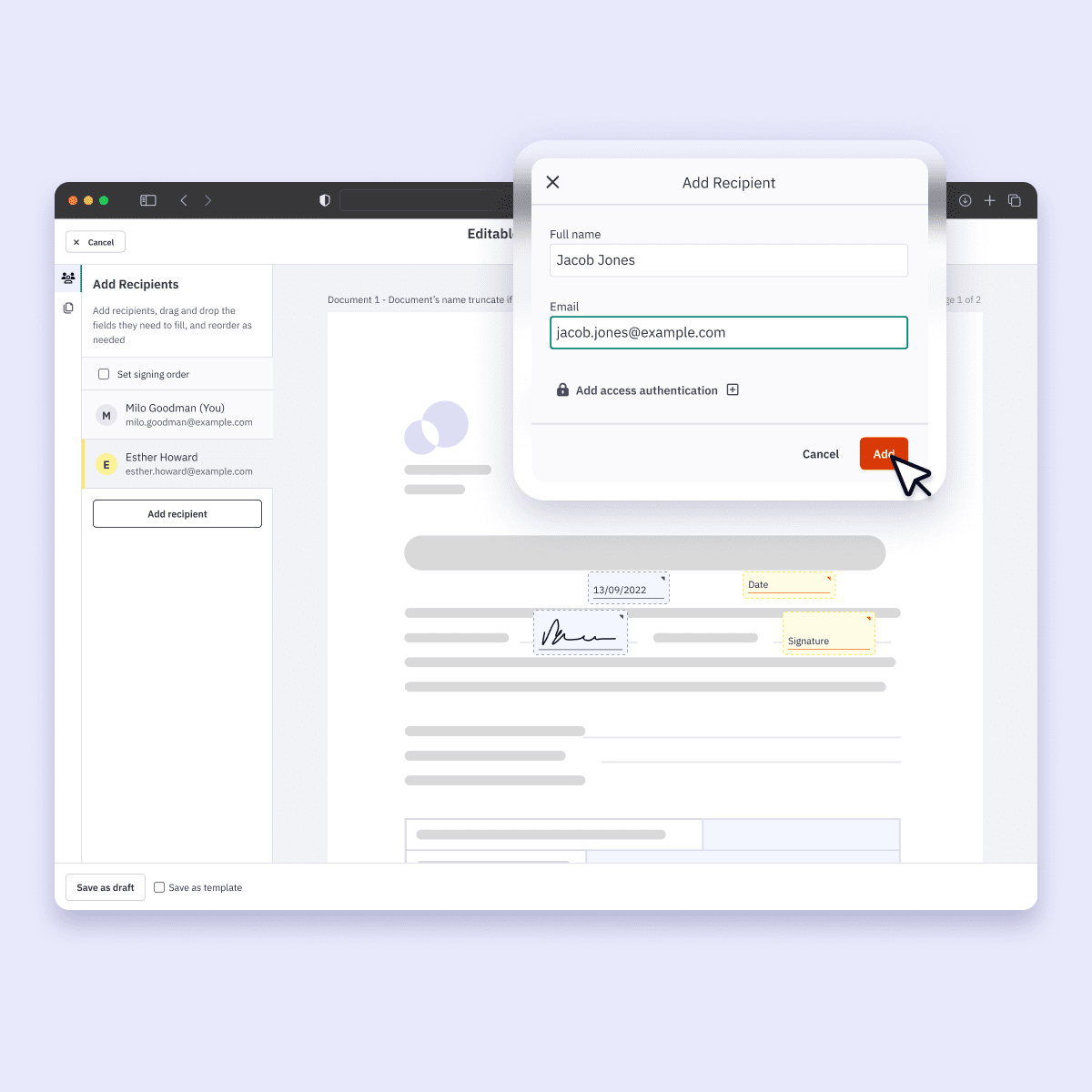
Nitro Sign being used to add fields and users

What can professionals do with Nitro Sign?

  • Send documents for electronic signature: Send contracts and agreements to clients for signature, compliant with the ESIGN Act, UETA, eIDAS, and GDPR

  • Sign documents electronically: Complete client and vendor agreements without printing or scanning documents

  • Create and fill forms: Use predefined fields to create and complete client-facing forms

  • Track signing activity: Monitor client and vendor agreement activity through the signing workflow's audit log

  • Send reminders: Remind clients and vendors to complete signature requests

  • Manage multiple recipients: Send signature requests to multiple parties on a contract and, where supported, establish a signing order (Nitro Sign Plus)

  • Customize templates and workflows: Nitro Sign Plus supports reusable templates for recurring client agreements, with custom fields, workflows, and SMS or email authentication

  • Secure sensitive information: Store signed client documents securely with advanced encryption 

Screenshots-Smart Redact-Preview ModeALT

What can professionals do with Nitro AI?

  • Analyze PDF documents: Use AI tools to work with and understand contracts, proposals, and reports

  • Extract data: Extract information from client invoices, contracts, and tables

  • Create fillable forms: Use AI-powered tools to create interactive forms from static intake sheets and agreements

  • Identify sensitive information: Use Smart Redact to automatically detect sensitive client information for redaction

  • Interact with PDF content: Use Nitro Assistant to search, summarize, and translate client documents and reports

Nitro does not use or share customer data with third parties to train generative AI models. 

Screenshots-Sign-Integrations

How Nitro works with the tools professionals already use

Nitro supports integrations with commonly used productivity, cloud storage, and business applications. Depending on the Nitro product and plan, available integrations include: 

  • Microsoft Word and Outlook
  • Microsoft Power Automate
  • Google Drive
  • OneDrive
  • Dropbox
  • Box
  • SharePoint
  • Salesforce
  • Zapier
  • And others

Nitro Sign also provides an API for integrating electronic signatures into applications and workflows. Available integrations and capabilities vary by product and plan.

Trusted around the world

Join millions of professionals who choose Nitro

 
As someone who uses PDF documents on a daily basis, I'm glad to have found such a reliable solution. I would highly recommend Nitro to anyone looking for an efficient and professional tool for PDF document management."
Elsa
Nitro User, TrustPilot Review

Get started with Nitro for professionals

Choose the Nitro option that fits the way you work. Explore plans and pricing, start a free trial, or talk with a Nitro expert about your document workflow needs.
See plans & pricing
Learn

Featured resources for busy professionals

Tools, guides, and insights to help professionals streamline document workflows, boost productivity, and work smarter. Access eBooks, blog articles, webinars, and practical tips designed for everyday PDF, eSign, and AI tasks.

Explore our Resource Hub

What is Nitro and how can it help individuals and professionals?

Nitro provides PDF and electronic signature software that helps professionals create, edit, convert, organize, secure, and sign documents.

Nitro also includes AI-powered tools for working with PDF content, extracting data, creating forms, and identifying sensitive information.

Can I edit PDFs with Nitro?

Yes. Nitro PDF allows users to create, edit, annotate, convert, organize, and sign PDF documents. Nitro PDF Pro also includes OCR, forms, security features, and AI-powered tools.

Can I sign documents electronically with Nitro?

Yes. Nitro Sign allows users to send documents for electronic signature, complete signatures electronically, track signing activity, and send reminders to recipients.

Nitro’s electronic signatures are legally binding and comply with the ESIGN Act, UETA, eIDAS, and GDPR.

Can I use Nitro on multiple devices?

Yes. Nitro PDF is available for Windows, Mac, and iOS. Nitro PDF Pro for iOS supports creating, editing, organizing, filling, and signing PDFs on iPhone and iPad.

How can Nitro AI help professionals?

Nitro's AI-powered tools can analyze PDF documents, extract data from tables and forms, create fillable forms, identify sensitive information for redaction, and interact with PDF content through an AI assistant.

Is my data secure with Nitro?

Nitro uses encryption, access controls, monitoring, and other technical and organizational safeguards to protect customer data. Nitro's compliance program includes certifications such as ISO 27001 and SOC 2 Type 2, with specific certifications and controls varying by product and service. 

Does Nitro support OCR?

Yes. Nitro PDF Pro includes optical character recognition (OCR) that can convert scanned or image-based PDFs into searchable or editable documents.

Can I create and fill PDF forms with Nitro?

Yes. Nitro PDF supports creating and filling PDF forms.

Does Nitro integrate with other professional tools?

Yes. Depending on the product and plan, Nitro supports integrations including: Microsoft Word, Outlook, Power Automate, Google Drive, OneDrive, Dropbox, Box, SharePoint, Salesforce, Zapier, and others. Nitro Sign also provides an API for integrating eSignature functionality into applications and workflows.

Does Nitro offer a free trial?

Yes. Nitro offers a 14-day free trial with no features locked and no credit card required.

What Nitro plans are available for professionals?

Nitro offers PDF plans for individuals, teams, and businesses, and Nitro Sign Standard is specifically designed for individuals and small teams with basic signing needs. Available features and pricing vary by product and plan. 

See what Nitro can do for you

Take the next step to digital success today.

Icon-48px-Rapid Support

Contact sales

Talk to our experts about your business needs, and explore cost-effective options for Nitro's world-class PDF and eSign solutions.
Get in touch
Icon-48px-Smart signing

Free trial

Try Nitro’s PDF and eSign solutions to edit, sign, and organize documents effortlessly—free for 14 days!
Start your free trial
icon of people with a plus sign

Become a partner

Learn about our exciting partner opportunities for Nitro's trusted document solutions.
Partner with Nitro today