Compare the Best PDF Redaction Tools in 2026
Discover the top PDF redaction tools to manage and protect your confidential information.
Caroline Brady
Product Marketing Manager, PDF
What is a PDF Redaction Tool?
A PDF redaction tool is software designed to permanently remove sensitive information from a document. Unlike blacking out text—, which just obscures information—, a true PDF redaction tool deletes visible text, scanned content, metadata, comments, hidden layers, and embedded objects so they cannot be recovered, searched, or extracted.
A single missed data point can result in regulatory non-compliance, legal liability, and reputational damage, so many organizations redact sensitive text before sharing documents externally, including:
- Personally identifiable information (PII)
- Financial data
- Protected health information (PHI)
- Contractual terms
- Internal communications
But not all redaction tools provide the same level of security or effectiveness:
- Manual search and find-and-replace tools are slow, inconsistent, and error prone
- Fully automated, AI-powered tools that lack a human review step can introduce compliance risks
- Browser-based tools that prioritize speed often focus on surface-level text detection, putting deeper document elements at risk for exposure
The best PDF redaction tools combine contextual AI detection with human validation and integrated document control inside a secure workflow.
In this guide, we take an in-depth look at four of the best PDF redaction tools in 2026, breaking down why some features are non-negotiable, how to choose a platform that protects both your data and your organization, and which solution delivers the right balance of automation and oversight.
Jump to a Section
- Why every company needs a secure PDF redaction tool
- Feature comparison: What to look for in a PDF redaction tool
- Why find-and-replace and keyword search aren’t effective PDF redaction solutions
- At-a-glance: Compare the best PDF redaction tools
- What are the best PDF redaction tools in 2026?
- Why regulated industries trust Smart Redact to secure their confidential information
- Why Nitro Smart Redact is the best PDF redaction tool for your organization
- How to get started with Nitro Smart Redact
- FAQs
Why every company needs a secure PDF redaction tool
Every business handles PDFs containing sensitive information—whether they're contracts, financial reports, healthcare records, employee files, legal filings, or board presentations. Yet many organizations still rely on basic search tools or black boxes to “hide” confidential content before sharing documents externally, creating real risk for your customers and your business.
PDF redaction tools eliminate this risk by permanently removing sensitive information and adding additional layers of protection with intelligent text detection backed by human validation.
Common use cases for enterprise-grade PDF redaction tools include:
- Legal teams use secure PDF redaction tools to remove privileged information, protect client data, and maintain defensible audit trails.
- HR teams rely on redaction tools to protect employee PII, compensation details, and sensitive personnel records.
- Finance teams use them to redact bank details, tax IDs, and confidential financial data.
- Healthcare and compliance teams depend on redaction tools to permanently remove protected health information (PHI) and meet regulatory requirements.
- Sales teams use them to share contracts and proposals while removing internal pricing notes and sensitive customer information.
- Executive and board teams rely on secure redaction to prepare presentations and strategic documents without exposing internal commentary or hidden metadata.
Feature comparison: What to look for in a PDF redaction tool
When selecting a PDF redaction tool, look for a solution that combines AI-driven detection with human oversight, permanent data removal, and full document control capabilities.
Here are eight features to put on your “non-negotiable” list:
- AI-powered detection that identifies sensitive information based on context and patterns, not just exact keyword matches.
- Human-in-the-loop review workflow that suggests redactions for approval, prevents irreversible over-redaction, and provides clear visual confirmation of what will be removed.
- Permanent redaction that removes both visible text and underlying text layers, OCR text, metadata, embedded objects, and hidden content.
- Document inspection and metadata sanitization to detect and remove artifacts from comments, revision history, and attachments before sharing externally.
- Secure processing architecture that encrypts data in transit and at rest, aligns with compliance standards and regulations (e.g., SOC 2, HIPAA, GDPR), and supports data residency controls.
- Scalable workflows, batch processing, and integration with document management systems to expedite redaction for teams managing high document volumes.
Full PDF editing and post-redaction control that allow teams to reformat documents, add annotations, insert updated language, and apply signatures within the same environment.
Why find-and-replace and keyword search aren’t effective PDF redaction solutions
Many organizations rely on find-and-replace or basic keyword search tools to handle redaction; however, most manual tools only catch exact matches, so you have to know exactly what you're looking for and how it’s written before you start searching.
Sensitive information rarely appears in a consistent, predictable format, so this approach often misses:
- Contextual references: Indirect mentions of sensitive data, like “the applicant’s SSN” or “the defendant’s phone number”
- Format variations: Data written in multiple formats, such as 123-45-6789, 123456789, or XXX-XX-6789
- Free-form text: Identifiers buried inside paragraphs, such as “… lives at 345 West Oak St.”
- Visual content: Sensitive information embedded in scanned documents or images through OCR
The best PDF redaction tools go beyond keyword matching, using contextual AI and natural language processing (NLP) to automatically detect sensitive data across structured and unstructured content then prompt human validation before finalizing changes.
At-a-glance: Compare the best PDF redaction tools
|
Tool |
Best For |
Key Strength |
Key Weakness |
|
Nitro Smart Redact |
AI-powered redaction with human oversight |
Combined advanced Natural Language Processing for maximum PII detection with structured oversight OCR for scanned documents, image files and handwriting dramatically improves compliance coverage |
May exceed the needs of one-off users |
|
Adobe Acrobat |
Manual redaction within existing Acrobat workflows |
Strong integration with Adobe Document Cloud and enterprise environments |
Manual process increases time and error risk |
|
Foxit |
Enterprise AI automation inside a PDF suite |
Customizable automation with enterprise redaction controls |
Automation requires careful configuration and oversight |
|
Redactable |
Fast, browser-based cloud AI redaction |
Fast AI redaction in a browser interface |
Limited editing compared to integrated PDF platforms |
What are the best PDF redaction tools in 2026?
Nitro Smart Redact
Best for: Organizations that need AI-speed redaction without sacrificing human validation, compliance control, or full PDF editing capabilities.
Nitro Smart Redact: Strengths
- Advanced NLP-powered detection of contextual PII that pattern-based tools miss
- Human review workflow that prevents over- or under-redaction and ensures compliance
- Secure, local processing within a full-featured PDF environment
- Built-in metadata sanitization and document inspection
- Part of a complete PDF platform
- Certified to global security standards (ISO 27001, SOC 2, HIPAA, EU–U.S. Data Privacy Framework) with strict data protection policies
- Document data is are never used for generative AI training
Nitro Smart Redact: Weaknesses
- Language support is currently limited to English and Spanish.
- Requires a license with Advanced Tools enabled; not available to all Nitro users out of the box.
Talk to our Sales team to learn more about Nitro Smart Redact.
Adobe Acrobat
Best for: Teams in an established Acrobat environment that need manual redaction workflows.
Adobe Acrobat: Strengths
- Powerful manual redaction with search, pattern matching, and metadata/sanitize tools
- Deep PDF editing features beyond redaction
- Industry-standard tool with desktop and cloud support
- Permanent deletion of sensitive data when done correctly
- Strong integration with Adobe Document Cloud and enterprise environments
Adobe Acrobat: Weaknesses
- Primarily manual redaction workflow increases time and human error risk
- Relies on manual review and simple pattern searches
- Subscription pricing can scale quickly for enterprise teams
- Redaction requires Acrobat Pro subscription, increasing total cost of ownership
Foxit
Best for: Businesses and teams that want enterprise-grade PDF tools with AI-assisted redaction and strong security.
Foxit: Strengths
- AI-powered detection capabilities
- Policy-driven redaction workflows
- Enterprise security certifications
- Part of a full PDF editing suite
- Customizable automation profiles
Foxit: Weaknesses
- Heavier automation may require careful configuration to avoid over-redaction
- Redaction features gated behind premium Editor+ tier
- Workflow complexity may increase onboarding time
- Data governance and storage policies may require additional review in highly regulated U.S. sectors
Verdict: Foxit offers strong AI automation, but organizations must balance speed with oversight. For teams looking for a PDF redaction tool that provides validation and automation, alternative solutions may offer stronger risk management.
Redactable
Best for: Users and teams who want a web-based AI-focused redaction tool that automates detection and permanent removal of sensitive information.
Redactable: Strengths
- AI automation dramatically cuts redaction time and manual effort
- Browser-based platform with no install required
- Built-in collaboration and cloud workflows for teams
- Advanced OCR and permanent removal
- Affordable and focused purely on redaction, not a broad PDF editor
Redactable: Weaknesses
- Cloud-only architecture may not meet strict data residency requirements
- Limited full-document editing beyond redaction
- Reliance on automation requires careful review for regulatory-grade workflows
- Requires leaving your primary PDF environment
Verdict: Redactable excels in browser-based AI redaction, but organizations requiring comprehensive document control and built-in oversight may benefit from integrated platforms that combine redaction, editing, and file management in a single secure environment.
Government
- Redact PII from public records and Freedom of Information Act (FOIA) releases
- Protect classified information in internal reports
- Sanitize internal emails before external sharing
- Secure intelligence and law enforcement case files
- Remove sensitive data from budgets and grants

Healthcare
- Redact PHI in patient records and tests
- Anonymize clinical trial and research data
- Secure billing and insurance claim documents
- Sanitize internal audit and compliance reports
- Remove identifiers from scanned forms and imaging

Insurance
- Redact claimant PII in policy and claims
- Protect financial data in underwriting reports
- Secure sensitive client and vendor correspondence
- Remove confidential information from regulatory filings
- Anonymize documents for actuarial analysis
Legal
- Redact privileged client communications before filings
- Protect sensitive information in contracts and settlements
- Remove PII from deposition transcripts and statements
- Secure financial and corporate data in due diligence

Why do businesses worldwide choose Smart Redact for secure PDF redaction?
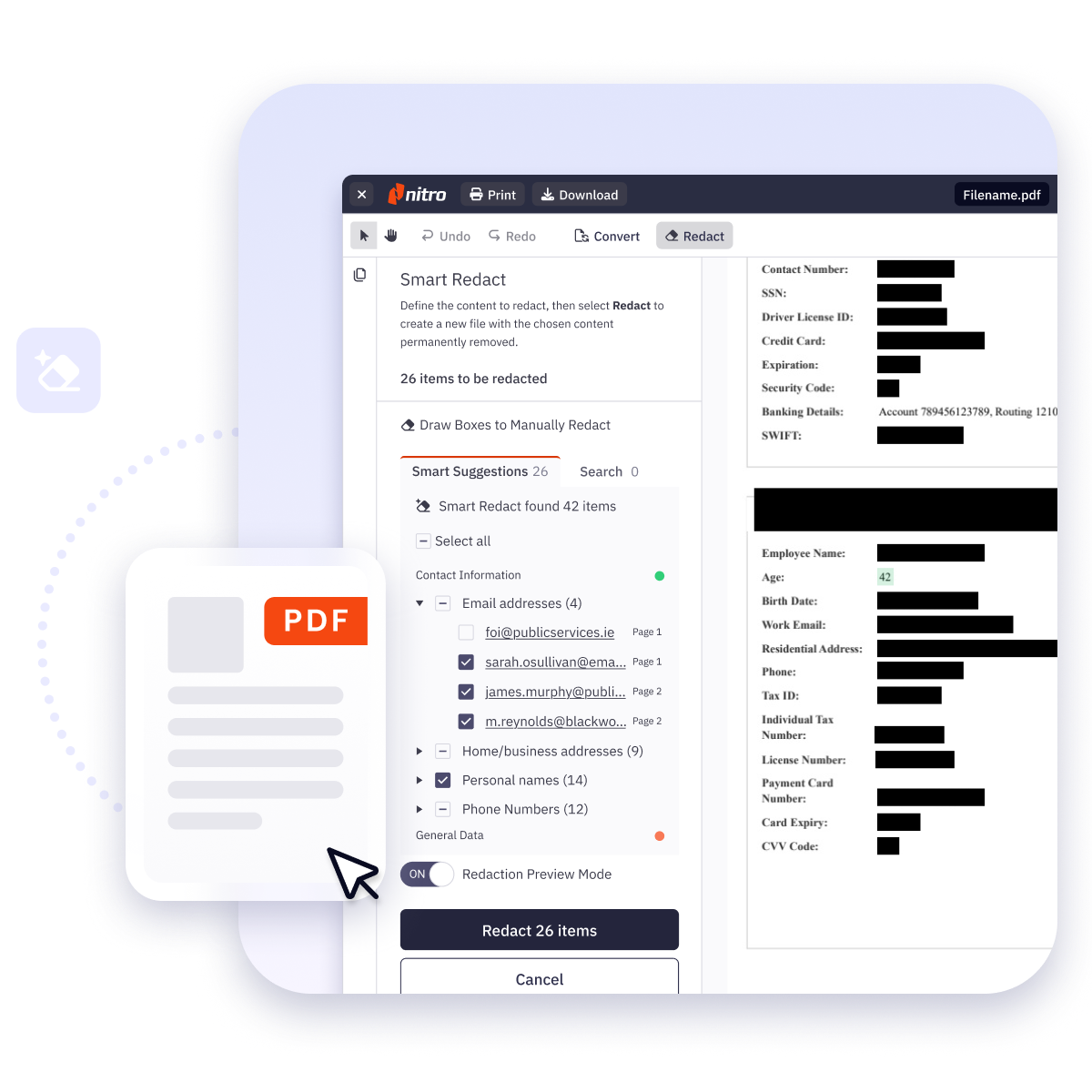
- Automated PII detection uses AI and NLP to identify 30+ types of personally identifiable information
- Confidence-based AI groups detected PII by category and confidence level, making it easy to review and approve suggestions
- Manual editing control lets you easily add or adjust redaction marks before finalizing your document
- Secure file processing in a temporary session with no storage or data retention keeps sensitive information secure
- Permanent redaction removes all visible and hidden data, including metadata and scripts, ensuring sensitive information is fully protected
- Fast, efficient workflows let you redact multiple pages or entire documents in seconds
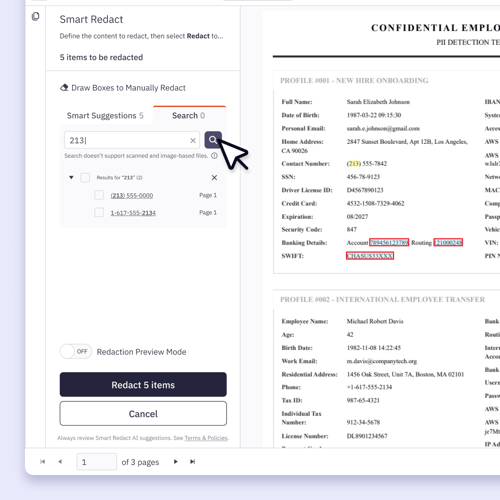
What types of PII does Smart Redact identify?
-
Financial: Bank account numbers, routing numbers, IBAN, SWIFT codes, credit/debit card numbers, and PINs.
-
Government IDs: Social Security numbers, tax identification numbers, passport numbers, driver’s licenses, and national ID numbers.
-
Healthcare IDs: NHS numbers, Canadian Health Numbers, Indian NREGA IDs, and other region-specific healthcare identifiers.
-
Contact information: Full names, addresses, phone numbers, emails, and age-related information.
-
Digital security: Usernames, passwords, IP addresses, MAC addresses, URLs, API keys, and AWS keys.
-
Other: Dates, times, vehicle information, license plates, and vehicle identification numbers.
How to get started with Nitro Smart Redact
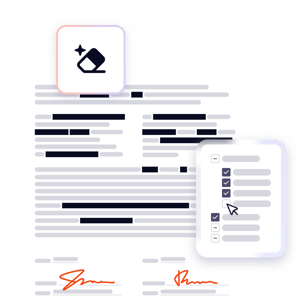
Get secure, fully redacted PDFs in five steps.
- Log in to Nitro Workspace and select the Nitro Smart Redact tile under Tools.
- Upload a PDF from your device, or open a file from your OneDrive connection, and select Redact from the Workspace Reader toolbar.
- AI scans and highlights redaction candidates.
- Review and apply manual changes as needed.
- Download a clean, fully redacted document.
What is the difference between masking and PDF redaction?
Is AI-powered redaction safe?
Why isn’t manual PDF redaction enough?
Are browser-based redaction tools secure enough for enterprise use?
Not always. Browser-based tools can be convenient, but enterprises must evaluate data residency, encryption standards, metadata inspection capabilities, and document control features.
For regulated industries or high-risk environments, deeper document inspection, secure processing architecture, and integrated editing controls are often required to meet compliance standards.
What features should enterprise teams prioritize in a PDF smart redaction tool?
- Contextual AI detection, not just keyword search
- OCR support for scanned documents
- Permanent removal of hidden data and metadata
- Human review workflows
- Batch processing and repeatable redaction profiles
- Defensible compliance controls
- Integrated PDF editing and document inspection tools