/Card-Page%20Previews-AI.png?width=1200&height=800&name=Card-Page%20Previews-AI.png)

Nitro PDF offers three distinct plans designed for different user needs: Nitro PDF Classic (single payment for a 3-year license on Windows desktop), Nitro PDF Standard (subscription for individuals and small teams), and Nitro PDF Plus (enterprise subscription with advanced security and analytics).
Each plan provides PDF editing, conversion, and security features at different price points and deployment models, serving over 2.5 million users across 236 countries including 67% of Fortune 500 companies.
This guide breaks down the features, pricing structure, ideal use cases, and limitations of each Nitro PDF plan to help individuals, small businesses, and enterprises select the most cost-effective solution for their document management needs.
What is Nitro PDF Classic and who should use it?
Nitro PDF Classic (formerly Nitro PDF Pro) is a 3-year license desktop application exclusively for Windows users who need comprehensive PDF editing without recurring subscription costs. This plan appeals to individuals and businesses that prefer fixed-term software licensing over monthly or annual subscriptions.
Key features of Nitro PDF Classic:
- PDF creation and editing: Create PDFs from any file format, modify existing content, and export to Word, Excel, or other formats
- Document security: Password protection, encryption, and permission controls to restrict unauthorized access
- File manipulation: Merge multiple PDFs into single documents or split large files into separate sections
- 24/7 customer support: Round-the-clock technical assistance available every day of the year
- Offline functionality: Full desktop application that works without internet connectivity
Best for: Individual professionals, freelancers, small businesses, and organizations that prefer single-payment licensing rather than ongoing subscriptions, particularly those working primarily on Windows desktops and seeking 3-year predictable costs.
Pricing model: Single upfront payment covering a 3-year license period with no recurring monthly or annual fees.
Limitations: Windows-only compatibility; lacks cloud-based collaboration features, mobile access, and automatic updates included in subscription plans; license expires after 3 years requiring renewal.
What features does Nitro PDF Standard include?
Nitro PDF Standard is a subscription-based plan designed for individuals and small teams requiring collaborative PDF tools with cloud integration and continuous software updates. This plan bridges the gap between basic desktop editing and enterprise-level document management.
Nitro PDF Standard features include:
- Advanced PDF creation and conversion: Generate PDFs from multiple sources, convert to various formats, and merge documents seamlessly
- Comprehensive editing tools: Modify text, images, and page layouts with intuitive desktop and web-based editors
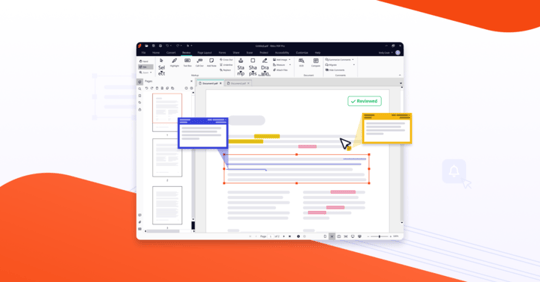
- Collaboration features: Annotate, comment, review, and share PDFs with team members in real-time
- Admin portal access: Centralized dashboard (Nitro Admin portal) for managing team licenses, user permissions, and software deployment
- AI-powered productivity tools: Intelligent features that automate repetitive tasks and enhance document processing efficiency
- Integration capabilities: Connect with Microsoft Office, Google Workspace, SharePoint, and other productivity platforms
- Continuous updates and support: Automatic software updates and 24/7 customer assistance included
Best for: Small to medium-sized teams (5-50 users), remote workforces, businesses requiring cross-platform compatibility, and organizations that prioritize collaborative document workflows with ongoing feature updates.
Pricing model: Annual or monthly subscription with per-user licensing, providing ongoing access to updates, cloud features, and technical support.
Limitations: Requires recurring subscription payments; may exceed budget constraints for users who only need basic PDF editing capabilities without collaboration tools.
What advanced capabilities does Nitro PDF Plus provide for enterprises?
Nitro PDF Plus is Nitro's enterprise-tier subscription plan offering all Standard features plus enhanced security protocols, usage analytics, and dedicated account management for large organizations with complex compliance and governance requirements.
Additional features in Nitro PDF Plus beyond Standard:
- All Nitro PDF Standard functionality: Complete access to editing, conversion, collaboration, and integration tools
- Enterprise security controls: Single sign-on (SSO) integration, domain-level access management, and Azure Information Protection compatibility
- Nitro Analytics dashboard: Real-time insights into software adoption, return on investment (ROI) metrics, and environmental sustainability savings from reduced printing
- Advanced compliance tools: Features supporting GDPR, HIPAA, SOC2, and other regulatory frameworks
- Dedicated customer success manager: Personalized onboarding, training, and ongoing strategic support
- Priority technical support: Expedited response times and direct access to senior support engineers
- Customized deployment options: Flexible installation configurations for large-scale enterprise environments
Best for: Organizations with 50+ employees, enterprises in regulated industries (healthcare, finance, legal), companies requiring detailed usage reporting, and businesses with strict security and compliance mandates.
Pricing model: Enterprise subscription with volume-based pricing and customized licensing arrangements.
Limitations: Higher price point may not justify costs for small teams or organizations without enterprise security and analytics requirements; subscription commitment required.
How do Nitro's PDF plans compare to Adobe Acrobat?
Nitro positions itself as a cost-effective Adobe Acrobat alternative, offering comparable PDF editing, conversion, and security features at lower price points. The key differentiators include Nitro's flexible purchasing options (3-year license via Classic vs. subscription-only Adobe), more affordable subscription rates for small teams, and enterprise analytics not available in standard Adobe plans.
While Adobe Acrobat maintains broader third-party integration and slightly more advanced form creation tools, Nitro provides sufficient functionality for most business use cases at 40-60% lower costs depending on the plan selected.
What factors should you consider when choosing a Nitro PDF plan?
Selecting the right Nitro PDF plan depends on several key considerations that align with your workflow, budget, and organizational requirements.
Primary decision factors:
- Operating system requirements: PDF Classic is Windows-only; Standard and Plus support cross-platform use including Mac and web access
- Budget structure: Single 3-year payment (Classic) vs. recurring subscription (Standard/Plus)
- Team size: Individual users may prefer Classic; teams of 5-50 benefit from Standard; enterprises need Plus
- Collaboration needs: Cloud-based sharing and real-time collaboration require Standard or Plus subscriptions
- Security and compliance: Enterprises with regulatory requirements (HIPAA, SOC2) should evaluate Plus features
- Analytics requirements: Organizations tracking software ROI and sustainability metrics need Plus
- Update frequency: Classic users receive updates during 3-year term; subscription plans get continuous updates
- Support expectations: All plans include 24/7 support, but Plus adds dedicated customer success management
For businesses uncertain about their requirements, starting with Nitro PDF Standard provides a balanced feature set with flexibility to upgrade to Plus as needs expand.
Why do over 2.5 million users choose Nitro PDF software?
Nitro has established itself as a trusted PDF solution provider serving users in 236 countries, including 67% of Fortune 500 companies. This widespread adoption reflects Nitro's commitment to three core principles: simplicity (intuitive interfaces requiring minimal training), affordability (competitive pricing compared to Adobe alternatives), and security (enterprise-grade protection with SOC2 compliance).
The platform supports diverse workflows from individual contract editing to enterprise-wide digital transformation initiatives, with flexible deployment options that scale alongside organizational growth. Whether you need a fixed-cost 3-year license or subscription-based enterprise analytics, Nitro delivers solutions designed to match how your business operates.
To compare detailed pricing and features across all Nitro plans, visit the official Nitro pricing page where you can access current subscription rates, volume discounts, and free trial options.
Still unsure which plan is right for you? To explore these plans in detail and find the perfect fit for your needs, visit our pricing page for more information on our flexible, user-friendly options.