
In addition to viewing an envelope's history, a detailed audit trail of all the activity associated with an envelope can be downloaded from Nitro Sign. The ability to download an audit trail provides users with a clean and descriptive document highlighting all document information, active users, and envelope history.
How to download an envelope's audit trail in Nitro Sign via the Information icon
1. Open the desired envelope
2. Click the Information icon in the top-right of the screen
3. In the Details panel, select the History tab and click the Download audit trail button
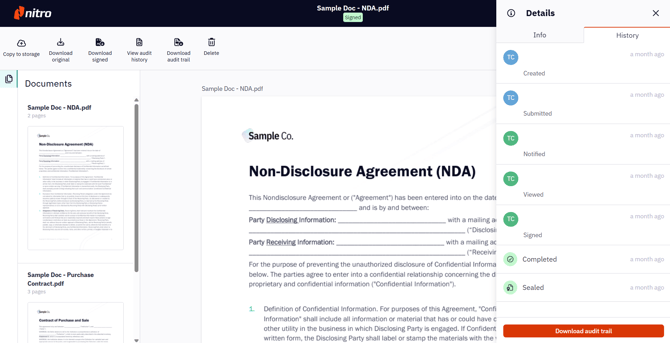
4. Once downloaded, the audit trail document can be saved to your desktop, ready for analysis using Nitro PDF Pro
How to download an envelope’s audit trail in Nitro Sign via Ribbon
1. Open the desired envelope
2. Select Download audit trail
3. Once downloaded, the audit trail document can be saved to your desktop, ready for analysis using Nitro PDF Pro