
SSO Default Product Assignment is used to determine which products are automatically assigned to SSO-provisioned users. It can be accessed in the Nitro Admin Portal by a user with a Global Admin role.
-
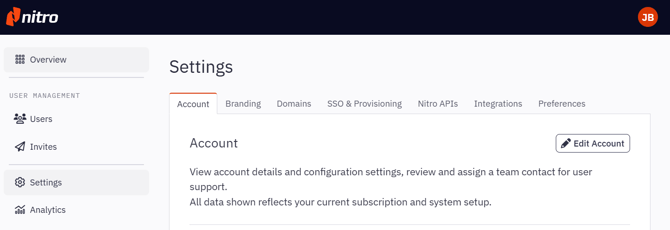
In the Nitro Admin Portal, click Settings and then click SSO & Provisioning tab
-
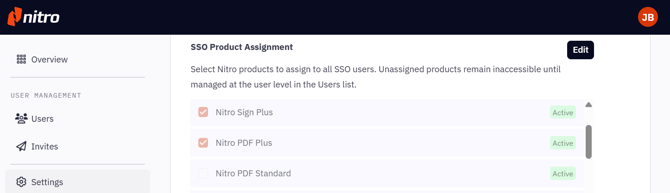
Click Edit in the SSO Product Assignment section
-
Select the products to enable for SSO Product Assignment:
-
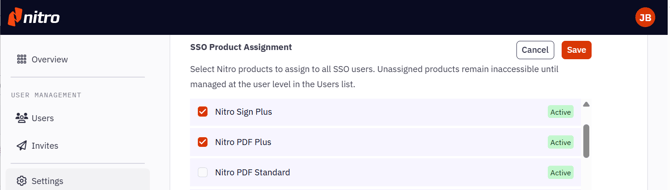
If customer wants all users on SSO to access a product, make sure it’s checked
-
If customer wants only specific users to access a product, make sure it’s unchecked
-
-
Click Save to apply the change
Notes:
-
Your changes won’t be saved until you click Save
-
You can click Cancel if you don’t want to Save your change
Frequently Asked Questions
-
What is SSO Default Product Assignment?
It is a feature that automatically assigns a specific product to users when they log in via SSO (Single Sign-On).
-
Who decides what the SSO Default Product is?
The Global Admin of the customer’s Nitro account can select which product(s) are assigned by default in the Nitro Admin Portal (admin.gonitro.com).
-
How can SSO-enabled customers control who gets access to Nitro products?
Use SSO Default Product Assignment to assign products automatically to all users upon user login.
Use manual assignments via the Admin App > User Management to assign products to specific users only. These products should not be enabled for SSO Default Product Assignment.
-
Can an account have more than one SSO Default Product?
Yes, Global Admins can select multiple default products. Every user logging in via SSO will receive all selected default products.
-
What happens if no default product is assigned?
This is not allowed. Every SSO-enabled account must have at least one default product.
-
What happens if a product is assigned as SSO Default Product?
Any user on that account who logs in via SSO will automatically be assigned a license for the default product.
Example: If the Global Admin sets PDF Plus as the SSO Default Product, every user who logs in via SSO will automatically receive a PDF Plus license.
-
What happens if a user was manually assigned a product via User Management on Nitro Admin Portal?
The user will have access to the default assigned product and manually assigned product.
Example: If a user is manually assigned Sign Standard, but the SSO default product is PDF Plus, they will have access to both PDF Plus and Sign Standard after logging in.
-
How long does it take for the new default product to apply?
It applies immediately upon the user’s next login via SSO.
-
I changed the default product assignment of the customer. Why are there still some users who are assigned to previous default product?
User product assignments are updated when the user logs in via SSO. If a user has not logged in since the default product was changed, they will still appear assigned to the previous default product. Their assignment will update upon their next login.
-
What happens if a user has not logged in for a long time?
A user's default product assignment is only updated when they log in via SSO. If the default product has changed but they haven't logged in, they will still be assigned the old product until they sign in again.