
Note: This guide is for admins of an MSP (Managed Service Provider) account only.
The Customers page in the Nitro Admin Portal allows MSP Admins to view and manage all end customer accounts from a single place.
-
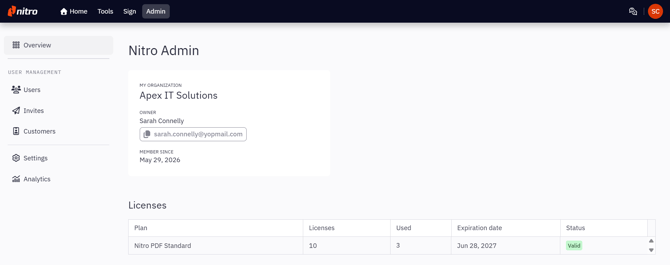
In the Nitro Admin Portal, click the Customers tab in the left-hand navigation
Note: The Customers tab is only visible to users of an MSP account. It will not appear for non-MSP users.
-
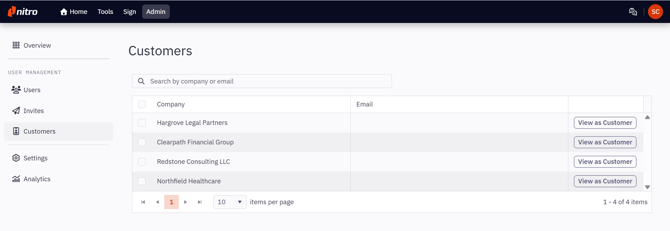
The Customers page displays a table of all end customer accounts managed by the MSP. The table is paginated and can be sorted. You can also use the search bar to search by name or email.
-
To manage a customer's account, click View as Customer
-
You will be taken into the customer's Admin Portal in impersonation mode. While impersonating:
-
An orange border is displayed around the page
-
A tag reading "Viewing as [Company Name]" is shown at the top of the page
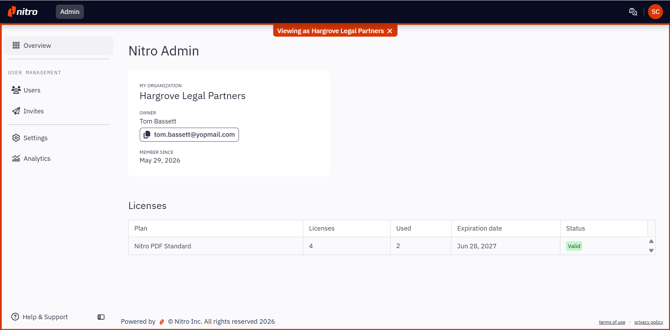
In this mode, you can perform any standard admin action available to that customer, including inviting and managing users, assigning and unassigning licences, and configuring account settings.
-
-
To exit impersonation, either:
-
Click the ✕ icon beside the customer name tag, or
-
Navigate to your own account using the top navigation bar
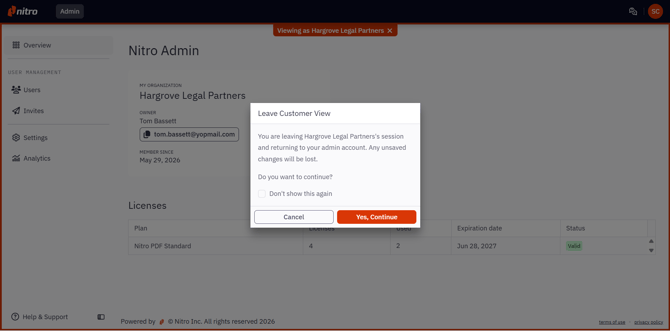
A confirmation modal will appear. Click Confirm to return to the Admin Portal homepage.
-