
What are Custom Terms?
Smart Redact uses AI to identify and suggest personally identifiable information (PII) for redaction. Custom Terms lets you control this process by defining two types of rules:
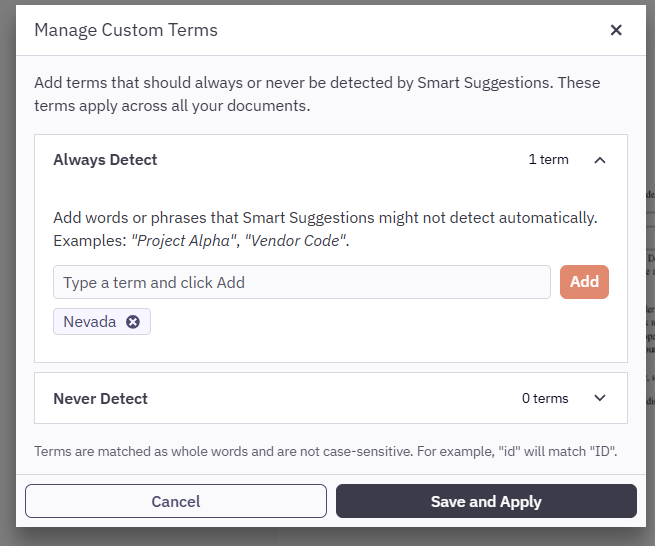
Always Redact
Terms in this list are always flagged as redaction candidates, even if they are not standard PII. Use this list for project names, internal codes, or other sensitive terms.
Never Detect
Terms in this list are never suggested for redaction, even if they are PII, such as a person's name. Use this list to improve Smart Suggestions and reduce false positives. For example, add a person’s name or email that Smart Redact identifies as PII, but that is not relevant to the redaction flow.
- Open a document in Smart Redact
- In the Smart Redact sidebar, click Custom Terms
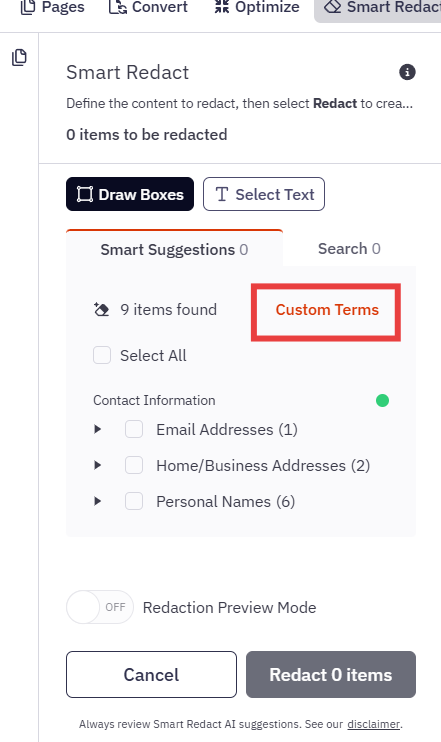
- Add terms to the Always Redact or Never Detect list
- Click Save and Apply
- Review the updated Smart Suggestions results
Note: The Never Detect list applies only to Smart Suggestions. It does not affect Search or Manual Redaction. If you search for a term manually, Smart Redact still returns the term as a result, even if it is in the Never Detect list.
For more information regarding Smart Redact, visit our Smart Redact article.