Skip to content

Edit PDFs with Ease. Powered by Nitro.

Nitro’s advanced PDF editing tools are built to make your PDFs work the way you want. Whether you need to correct text, extract data, add watermarks, or annotate securely, Nitro puts full control right at your fingertips with intuitive features for every level of user. Get started for free today.
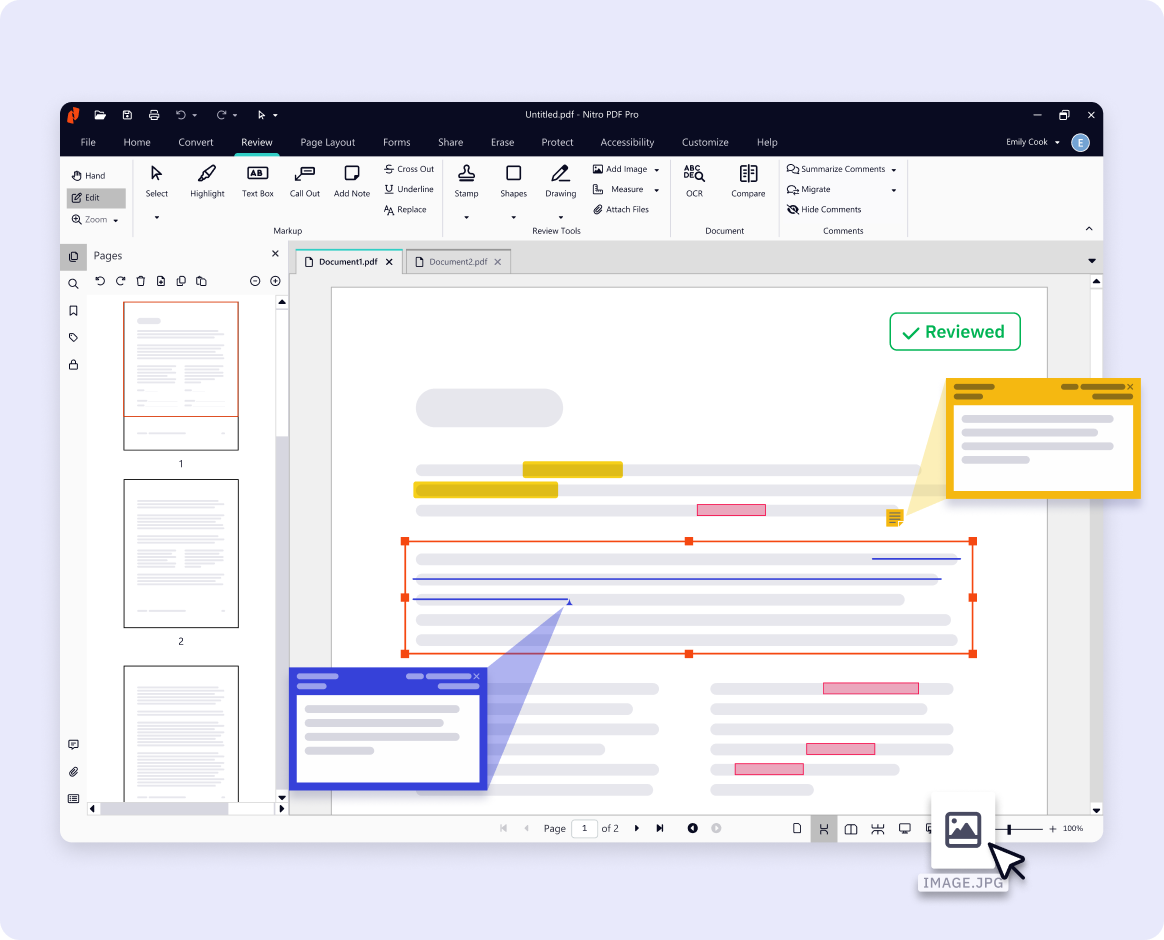
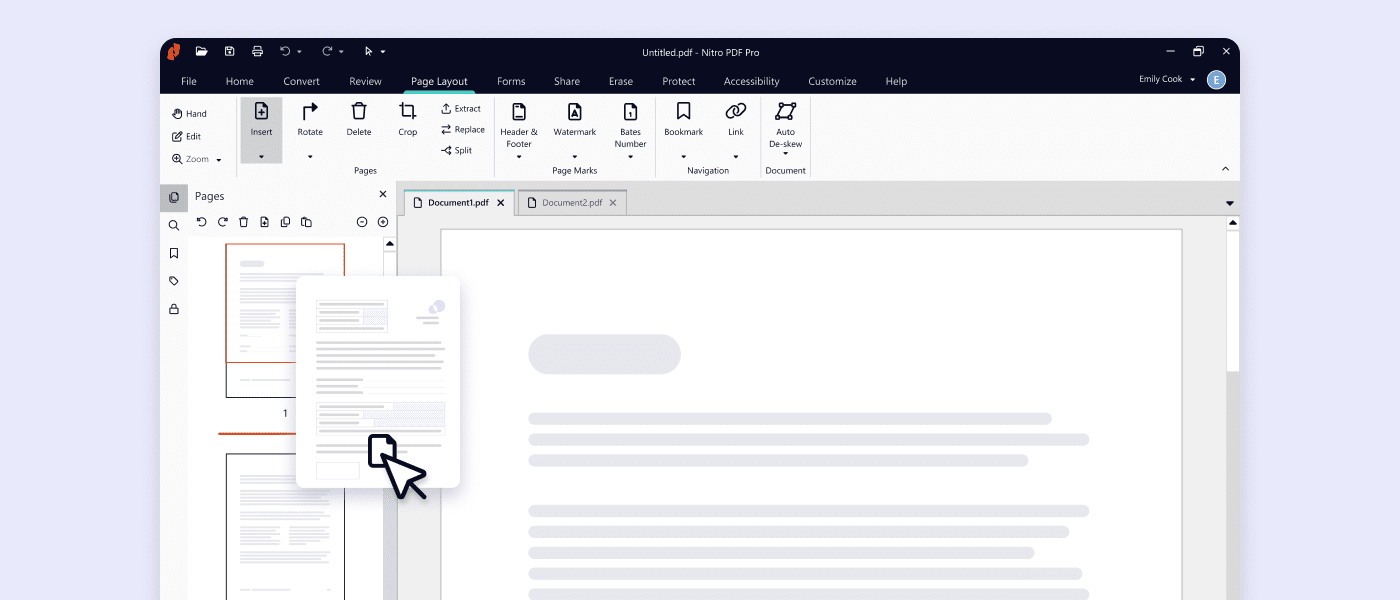
Web - Screenshot - editing pdf

Your Complete Guide to Editing PDFs: Tools, Tips & Tutorials

What do you want to do with your PDF editor? Explore Nitro's range of tools and features.
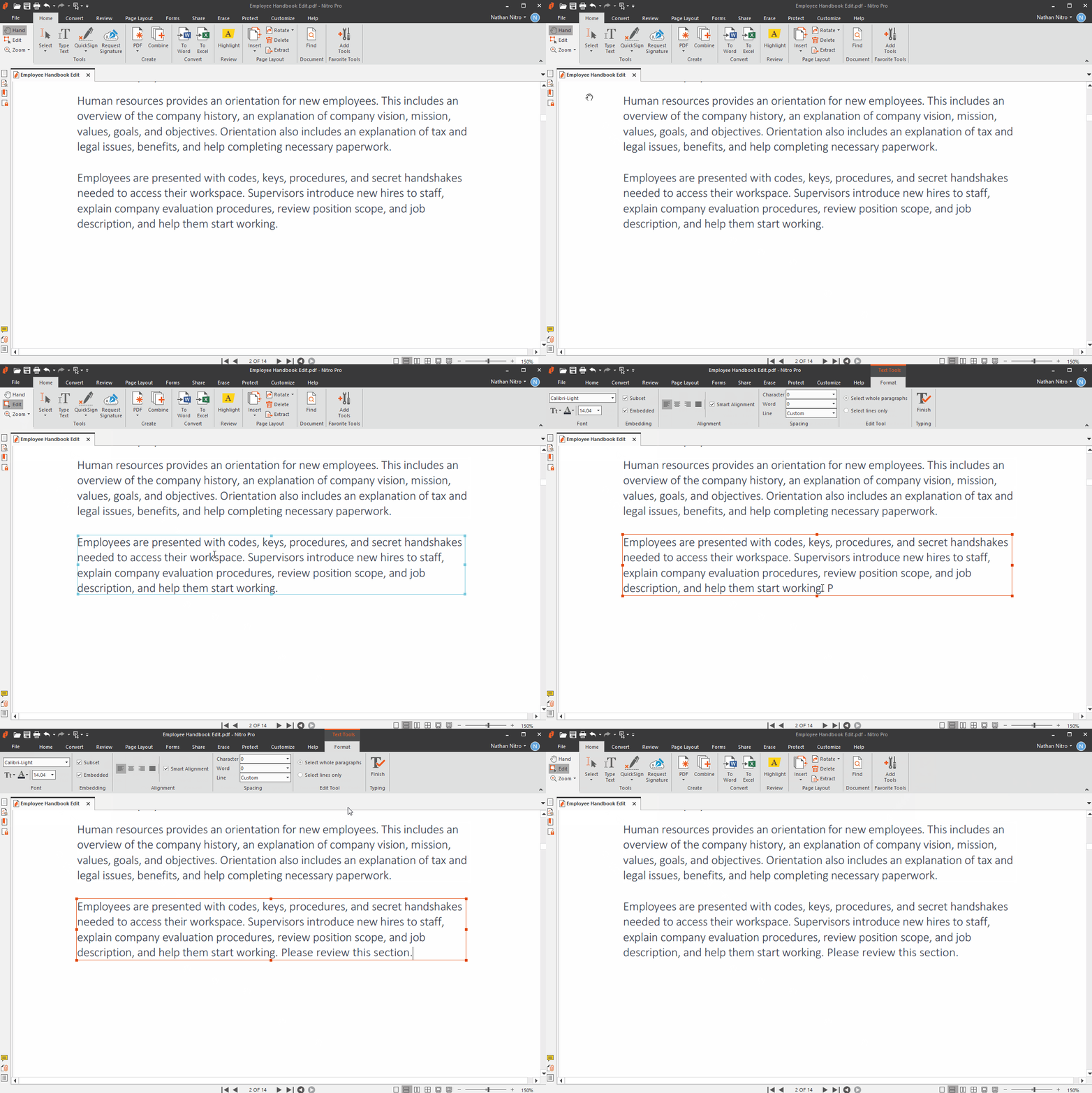
edit-text-3

Edit PDF Text

Nitro makes it easy to select any paragraph or image and make instant edits. Change fonts, resize images, and adjust colors all without losing layout or design.

Screenshots-PDF for Mac-Edit & Annotate

Add Images to PDF

Insert photos, logos, or graphics into your PDFs with ease. Nitro makes it simple to place and resize images anywhere in your document for a polished, professional look.

Screenshots-PDF Pro for Mac-OCR

Turn Scanned Pages Into Editable PDFs With OCR

Nitro’s OCR feature extracts searchable text so you can edit, highlight, and reuse content from scanned papers or images.

Screenshots-PDF-Forms Auto

Create & Fill Forms

Complete interactive forms or create your own with easy-to-use tools that save time and reduce manual work.

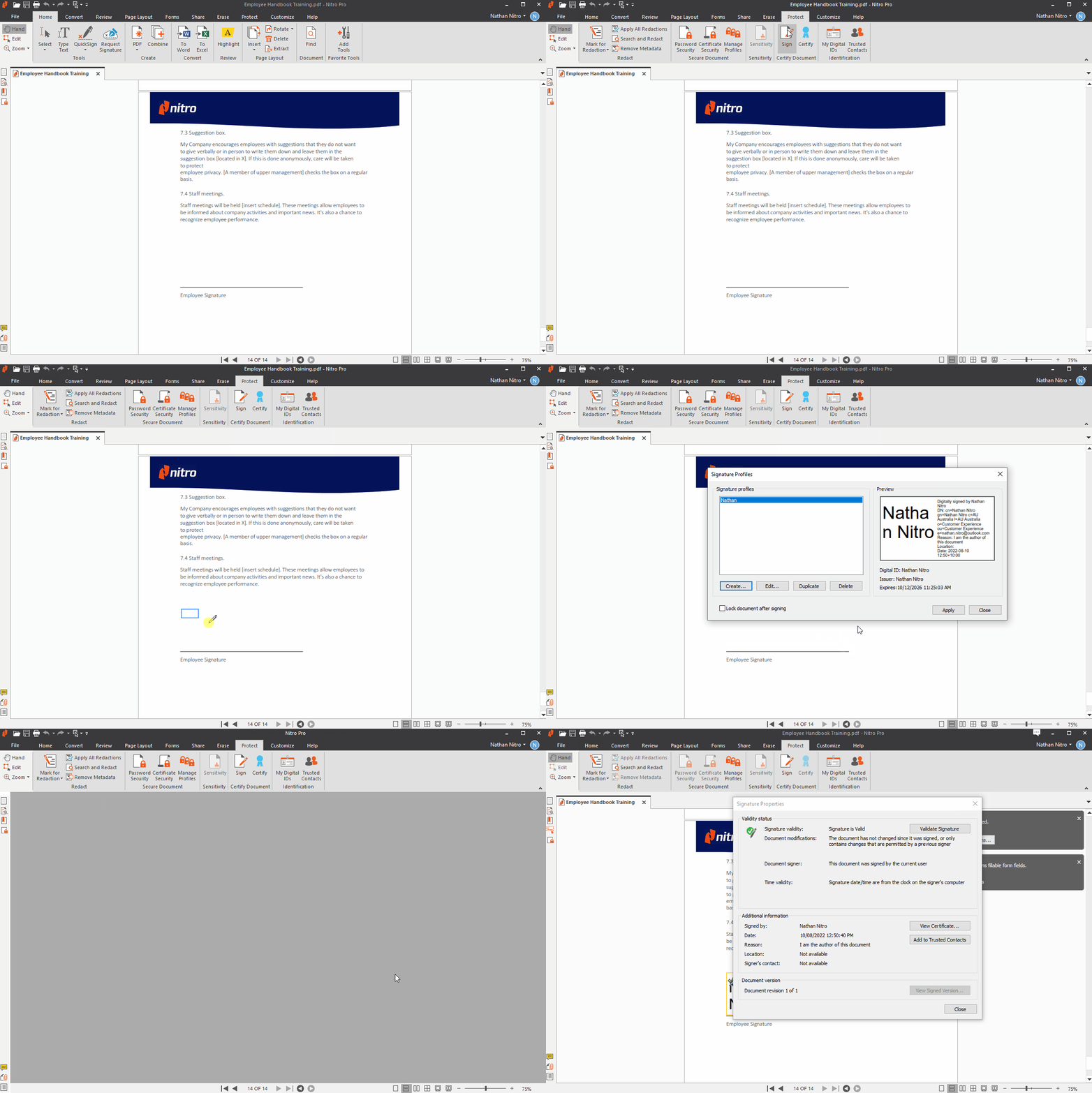
digital-sign-3

Sign PDFs

 Add secure, legally binding electronic signatures to your PDFs in seconds—no printing, scanning, or delays.

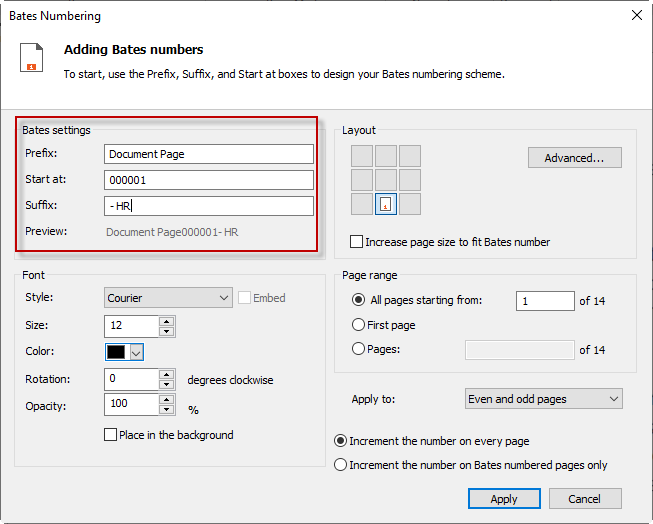
bates-presuf-4

Bates Numbering

Add Bates numbers to your PDFs for streamlined document tracking and professional compliance.

Screenshots-PDF for Mac-Edit & Annotate

Annotate & Markup

Highlight text, add comments, and collaborate in real time with easy-to-use annotation tools.

Card-Release-Knowledge Assistant

PDF AI Assistant

Generate instant summaries, extract table data, or ask Nitro’s AI-powered assistant questions in 80+ languages to transform PDFs into actionable knowledge.

Try Our PDF Editor 14 Days Free

No credit card required, no features locked.
Start Your Free Trial

More PDF editing resources

Explore expert tips, how-to guides, and best practices to get the most out of Nitro's PDF editor.

Screenshots-PDF for Windows-Edit and annotate

User Guide: How to Edit PDF Files with Nitro

With the right PDF editing tools, you can minimize the amount of time you spend switching between different programs and file types.

convert-export-PDF

Edit & Convert PDFs in One Streamlined Workflow

Nitro helps you make final edits to your PDF and convert it to the format you need, without switching tools or starting over.

Screenshot Carousel-PDF-Merge

Edit & Merge Your PDFs with Precision

Make changes, clean up content, and combine files into a single document. All in one place with Nitro - the easy PDF editor.

What can I do with Nitro’s PDF editor?

Nitro’s PDF editor lets you easily edit text and images, merge PDFs, fill forms, OCR scanned files, add watermarks and headers, annotate, and more—all in one powerful tool.

Try it 14 days free today.

Can I edit PDFs for free with Nitro?

Nitro offers a 14‑day free trial of our full-featured PDF editorno credit card required. Download today to test all of our features with no limits, including editing, converting, and signing PDFs.

Does Nitro PDF support OCR?

Yes. Nitro’s OCR feature makes scanned PDFs fully searchable and editable. Extract text, tables, and data with just a click.

How is Nitro PDF different from Adobe Acrobat?

Nitro matches Adobe Acrobat’s key features—PDF editing, OCR, signing, and more—but at a lower cost, with a familiar Microsoft Office-style interface and a trial so you can try before you buy.

What AI features does Nitro PDF include?

Nitro's AI tools can summarize PDFs, answer questions, and extract data from tables and forms, making it easier to work with long or complex documents.

Learn more about Nitro AI.

Is Nitro PDF available for businesses or teams?

Yes. Nitro’s Standard and Plus
subscriptions support teams of all sizes with collaborative tools, enterprise-grade security, and advanced PDF editing and sharing features.

Both are available with a 14-day free trial. No credit card required, no features locked.

How can I learn more about Nitro’s PDF editing tools?

Nitro provides video tutorials, step-by-step guides, and a resource center with tips for beginners and power users alike. See a list of useful links and resources below: 
Nitro PDF Standard
Explore Nitro PDF Standard
Nitro PDF Plus
Explore Nitro PDF Plus
Nitro PDF Classic
Explore Nitro PDF Classic

Top Features

Interact with, create, edit & review PDFs on your Windows device
Interact with, create, edit & review PDFs on your Mac device
Interact with, create, edit & review PDFs on your iOS device
Edit text and images, reorder and delete pages in a PDF
Convert PDFs and export to Word, Excel and PowerPoint
Reassign licenses in the web-based Admin Console
Add security & password protect PDF files
Turn scanned documents into editable searchable PDFs
Compare two versions of a PDF to review all differences
Access advanced 24/7 tech support 2+ users 2+ users
Access Nitro Analytics to understand PDF software usage, ROI, and sustainability savings
Automatically extract table & form data from PDFs with Nitro Table & Form Extract
Summarize, rewrite, and extract key data from your document with Nitro AI Document Assistant
Easily create, fill, sign, send, and store forms
Automatically create fillable forms with Nitro Automatic Form Creation
Redact PDFs with AI-assisted Smart Redact to permanently remove sensitive information
Enable single sign-on for users across the organization

Interact with PDFs

View, interact and comment on PDF content from your computer, mobile device or web browser
Track activity across desktop, mobile and web for documents sent for viewing & reviewing
Access, edit and store files in your Box, Dropbox, Google Drive and Microsoft OneDrive accounts
Compare two versions of a PDF to review all differences
Measure the distance, area and perimeter of objects in PDFs
Open PDFs are protected by Microsoft Information Protection solutions, including Azure Information Protection and Microsoft 365.

Create PDFs

Convert documents and images to PDF files
Create PDFs from any application that prints
Convert Microsoft Word, Excel or PowerPoint files to PDFs
Create, protect and send PDFs in popular Microsoft 365 apps for Windows
Combine multiple documents and file types into one PDF file
Convert web pages to interactive PDFs, complete with links
Prevent others from copying or editing information in PDFs
Create a password-protected PDF
Create and export PDFs on your mobile device
Use one-click creation of rich PDFs within Microsoft 365
Turn scanned paper documents into instantly searchable and editable PDFs with fonts that match the original
Convert and validate PDFs for compliance with ISO standards like PDF/A
Convert to rich & plain text
Create and validate PDFs to meet accessibility standards for people with disabilities
Extract text and images
Integration with Office 365, Sharepoint 365, OneDrive for Business, Dropbox, Box, Google Drive
Copy and paste selected parts of a PDF file with formatting intact
Batch create PDF files
Create PDF from File Explorer context menu
Create PDF from Finder/iCloud
Create accessible documents, tag creation, embed fonts, voice over

Edit & Review PDFs

Edit PDF text and images with full-page paragraph reflow
Turn PDFs into editable Microsoft Word, Excel or PowerPoint files
Insert, delete and organise pages in a PDF
Convert PDFs to JPG, TIFF or PNG image formats
Split a PDF by extracting one or multiple pages
Add bookmarks, headers, numbering and watermarks
Add or edit text and images on your tablet and mobile phone
Reorder, delete or rotate PDF pages on your iOS tablet
Redact to permanently remove sensitive visible information in PDFs
Add audio to PDFs
Add Bates numbering to legal documents
Visual rotation of images and pages
Quicksign PDF documents
Work with certificate signatures
Add comments to PDFs with a full suite of commenting tools including text editing, highlighter, and sticky notes
Turn paper or Word docs into fillable PDF forms
Automatically optimize PDFs to reduce file size and customize settings
Enhance PDF forms by adding interactivity with JavaScript
Mark PDFs with stamps, such as “approved” or “draft”

Support & Platform Benefits

Additional compliant security (HIPAA, SOC2, GDPR)
Enable single sign-on for users across the organization
Access advanced 24/7 tech support 2+ users 2+ users
Access support through the community forum & knowledge base
Access support through Nitro AI Knowledge Assistant
Customer success manager for white glove deployment & support for eligible customers for eligible customers
Access Nitro Analytics to understand PDF software usage, ROI, and sustainability savings
  • Spr25_Grid Leader
  • Spr High Performer
  • Spr25_ROI MidMarket
  • Spr25_HighPerformerSmall
  • Sp25_Enterprise
  • Spr25_HighPerformerMid
  • Spr25_User Adoption

Start editing PDFs for free today

See our PDF editor in action with a 14-day free trial. No credit card required.